Frank in Spokane
Participating Frequently
December 12, 2019
Question

Saving InDesign Workspace Preferences between upgrades

  • December 12, 2019
  • 2 replies
  • 941 views

I have been using ID in Windows 7 for maybe a year, and any time I updated the app (upon notice from Adobe), I lost my Workspace Preferences, and had to rebuild them from memory.


Last week, I received a new PC running Windows 10 (AND Adobe CC installed ID 2020 (15.0.1)), and I lost my preferences again. Thankfully, I've been able to rebuild them quicker -- both by referring to recommendations from a Udemy class I took, and by emailing myself a screenshot of my customized workspace, obtained from my prior PC (running ID 2019 (14.0.3)).


My Q: How do I ensure that my Workspace prefs stay with me permanently, from version to version, or from one OS to another? (Or even between platforms, if I ever start using ID on my Mac at home?)


Thx in advance,

Frank

Spokane, WA


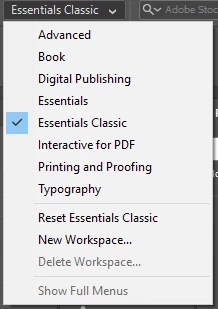
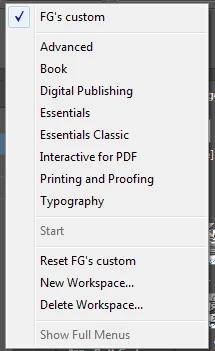
Here are my previous (2019) and my current (2020) Workspace switcher menus:


{Renamed by MOD}

This topic has been closed for replies.

2 replies

Srishti_Bali
Legend
December 13, 2019

Hi Frank,


Derek is right, when you update to the newer version, Creative Cloud gives you the option to keep previous versions and Preferences. You can also take a backup of folders for the safer side. On Windows, machine workspaces are saved in this folder location: C:\Users\UserName\AppData\Roaming\Adobe\InDesign\Version 15.0-ME\en_US\Workspaces. 


You can keep a copy of this folder and place it same location in the newer version.


Regards,

Srishti

Participant
December 20, 2019

Please see my reply to Derek. (I just poked around in CC Prefs, and saw nothing related; then I updated Photoshop, and didn't get any options -- it simply went directly into "updating.) Thx ...

Derek Cross
Community Expert
Community Expert
December 12, 2019

Normally when you update to a new version of an Adobe CC application you have the opportunity to keep previous versions and retain settings and preferences.


Participant
December 20, 2019

Thx for the reply, Derek. But I have never seen a dialog like that, or any other on-screen mechanism, giving me either of those two options (check boxes).


Your comment made me consider Adobe CC Preferences. The Prefs window has 5 tabs down the side: General, Apps, Syncing, Notifications, and Services. None of those tabs has any controls pertaining to the two options/checkboxes shown in the "update" dialog you shared.


I then noticed that I had 3 updates waiting -- for Photoshop, Bridge, and Camera Raw. It gave me the choice to update each app individually, or "Update all." I opted to update only Photoshop, and when I clicked on the button, it went directly into "updating."


Other ideas? Thx ... 🙂