Participating Frequently
January 2, 2019
Answered

Scaling photos proportionally in indesign

  • January 2, 2019
  • 2 replies
  • 1769 views

Hi wondering if anyone knows how to change a shortcut for scaling photos proportionally in indesign?

    This topic has been closed for replies.
    Correct answer hammer0909

    The shortcut is not cmdoption< or > (Mac) or at least on

    my mac is Shift+option, I need to change it to just Shift.

    The shortcut absolutely is cmd+option < or > (Mac). It's shift+cmd if you're dragging a handle.

    There is no Increase/Decrease scale by 1% or 5% in the drop down menu for

    Object Editing.

    There absolutely is. See screenshot below.
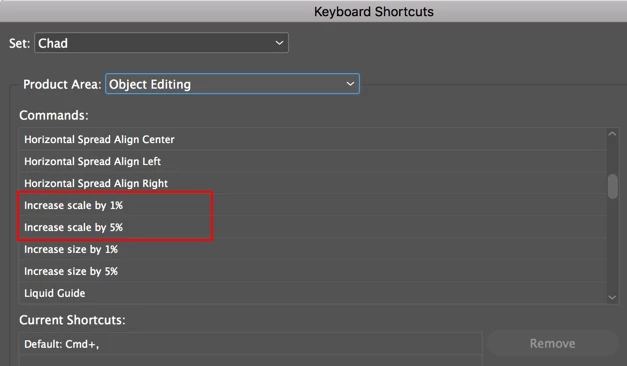
    Thank you, I am aware of these but need to know how to change the shortcut.

    I told you in my previous post how to change the shortcut and the screenshot above shows you which options in which you would assign that shortcut.

    I need to change it to just Shift.

    You won't be able to do that as InDesign requires a minimum of two keys to be used. Shift + something else.

    2 replies

    Colin Flashman
    Community Expert
    Community Expert
    January 3, 2019

    Sure, there are a few ways, but the easiest is to use the Freeform Transform Tool (on a selected image frame) in the following way:

    Another way is to use the select the frame with the black arrow tool and do the same thing, but also holding the command (Mac) or control (Windows) key. The former requires less fingers with my non-dominant hand on the keyboard.

    Another way would be to select the frame with the black arrow tool and then key the percentage increase/decrease into the control panel. The image will then scale from the black point of the nine point proxy (the little box in the top left of this screenshot):

    If you're using the new "Essentials" workspace with the properties panel, it will look something like this:

    If the answer wasn't in my post, perhaps it might be on my blog at colecandoo!
    Participating Frequently
    January 3, 2019

    Thank you, I am aware of these but need to know how to change the shortcut.

    Thanks again for the help

    hammer0909
    Community Expert
    hammer0909Community ExpertCorrect answer
    Community Expert
    January 3, 2019

    The shortcut is not cmdoption< or > (Mac) or at least on

    my mac is Shift+option, I need to change it to just Shift.

    The shortcut absolutely is cmd+option < or > (Mac). It's shift+cmd if you're dragging a handle.

    There is no Increase/Decrease scale by 1% or 5% in the drop down menu for

    Object Editing.

    There absolutely is. See screenshot below.

    Thank you, I am aware of these but need to know how to change the shortcut.

    I told you in my previous post how to change the shortcut and the screenshot above shows you which options in which you would assign that shortcut.

    I need to change it to just Shift.

    You won't be able to do that as InDesign requires a minimum of two keys to be used. Shift + something else.

    hammer0909
    Community Expert
    Community Expert
    January 3, 2019

    The shortcut to scale photos in InDesign is cmd+option+< or > (Mac) and ctrl+alt+< or > (Windows). Depending on whether you have the frame or the image selected it will scale whatever is selected. If you want to change this shortcut, choose Edit > Keyboard Shortcuts and choose Object Editing from the Product Area drop-down menu. Choose Increase/Decrease scale by 1% or 5% and assign a new keyboard shortcut.

    Participating Frequently
    January 3, 2019

    Hi,

    There is no Increase/Decrease scale by 1% or 5% in the drop down menu for

    Object Editing. The shortcut is not cmdoption< or > (Mac) or at least on

    my mac is Shift+option, I need to change it to just Shift.

    Please let me know.

    Thanks in advance.

    On Thu, Jan 3, 2019 at 4:38 AM srishtib8795206 <forums_noreply@adobe.com>