
Participant
December 11, 2024
Answered

Screen turns white when dragging objects with Selection Tool and selecting with Type Tool

  • December 11, 2024
  • 3 replies
  • 465 views

I’m using InDesign Version 20.0.1 on macOS Sonoma Version 14.7.1.


The screen turns white when dragging an object with the Selection Tool.


The screen also flashes white when selecting inside a text frame with the Type Tool, and the blinking cursor doesn’t appear in the frame.


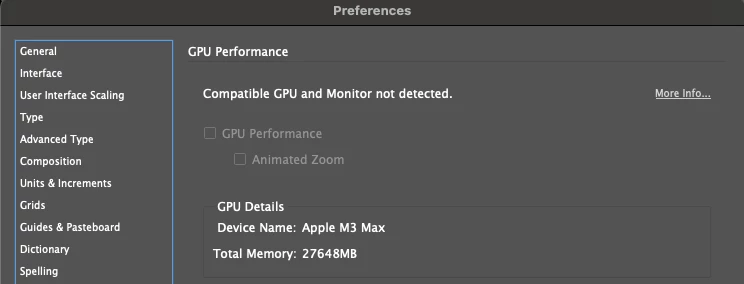
I tried hiding rulers but that didn’t help. The option for GPU Performance in InDesign Preferences is grayed out:

 

This topic has been closed for replies.
Correct answer Frans v.d. Geest

No, it is not Magnet, I never used that, it is the graphic driver of Apple again it seems like we had in Sonoma before; strange enough 2024 is fine, 2025 not. I have the same here in my MacBook M4 Max. It happens as soon as you see the 'not detected' in the preferences as shown in the screenshot (for instance connecting a presentation TV screen in a classroom with HDMI). For now sadly there is no sulution yet...

3 replies

leo.r
Community Expert
Community Expert
December 11, 2024

As I have reported on other threads, it's a new bug in InDesign 20.0.1.


Turning GPU on fixes the issue, which doesn't help users like you who don't have the GPU option available at all.


You can roll back to 20.0 in the Creative Cloud app:


leo.r
Community Expert
Community Expert
December 11, 2024

P.S. As further tests revealed, reverting to 20.0 doesn't necessarily make this bug go away, even though it appears to be only introduced in 20.0.1.

Participant
December 11, 2024

I just had this come up today, out of of the blue! My OS is updated in the background by our IT Dept, so I have no admin control. But, I did notice that GPU performance (Mac OS preferences) was unchecked. When I checked it, I no longer have the InDesign problem. I don't know why yours is grayed out. But here's a link to an article about Macs and GPU. 


https://helpx.adobe.com/indesign/using/gpu_performance.html


Participant
December 11, 2024

Sorry, I meant to write that I checked GPU performance in InDesign prerences. Same screen as the OP shows.

Bill Silbert
Community Expert
Community Expert
December 11, 2024

If you are running the magnet app turn it off.

Frans v.d. Geest
Community Expert
Frans v.d. GeestCommunity ExpertCorrect answer
Community Expert
December 11, 2024

No, it is not Magnet, I never used that, it is the graphic driver of Apple again it seems like we had in Sonoma before; strange enough 2024 is fine, 2025 not. I have the same here in my MacBook M4 Max. It happens as soon as you see the 'not detected' in the preferences as shown in the screenshot (for instance connecting a presentation TV screen in a classroom with HDMI). For now sadly there is no sulution yet...