Community Expert
December 24, 2025
Question

Script convert to IDML - please update as you like or have any other cool ideas

  • December 24, 2025
  • 2 replies
  • 404 views

I'm not the best scripter but finding bits and cobbling them together seems to be working for me so far.

I was using InDesign 2023 (moved to 2024/2025), but as newer files started coming in I had to install 2025 as well.


Opening a newer file in 2023 triggers the online conversion, but it regularly gets stuck at 33%, so I ended up having to open the file directly in 2025 (and soon, probably 2026). It worked, but it was a bit cumbersome.


So I cobbled together a small script that I now run from InDesign 2023. It asks for the file location, launches 2025, saves an IDML in the same folder, and that’s it — no fuss.


I did try to:

  • automatically close 2025 afterwards (gave up on that), and

  • open the resulting IDML automatically (I’ve associated IDMLs with 2023 at OS level), but I couldn’t get that working either.


Still, with a bit of BridgeTalk experimentation and some trial-and-error, this is where I landed, and I’m about 99% happy with it.


First things first:
Run this small script in the version of InDesign you want to target for the conversion:

alert(BridgeTalk.appSpecifier);

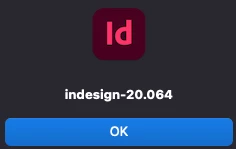
It should return something like

Screenshot 2025-12-24 at 09.41.54.png


Then in the script below - you can insert the version in the bt-target

"bt.target = "indesign-20.064"; // Confirmed target for 2025"

// Ask for a file
var f = File.openDialog("Select InDesign file to convert to IDML");
if (!f) exit();

// Determine output IDML path
var output = f.fsName.replace(/\.indd$/i, ".idml");

// BridgeTalk message to InDesign 2025
var bt = new BridgeTalk();
bt.target = "indesign-20.064"; // Confirmed target for 2025
bt.body = "\
(function(){ \
    app.scriptPreferences.userInteractionLevel = UserInteractionLevels.NEVER_INTERACT; \
    var f = File(\"" + f.fsName + "\"); \
    var doc = app.open(f); \
    doc.exportFile(ExportFormat.INDESIGN_MARKUP, File(\"" + output + "\")); \
    doc.close(SaveOptions.NO); \
})();";

// When 2025 reports back, open the new IDML here in 2023
bt.onResult = function(res){
    var idml = File(output);
    if (idml.exists) {
        app.open(idml);
        alert("Done. IDML opened in 2023.");
    } else {
        alert("IDML was not found. Something went odd.");
    }
};

bt.onError = function(err){
    alert("Error: " + err.body);
};

bt.send();


P.s. I need to be in 2023 for a specific reason, so need to convert newer files back, but will be moving up versions soon.

2 replies

rob day
Community Expert
Community Expert
January 16, 2026

I’m also working in a mixed version environment, so this is a useful script. I added some code that closes ID2025 and opens the saved .idml into the ID version running the script. This is working for me, but I havn’t tested any big files yet:


#targetengine "session" 

var f = File.openDialog("Select InDesign file to convert to IDML");
if (f) {
    //the Bridgetalk function
    //parameter is file name with no extention
    runID(f.fsName.replace(/\.indd$/i, ""));
} 

//the saved .idml file from ID2025
var cf = File(f.fsName.replace(/\.indd$/i, ".idml"))

//wait for the saved .idml file to exist
while (!cf.exists) {
    if (cf.exists) { 
        break
    } 
}
//pause
$.sleep(500); 
//open the saved .idml file in InDesign
app.open(File(f.fsName.replace(/\.indd$/i, ".idml")))

/**
* Open ID 2025
*/
function runID(s){

    var bt = new BridgeTalk();  
    bt.target = "indesign-20.064"; 
    
    //converts the idScript(s) function into a string for bt.body
    bt.body = idScript.toString() + "\ridScript('"+s+"');";
    //$.writeln( bt.body)

    bt.onResult = function(resObj) {}  
    bt.onError = function( inBT ) { alert(inBT.body); };  
    bt.send(8); 
 
    /**
    * Open the selected file
    */
    function idScript(s) {
        
        app.scriptPreferences.userInteractionLevel = UserInteractionLevels.NEVER_INTERACT;
        //open the .indl file (s+".indd") and export as .idml
        app.open(s+".indd")
        app.activeDocument.exportFile(ExportFormat.INDESIGN_MARKUP, File(s+".idml"));
        app.activeDocument.close(SaveOptions.NO);

        //listen for idle time and quit
        var it = app.idleTasks.add({name:"canQuit", sleep:10})
        it.addEventListener(IdleEvent.ON_IDLE, quitID);

        function quitID(e){
            app.quit()
        }
        return 
    }
}
    
Community Expert
January 17, 2026

Oh brilliant! Thanks that's very useful! I'll have to definitely do this, but I'd like to keep the 2025/2026 version open. 

Guess we can't detect what the version of the InDesign file is? If we could then technically it could self target the app version that created it? 


In my latest version 2026 opens, but doesn't close, which is fine for me, as I'll probably need it for the next conversion. I've seen Windows do a blind coversion, but not sure Macs can yet... unless something new has happened in the meantime. 


Going to 2026 for the IDML is fine, just wanted that IDML to open automatically in 2023, which it probably will now.


Thank you! 

Legend
January 17, 2026

Guess we can't detect what the version of the InDesign file is?

Do you mean the .indd?

@Vamitul has recently revived the Soxy idea.

https://github.com/vamitul/id-launcher

Community Expert
January 9, 2026

Every attempt I've made to open the IDML file after export is failing for me. 

I've updated the script to open in 2026 - which is fine and works perfectly. From InDesign prior version, run the script, select the file, it opens 2026, then it creates the IDML file.


But everything I've tried to open the IDML file (which is file associated with 2023) does not work.


Am I wasting my time, or is there an easy way after the export that the IDML file can be targeted to open (it should open in 2023).

Legend
January 15, 2026

> (I’ve associated IDMLs with 2023 at OS level)

What happens if you open that IDML file at OS level?

Using a script for that should then work the same.

Either File(idml).Execute(), or maybe via the app.doScript / do shell script route


Community Expert
January 15, 2026

When I open it at OS level it opens in 2023 which is what I want - as it's associated to 2023. 


No matter what I try in the Script it won't open the file. I was trying to run it at the end of the script after the conversion but nothing happens.


Are you suggesting a 2nd script to open the file?