
SCRIPT: export Page Ranges To Multiple PDFs - fast export workflow
Hello Adobe Community,
I'm pleased to share my PDF export script with everyone.
"exportPageRangesToPDF.jsx"
https://github.com/MoebiusSt/exportPageRangesToPDF.jsx
Description:
This InDesign script (Adobe InDesign CC 19.5 currently) exports page ranges to separate PDFs. It provides a fast way to export multiple page ranges from your InDesign document to individual PDF files and reduces file-naming and handling for you. It's become my standart PDF export routine used daily.
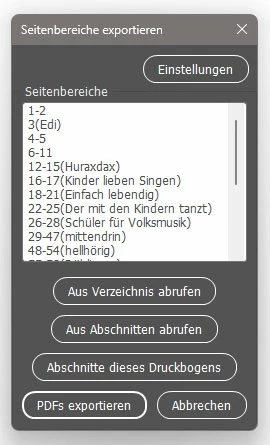
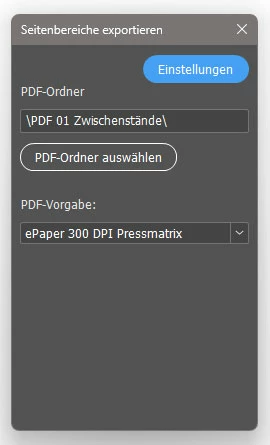
See screenshots attached.
Version:
v2.08, Date: 2025-08-11
From Version 2.02 to 2.08: mostly bug fixes but one significant added feature is the ability to customize your pages prefix in the file naming schema.
Features:
- Export multiple page ranges to individual PDFs
- Specify export folder and PDF preset to use
- Manually input page ranges and labels/identifiers for each range
- Retrieve a list of page ranges from:
- Previously exported PDFs in the target directory
- Active document's sections and section markers
- Currently viewed section(s) for quick versioned export - Handle odd/even page starts in PDF view settings (cover sheet YES/NO)
- Automatic versioning for exported PDFs (can be overridden)
- Save settings to a document script label for persistence
- Multi-Language: English, French, German, Spanish, Russian, and Arabic
Usage:
Launch the script from within Adobe InDesign's script panel or with your custom keyboard shortcut. Enter your desired page ranges into its edit text box and click "PDF export". It will export all page ranges to PDFs with the given PDF preset and work folder you provide in its settings. It has many features designed for convenience.
Input Format
Each line in the input text area should follow this format:
Page or PageRange(label)
The label in brackets is optional. Do not use commas.
Example Input:
1
5-7(Introduction)
8-15
16
17-20(Chapter 2)
Output File Naming
Exported PDF files will be named according to this schema:
[DocumentName]_pages_[PageRange]_[Label-from-brackets-if-given]_v[Version].pdf
Example Output:
MyDocument_pages_1_v1.pdf
MyDocument_pages_5-7_Introduction_v1.pdf
...
MyDocument_pages_17-20_Chapter 2_v1.pdf
Version Control:
The version number will auto-increment if an existing PDF file with the same name is found (e.g., from _v1 to _v2). To overwrite the last PDF file version and suppress version incrementation, add a minus (-) to the end of a line:
1-
5-7(Introduction)-
17-20
In this example, existing v1 PDFs for pages 1 and 5-7 will be overwritten, while the 17-20 range will increment to the next version.
Author and Credits:
Author: Stephan Möbius
Original idea: Jongware
Multi-language L10N function: Marc Autret (equalizer.js, 2012)
License:
MIT License – Do whatever you like with it, but whatever you do must also adhere to MIT License.
Contributing / Support
stephan dot moebius att gmail dot com
Caveats - Who will not benefit from this script:
- The script works EXCLUSIVELY WITH ABSOLUTE PAGE NUMBERING.
- It is not designed or tested for Book files (.indb).
- If section prefixes or unconventional page numbering are used, the script will likely give up quickly. Try it in simple, linearly numbered magazines, brochures, etc.
- Does it run on macOS? The different decoding of file paths was difficult for me. I added debugging for macOS-Users in version 2.02. Please send me the "exportPDF_debug.txt" log-file it creates on your desktop. If it works you can edit the script and disable debugging by changing the line "var DEBUG_MAC = true;" to "var DEBUG_MAC = false;"
Best regards,
Stephan


 AdChoices