Inspiring
January 1, 2017
Answered

script for adjusting table and cell properties

  • January 1, 2017
  • 2 replies
  • 4972 views

I have many tables in my file, is there any script which can help me to apply below properties ignore font and its font family,

my procedure will be i will select the whole single table and i will click the script and below properties will be applied...

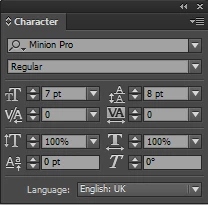
font size 7 and leading 8

and cell properties

and row hieght

Thanks in advance!!!

    This topic has been closed for replies.
    Correct answer Kasyan Servetsky

    You wrote: "font size 7 and leading 8". So I thought you wanted to apply only these values.

    Anyway, in JavaScript it is quite easy to make modifications by intuition -- even for those who are unfamiliar with coding.

    Here's another version. You can select either the whole table, or one or more cells

    Also, in this version you can Undo-Redo the whole script.

    var scriptName = "Table",

    doc;

    app.doScript(PreCheck, ScriptLanguage.JAVASCRIPT, undefined, UndoModes.ENTIRE_SCRIPT, "\"" + scriptName + "\" script");

    //===================================== FUNCTIONS ======================================

    function Main() {

        if (app.selection[0].constructor.name == "Table") {

            var cells = app.selection[0].cells.everyItem().getElements();

            for (var i = 0; i < cells.length; i++) {

                ProcessCell(cells);

            }

        }

        else {

            ProcessCell(app.selection[0]);

        }

    }

    //--------------------------------------------------------------------------------------------------------------------------------------------------------

    function ProcessCell(cell) {

        cell.texts[0].pointSize = "7 pt";

        cell.texts[0].leading = "8 pt";

        cell.texts[0].tracking = 0;

        cell.texts[0].kerningValue = 0;

        cell.leftInset = cell.rightInset = "1 mm";

        cell.topInset = cell.bottomInset = "0.5 mm";

        cell.verticalJustification = VerticalJustification.CENTER_ALIGN;

        cell.autoGrow = true;

        cell.minimumHeight = "3.75 mm";   

    }

    //--------------------------------------------------------------------------------------------------------------------------------------------------------

    function PreCheck() {

        if (app.documents.length == 0) ErrorExit("Please open a document and try again.", true);

        doc = app.activeDocument;

        if (doc.converted) ErrorExit("The current document has been modified by being converted from older version of InDesign. Please save the document and try again.", true);

        if (!doc.saved) ErrorExit("The current document has not been saved since it was created. Please save the document and try again.", true);

        if (app.selection.length == 0) ErrorExit("Nothing is selected, Select some cells and try again.", true);

        if (app.selection[0].constructor.name != "Cell" && app.selection[0].constructor.name != "Table") ErrorExit("Select a table, or one or more cells and try again.", true);

        Main();

    }

    //--------------------------------------------------------------------------------------------------------------------------------------------------------

    function ErrorExit(error, icon) {

        alert(error, scriptName, icon);

        exit();

    }

    //--------------------------------------------------------------------------------------------------------------------------------------------------------

    — Kas

    2 replies

    Willi Adelberger
    Community Expert
    Community Expert
    January 2, 2017

    I would do it with Table and Cell Styles, not with a script.

    Inspiring
    January 2, 2017

    I cant create additional styles in my file because it is against policy of my project

    Kasyan Servetsky
    Legend
    January 1, 2017

    Let's try this script. Place the cursor into the table an run it.

    var scriptName = "Table",

    doc;

    PreCheck();

    //===================================== FUNCTIONS ======================================

    function Main() {

        var table = CatchTable();


        table.cells.everyItem().texts[0].pointSize = "7 pt";

        table.cells.everyItem().texts[0].leading = "8 pt";

        table.cells.everyItem().leftInset = table.cells.everyItem().rightInset = "1 mm";

        table.cells.everyItem().topInset = table.cells.everyItem().bottomInset = "0.5 mm";

        table.cells.everyItem().verticalJustification = VerticalJustification.CENTER_ALIGN;

        table.cells.everyItem().autoGrow = true;

        table.cells.everyItem().minimumHeight = "3.75 mm";

    }

    //--------------------------------------------------------------------------------------------------------------------------------------------------------

    function CatchTable() {

        if (app.selection.length > 0) {

            if (app.selection[0].parent.constructor.name == "Table") {

                return app.selection[0].parent;

            }

            else if (app.selection[0].parent.parent.constructor.name == "Table") {

                return app.selection[0].parent.parent;

            }

            else {

                ErrorExit("Place the cursor into the table.", true);

            }

        } else {

            ErrorExit("Place the cursor into the table.", true);

        }

    }

    //--------------------------------------------------------------------------------------------------------------------------------------------------------

    function PreCheck() {

        if (app.documents.length == 0) ErrorExit("Please open a document and try again.", true);

        doc = app.activeDocument;

        if (doc.converted) ErrorExit("The current document has been modified by being converted from older version of InDesign. Please save the document and try again.", true);

        if (!doc.saved) ErrorExit("The current document has not been saved since it was created. Please save the document and try again.", true);

        Main();

    }

    //--------------------------------------------------------------------------------------------------------------------------------------------------------

    function ErrorExit(error, icon) {

        alert(error, scriptName, icon);

        exit();

    }

    //--------------------------------------------------------------------------------------------------------------------------------------------------------

    Hope it helps!

    — Kas

    Inspiring
    January 2, 2017

    Thank u very much!!! it works u help me lot with this script, there is only one problem, which i have mentioned below, can u please solve this by modifying the same script...

    Thanks in Advance