

[Script] How to get/ set measurements of a document in any units
Hi guys,
I'm struggling to understand how the get/ set things in various units, like inches, millimeters, points and so on in a script.
I've got 2 issues at the moment.
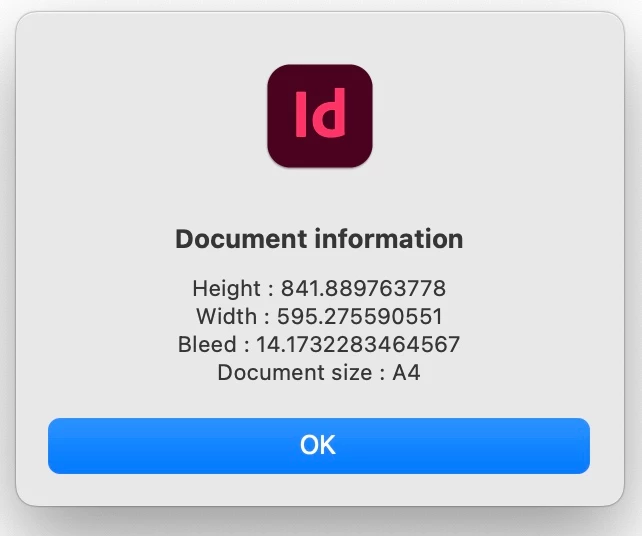
1- the basic following script shows me some information about the active Document. The problem is the datas are not in millimeters (like it is set on my ID), even despite my attempt to set it up in the script. I wonder what's wrong with it, moreover how to get the information set up in the active Document and use it.
DocInformation();

function DocInformation () {

// Boundaries of my document
var myDoc = app.activeDocument;

with(myDoc.viewPreferences){
horizontalMeasurementUnits = MeasurementUnits.MILLIMETERS;
verticalMeasurementUnits = MeasurementUnits.MILLIMETERS;
}

var myDocHeight = myDoc.documentPreferences.pageHeight;
var myDocWidth = myDoc.documentPreferences.pageWidth;
var myDocBleed = myDoc.documentPreferences.documentBleedTopOffset;
var myDocSize = myDoc.documentPreferences.pageSize;

alert ("Document information \nHeight : " + myDocHeight + "\rWidth : " + myDocWidth + "\rBleed : " + myDocBleed + "\rDocument size : " + myDocSize)

}
2- I'm working on moving Rectangles as well and the units I'd like the script to use would be in whatever the page uses, no pixels by default.
Document and ID are set in millimeters but the following line understands the resize in pixels. How can it be ? I'm missing something and need your help.
myRectangle.resize(CoordinateSpaces.PARENT_COORDINATES, AnchorPoint.TOP_LEFT_ANCHOR, ResizeMethods.REPLACING_CURRENT_DIMENSIONS_WITH,[50,50], true, true);
As usual, thanks for the help,
Fred
 AdChoices