I’ve always wanted to implement quick alignment of objects to guides. But since InDesign doesn’t allow selecting both an object and a guide at the same time, it seems impossible to achieve.
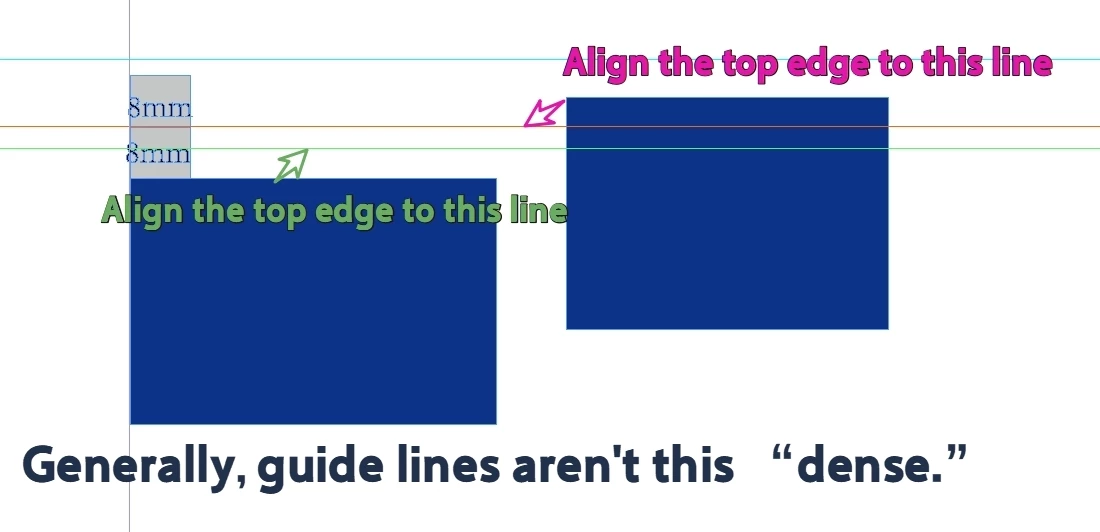
Today I just came up with a new approach: have the object align to the nearest guide. There are too many possible alignment directions, so it’s unnecessary. We only need to align the selected object to the nearest guide to the left or right.
This requires two separate scripts: one for left alignment and one for top alignment.
Consider only the top and left margins. Take top alignment as an example: You can define what constitutes “nearest” by setting a value yourself. For example, the detection range could be set to ±8mm; objects beyond 8mm will not be affected. If necessary, manually drag them within 8mm.
(Including the guide lines on the Masterpage.)
You might be able to align it even in complex situations by pressing the button repeatedly.
In testing I find it quite strange to have lots of guides drawn arbitrarily around the page - seems like a less efficient way to work.
Typically I’d align to Key Object. Then drag to the guide using smart guides, can be sped up with a few key commands.
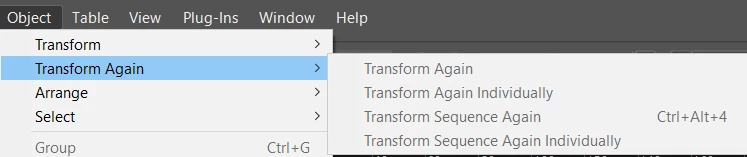
And you can do the same to more objects by using the Object>Transform Again or Sequence Individually (i have the indvidual setup as a keyboard shortcut on my other computer - but basically move one or transform one object, then use sequence indvidually on multilpe objects to do the same transformation.
====================
Scripting I can’t find an align to guide
So I guess you have to read the guide position first
First I tried this and got the alert
#target "InDesign"

var guides = app.activeWindow.activePage.guides;
var msg = "";

for (var i = 0; i < guides.length; i++) {
    msg += "Guide " + i + "\n";
    msg += "Orientation: " + guides[i].orientation + "\n";
    msg += "Location: " + guides[i].location + "\n\n";
}

alert(msg || "No guides on active page.");
Then I tried collecting them with this part
function collectCandidateGuides(item, orientation) {
    var guides = [];
    var page = getParentPage(item);
    var spread = page ? page.parent : getActiveSpread();

    if (page) {
        addGuides(guides, page.guides, orientation);
    }

    if (spread) {
        addGuides(guides, spread.guides, orientation);
    }

    return guides;
}
addGuides() is the part that actually reads each guide’s position:
out.push(Number(guide.location));
So for a vertical guide, guide.location is its X position. For a horizontal guide, guide.location is its Y position.
Then findNearestGuide() compares the selected object edge to every guide position and picks the closest one:
left edge = bounds[1] right edge = bounds[3] top edge = bounds[0] bottom edge = bounds[2]
Finally, alignItemToNearestGuide() calculates how far the object needs to move:
deltaX = guide - edge; // for left/right alignment deltaY = guide - edge; // for top/bottom alignment
And moves the object by that amount:
item.move(undefined, [deltaX, deltaY]);
So in plain English: it reads all matching guide positions, finds the guide closest to the chosen object edge, subtracts the current edge position from the guide position, then moves the object by exactly that difference.
Full test script with a rough UI
I suspect there’s more to your query - and this won’t do what you want out of the box - but it’s just a proof of concept.
#target "InDesign"
(function () { var SCRIPT_NAME = "Align Selected Objects to Nearest Guide";
if (app.documents.length === 0) { alert("Open a document first.", SCRIPT_NAME); return; }
if (app.selection.length === 0) { alert("Select one or more page items first.", SCRIPT_NAME); return; }
var left = panel.add("radiobutton", undefined, "Left edge to nearest vertical guide"); var right = panel.add("radiobutton", undefined, "Right edge to nearest vertical guide"); var top = panel.add("radiobutton", undefined, "Top edge to nearest horizontal guide"); var bottom = panel.add("radiobutton", undefined, "Bottom edge to nearest horizontal guide"); left.value = true;
if (aligned === 0) { alert("No selected page items could be aligned. Check that the relevant guides exist on the page or spread.", "Align Selected Objects to Nearest Guide"); } else if (skipped.length > 0) { alert("Aligned " + aligned + " item(s).\n\nSkipped " + skipped.length + " item(s) with no matching guide or no movable bounds.", "Align Selected Objects to Nearest Guide"); } }
function findNearestGuide(item, orientation, edge) { var guides = collectCandidateGuides(item, orientation); var nearest = null; var nearestDistance = Number.MAX_VALUE; var i; var distance;
for (i = 0; i < guides.length; i++) { distance = Math.abs(guides[i] - edge);
function collectCandidateGuides(item, orientation) { var guides = []; var page = getParentPage(item); var spread = page ? page.parent : getActiveSpread();
if (page) { addGuides(guides, page.guides, orientation); }
if (spread) { addGuides(guides, spread.guides, orientation); }
return guides; }
function addGuides(out, guides, orientation) { var i; var guide;
for (i = 0; i < guides.length; i++) { guide = guides[i];
if (guideMatchesOrientation(guide, orientation)) { out.push(Number(guide.location)); } } }
function guideMatchesOrientation(guide, orientation) { var value;
Eugene is quite correct of course, it is neccessary to include any guides that are inherited from a parent page. It’s worse that that in fact because you would also need to check for guides on a parent page inherited from another parent page and so on. (My script avoids that because it infers the horizontal grid from the spacing of the baseline grid.)
As for guides on parent spread but outside the page area —it seems they are not inherited and nor is anything else entirely outside the page area. Which I suppose makes sense.
I've done somethng similar for newspaper layouts with quite detailed grids of guidelines (horizontal guides that relate to the document's baseline grid but shifted by the cap height of body text to ensure alignment of text frames and pictures).
It works by getting the bounds of the object-to-be-aligned and then a list of all guides on the page and doing a search for the nearest guide in the list for all four sides of the object-to-be-aligned in turn and adjusting the bounds to suit.
It has a couple of special cases to raise the bottom of pictures slightly to allow for captions and for column guides and also to ensure the right side of a frame goes to the left side of a column gutter and vice versa.
It sounds long-winded but on any fairly modern machine it's done in a blink.
It's all in AppleScript — but of course the same logic could be applied in JavaScript.
use AppleScript version "2.4" -- Yosemite (10.10) or later
use scripting additions
------------------------------------------------------------------
# VERSION SAVED @ Tuesday 15 April 2025 at 11:43:57
------------------------------------------------------------------
property ColumnRuleGuidesList : missing value -- need to generate this
property LeftSideList : missing value
property RightSideList : missing value
property PageHeight : missing value
property PageWidth : missing value
property HorizontalGuides : missing value
property ActivePage : missing value
property TopMargin : missing value
property BottomMargin : missing value
property TypeLineFeed : missing value
property BaselineStart : missing value
property TheDoc : missing value
property TheSelection : missing value
property PagesOfSpread : missing value
property LeftPageLeftSide : {}
property LeftPageRightSide : {}
property RightPageLeftSide : {}
property RightPageRightSide : {}
property PullBackPic : false
-- display dialog "message" buttons {"Cancel", "OK"} default button "OK"
CheckForDocument()
SetProperties()
LoadColumnPositions()
ListHorizontalGuides()
tell application id "com.adobe.InDesign"
	activate
	repeat with s from 1 to count of items of TheSelection
		set NextItem to item s of TheSelection
		set NextItemElementLabel to "" -- («class ElLa» of nextItem)
		if class of NextItem is not graphic line then
			if {"PF Picture Frame"} contains NextItemElementLabel then
				set PullBackPic to true
			else
				set PullBackPic to false
			end if
		end if
		-- How to detect a column rule????
		if (side of parent page of NextItem) is left hand then
			set y1 to (GNV((item 1 of (geometric bounds of NextItem)), HorizontalGuides) of me)
			set x1 to (GNV((item 2 of (geometric bounds of NextItem)), LeftPageLeftSide) of me)
			set y2 to (GNV((item 3 of (geometric bounds of NextItem)), HorizontalGuides) of me)
			set x2 to (GNV((item 4 of (geometric bounds of NextItem)), LeftPageRightSide) of me)
			--set geometric bounds of nextitem to {y1, x1, y2, x2}
		end if
		if (side of parent page of NextItem) is right hand then
			set y1 to (GNV((item 1 of (geometric bounds of NextItem)), HorizontalGuides) of me)
			set x1 to (GNV((item 2 of (geometric bounds of NextItem)), RightPageLeftSide) of me)
			set y2 to (GNV((item 3 of (geometric bounds of NextItem)), HorizontalGuides) of me)
			set x2 to (GNV((item 4 of (geometric bounds of NextItem)), RightPageRightSide) of me)
		end if
		set SkipMe to false
		if PullBackPic is true then
			set y2 to y2 - (TypeLineFeed - BaselineStart)
		end if
		if class of NextItem is graphic line then
			if stroke weight of NextItem is 0.25 then
				if y2 - y1 > 20 then
					-- Is it really a column rule? Is there any other test?
					set x1 to x1 + 6
					set x2 to x2 + 6
					set y2 to y2 - (TypeLineFeed - BaselineStart)
				else
					--set SkipMe to true
				end if
			end if
		end if
		if SkipMe is false then
			if class of NextItem is in {rectangle, text frame, graphic line} then
				set geometric bounds of NextItem to {y1, x1, y2, x2}
			end if
		end if
	end repeat
end tell
------------------------------------------------------------------------------------------------------------
# Check there's a document and something selected
------------------------------------------------------------------------------------------------------------
on CheckForDocument()
	tell application id "com.adobe.InDesign"
		activate
		if (count of document) = 0 then
			display dialog "There is no document open" with title "No Document" buttons {"Cancel"} default button "Cancel"
		end if
		tell document 1
			set TheSelection to selection
		end tell
		if TheSelection is {} then
			display dialog "There is nothing selected" with title "No Selection" buttons {"Cancel"} default button "Cancel"
		end if
	end tell
end CheckForDocument
------------------------------------------------------------------------------------------------------------
# Make sure some prefs are as we need them to be
------------------------------------------------------------------------------------------------------------
on SetProperties()
	tell application id "com.adobe.InDesign"
		set TheDoc to document 1
		tell TheDoc
			set ruler origin of view preferences to page origin
			set zero point to {0, 0}
			set horizontal measurement units of view preferences to points
			set vertical measurement units of view preferences to points
			set TypeLineFeed to baseline division of grid preferences
			set BaselineStart to baseline start of grid preferences
			set TheSelection to selection
			set PageWidth to page width of document preferences
			set PageHeight to page height of document preferences
			set TopMargin to (top of (margin preferences))
			set BottomMargin to (bottom of (margin preferences))
		end tell
		set TheActiveSpread to parent of parent page of (item 1 of TheSelection)
		set PagesOfSpread to every page of TheActiveSpread
	end tell
end SetProperties
------------------------------------------------------------------------------------------------------------
# Find Columns
------------------------------------------------------------------------------------------------------------
on LoadColumnPositions()
	tell application id "com.adobe.InDesign"
		repeat with p from 1 to count of items of PagesOfSpread
			tell (item p of PagesOfSpread)
				set WhatSide to side
				tell margin preferences
					set InsideMargin to left
					set OutsideMargin to right
					set ColumnPositions to columns positions
				end tell
				if side is left hand then
					set ColumnStartPoint to OutsideMargin
					set FurthestLeftToDraw to OutsideMargin
					set FurthestRightToDraw to (PageWidth - InsideMargin)
					repeat with y from 1 to count of items of ColumnPositions by 2
						set LeftPageLeftSide to LeftPageLeftSide & ((item y of ColumnPositions) + ColumnStartPoint)
						set LeftPageRightSide to LeftPageRightSide & ((item (y + 1) of ColumnPositions) + ColumnStartPoint)
					end repeat
				end if
				if side is right hand then
					set ColumnStartPoint to InsideMargin
					set FurthestLeftToDraw to InsideMargin
					set FurthestRightToDraw to (PageWidth - OutsideMargin)
					repeat with y from 1 to count of items of ColumnPositions by 2
						set RightPageLeftSide to RightPageLeftSide & ((item y of ColumnPositions) + ColumnStartPoint)
						set RightPageRightSide to RightPageRightSide & ((item (y + 1) of ColumnPositions) + ColumnStartPoint)
					end repeat
				end if

			end tell
		end repeat
	end tell
end LoadColumnPositions
------------------------------------------------------------------------------------------------------------
# List Horizontal Guides (based on the baseline grid but shifted to bring cap height onto the object grid)
------------------------------------------------------------------------------------------------------------
on ListHorizontalGuides()
	set p to TopMargin
	set HorizontalGuides to {}
	repeat while p < ((PageHeight - BottomMargin) + 1)
		set HorizontalGuides to HorizontalGuides & p
		set p to (p + TypeLineFeed)
	end repeat
end ListHorizontalGuides
------------------------------------------------------------------------------------------------------------
# Get Nearest Value from a list
------------------------------------------------------------------------------------------------------------
on GNV(theValue, theList) -- GetNearestValue
	set TestCase to 100000
	set HoldValue to 0
	repeat with v from 1 to (count of items of theList)
		set TheGap to (theValue - (item v of theList))
		if TheGap < 0 then
			set TheGap to (TheGap * -1)
		end if
		if TheGap < TestCase then
			set TestCase to TheGap
			set HoldValue to (item v of theList)
		end if
	end repeat
	return HoldValue
end GNV
In testing I find it quite strange to have lots of guides drawn arbitrarily around the page - seems like a less efficient way to work.
Typically I’d align to Key Object. Then drag to the guide using smart guides, can be sped up with a few key commands.
And you can do the same to more objects by using the Object>Transform Again or Sequence Individually (i have the indvidual setup as a keyboard shortcut on my other computer - but basically move one or transform one object, then use sequence indvidually on multilpe objects to do the same transformation.
====================
Scripting I can’t find an align to guide
So I guess you have to read the guide position first
First I tried this and got the alert
#target "InDesign"

var guides = app.activeWindow.activePage.guides;
var msg = "";

for (var i = 0; i < guides.length; i++) {
    msg += "Guide " + i + "\n";
    msg += "Orientation: " + guides[i].orientation + "\n";
    msg += "Location: " + guides[i].location + "\n\n";
}

alert(msg || "No guides on active page.");
Then I tried collecting them with this part
function collectCandidateGuides(item, orientation) {
    var guides = [];
    var page = getParentPage(item);
    var spread = page ? page.parent : getActiveSpread();

    if (page) {
        addGuides(guides, page.guides, orientation);
    }

    if (spread) {
        addGuides(guides, spread.guides, orientation);
    }

    return guides;
}
addGuides() is the part that actually reads each guide’s position:
out.push(Number(guide.location));
So for a vertical guide, guide.location is its X position. For a horizontal guide, guide.location is its Y position.
Then findNearestGuide() compares the selected object edge to every guide position and picks the closest one:
left edge = bounds[1] right edge = bounds[3] top edge = bounds[0] bottom edge = bounds[2]
Finally, alignItemToNearestGuide() calculates how far the object needs to move:
deltaX = guide - edge; // for left/right alignment deltaY = guide - edge; // for top/bottom alignment
And moves the object by that amount:
item.move(undefined, [deltaX, deltaY]);
So in plain English: it reads all matching guide positions, finds the guide closest to the chosen object edge, subtracts the current edge position from the guide position, then moves the object by exactly that difference.
Full test script with a rough UI
I suspect there’s more to your query - and this won’t do what you want out of the box - but it’s just a proof of concept.
#target "InDesign"
(function () { var SCRIPT_NAME = "Align Selected Objects to Nearest Guide";
if (app.documents.length === 0) { alert("Open a document first.", SCRIPT_NAME); return; }
if (app.selection.length === 0) { alert("Select one or more page items first.", SCRIPT_NAME); return; }
var left = panel.add("radiobutton", undefined, "Left edge to nearest vertical guide"); var right = panel.add("radiobutton", undefined, "Right edge to nearest vertical guide"); var top = panel.add("radiobutton", undefined, "Top edge to nearest horizontal guide"); var bottom = panel.add("radiobutton", undefined, "Bottom edge to nearest horizontal guide"); left.value = true;
if (aligned === 0) { alert("No selected page items could be aligned. Check that the relevant guides exist on the page or spread.", "Align Selected Objects to Nearest Guide"); } else if (skipped.length > 0) { alert("Aligned " + aligned + " item(s).\n\nSkipped " + skipped.length + " item(s) with no matching guide or no movable bounds.", "Align Selected Objects to Nearest Guide"); } }
function findNearestGuide(item, orientation, edge) { var guides = collectCandidateGuides(item, orientation); var nearest = null; var nearestDistance = Number.MAX_VALUE; var i; var distance;
for (i = 0; i < guides.length; i++) { distance = Math.abs(guides[i] - edge);
function collectCandidateGuides(item, orientation) { var guides = []; var page = getParentPage(item); var spread = page ? page.parent : getActiveSpread();
if (page) { addGuides(guides, page.guides, orientation); }
if (spread) { addGuides(guides, spread.guides, orientation); }
return guides; }
function addGuides(out, guides, orientation) { var i; var guide;
for (i = 0; i < guides.length; i++) { guide = guides[i];
if (guideMatchesOrientation(guide, orientation)) { out.push(Number(guide.location)); } } }
function guideMatchesOrientation(guide, orientation) { var value;
My personal suggestion is to divide it into 4 scripts, and if necessary, assign 4 shortcut keys instead of a dialog box, which significantly reduces speed and user experience.
I directly commented out the dialog box.
Also, “#target "InDesign” seems unnecessary.
Could it slow down the code? Once, I was running in ID2024 and it was strange that ID2026 was opened.
//#target "InDesign"
. . .
var side = 'top';
//var side = showDialog(SCRIPT_NAME);
. . .
Oh, I noticed a digression:
Can I @ Adobe Forum Builder? Why not set the default code to JS? I always want to be lazy enough to skip every small step.




 AdChoices