
Answered
Script issue: Find/Change is not recognizing the full GREP expression
Hi everyone,
Can anyone help me with a script issue? Somehow, my Find/Change is not recognizing the full GREP expression "([\S\s]+)\K\1" when I run the code on Extendscript Toolkit. As shown in the screenshot below, the backslaches and number "1" are missing. Also, I'm unable to include "Condition 1" on Change Format. It seems this line "app.changeGrepPreferences.appliedConditions = "Condition 1"" is not correct. Here's the script:
var doc = app.activeDocument;

app.findGrepPreferences=app.changeGrepPreferences=null;
app.findGrepPreferences.findWhat = "([\S\s]+)\K\1";
app.findGrepPreferences.appliedCharacterStyle = "Character Style 1";
app.changeGrepPreferences.changeTo = "";
app.changeGrepPreferences.appliedCharacterStyle = "Character Style 2";
app.changeGrepPreferences.appliedConditions = "Condition 1"
doc.changeGrep();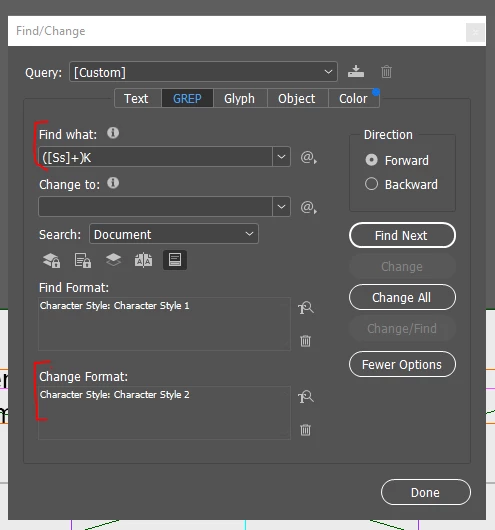
Thanks in advance,
Rogerio


 AdChoices