Participant
April 16, 2021
Question

Script Issues

  • April 16, 2021
  • 4 replies
  • 218 views

Hi,


I have just had CS5 installed on my new works laptop (Windows10) but when I copy over the scripts from my old laptop CS5 (Windows7) they no longer run and giving me the error:
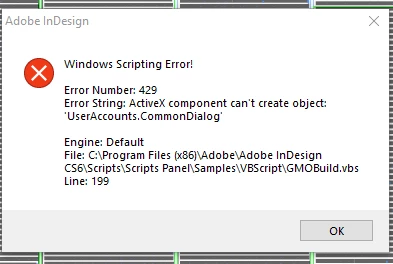


Nothing has changed in the script as it's exactly the same one I was using and running perfectly on my old laptop.


Any help would be much appreciated.


Many thanks in advance 🙂

This topic has been closed for replies.

4 replies

Participant
April 19, 2021

Thank you all for your help.


Turns out it was nothing related to the scripts at all.


When I copied my FindChangeSupport files over to the new laptop the system, for reasons unknown, decided to rename some of my .txt files to .docx files (I assume some sort of automatic file association kicked in somewhere)


All is now working as it should be.


Many thanks again 🙂

Community Expert
April 19, 2021

FWIW: At least my issue with VB scripts on Windows 10 will be resolved with the new upcoming update of InDesign 2021 to version 16.2.0.30. See: https://helpx.adobe.com/indesign/kb/fixed-issues.html


Fixed issues in InDesign

Scripting
[Win only] VB Script can be executed only after InDesign is launched in Admin mode at least once.


Regards,
Uwe Laubender

( ACP )

Community Expert
April 16, 2021

Hi defaulttcn46ypa0b4u,

I can only tell that I also have issues with VB scripts on a current Windows 10.

No error message though. Just a sound and nothing works. That's with InDesign 2021.


FWIW:

For me this is a non-issue, because I always write scripts in ExtendScript (JavaScript).

Maybe it's time to port the VB scripts to ExtendScript?


Sorry, this is not much help.


Regards,

Uwe Laubender

( ACP )

Derek Cross
Community Expert
Community Expert
April 16, 2021

I'm a Mac user, but I should think your 10-year-old version of InDesign would not be compatible with Windows 10.