


Script not reading values from input parameters correctly
Hello,
below is most of the code which can magically add rules to columns and frames of differenent lengths.
there is a controller code which sets values the user puts in and then creates and xml
and then there is the main code which can also use these xml values
the purpose behind both scripts is the user can use the main script via shortcut with no dialogue box
the controller script is working - and writes to xml file fine
but the main script doesnt seem to be able to get the right values for adjust top height or adjust bottom height
it always over does it by either adding more is the user entered a positive value or takeing away too much if the user ended a negitive value
Please may someone have a look as to what is making the main script not be able to read the controller script correctly
I have added the code below including the xml which is set up for adjust top height by 10 pt
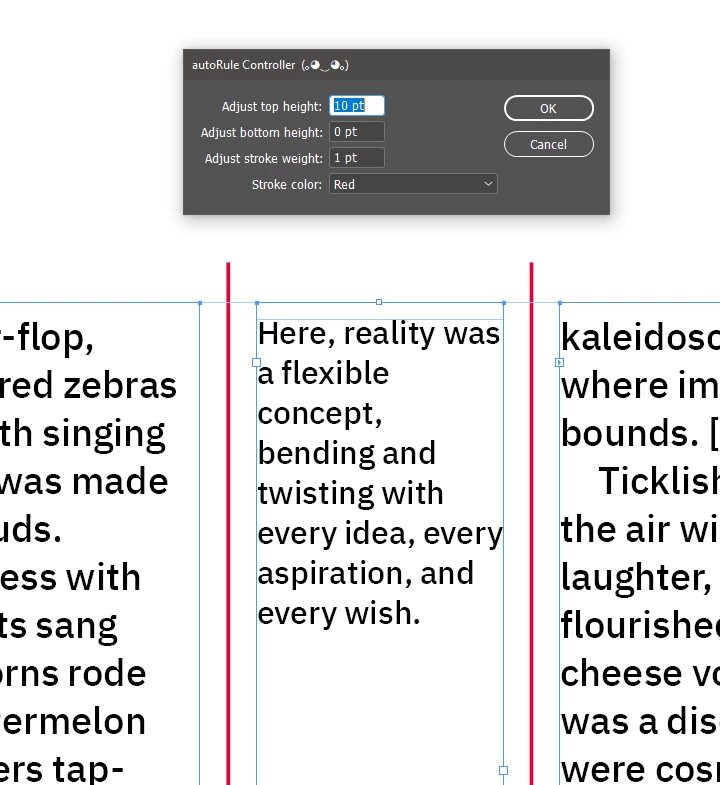
Then the same result should happen when you run the main script which is suppose to read the values of the controller -but it doesnt - it gives me this - much taller
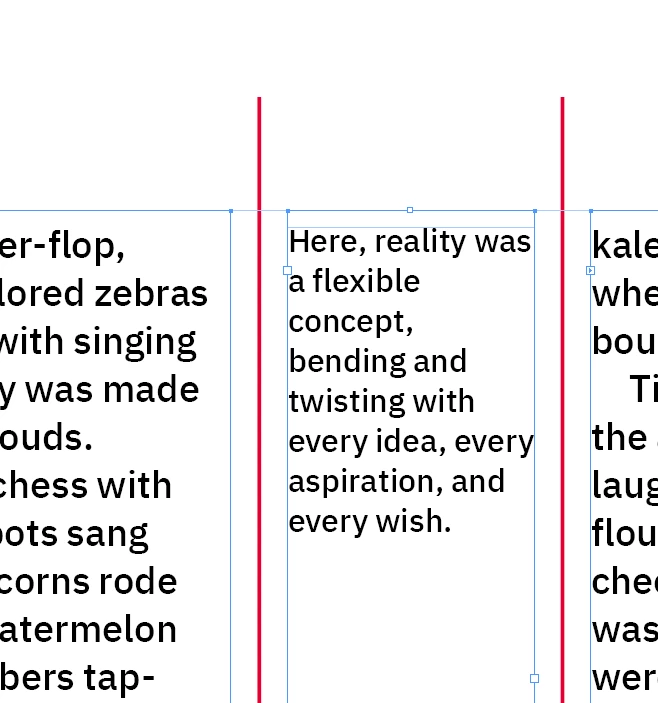
The code is here
Controller
var f = File($.fileName).parent + "/autoRule_user_preset.xml";

var xml = readXML(f);
if (xml == "") {
    xml = XML("<dialog><values><top>0</top><bottom>0</bottom><stroke>1</stroke><color>3</color></values></dialog>");
}

var tv = Number(xml.values.top); 	//var for topValue
var bv = Number(xml.values.bottom);	//var for bottom/Value
var sv = Number(xml.values.stroke); 	//var for strokeValue
var cv = Number(xml.values.color);	//var for colourValue

var t, b, s, c, cd;
makeDialog();

//Creates the box for user input

function makeDialog() {
    var d = app.dialogs.add({ name: "autoRule Controller  (。◕‿◕。)", canCancel: true });
    with (d.dialogColumns.add()) {
        staticTexts.add({ staticLabel: "Adjust top height:" });
        staticTexts.add({ staticLabel: "Adjust bottom height:" });
        staticTexts.add({ staticLabel: "Adjust stroke weight:" });
        staticTexts.add({ staticLabel: "Stroke color:" });
    }
    with (d.dialogColumns.add()) {
        t = measurementEditboxes.add({ editUnits: MeasurementUnits.POINTS, editValue: tv, minWidth: 50 });
        b = measurementEditboxes.add({ editUnits: MeasurementUnits.POINTS, editValue: bv, minWidth: 50 });
        s = measurementEditboxes.add({ editUnits: MeasurementUnits.POINTS, editValue: sv, minWidth: 50 });
        cd = dropdowns.add({stringList:getArrayNames(app.activeDocument.swatches.everyItem().getElements()), selectedIndex:cv, minWidth:80});
    }
    if (d.show() == true) {
        t = t.editValue;
        b = b.editValue;
        s = s.editValue;
        //get the swatch object
        c = app.activeDocument.swatches.everyItem().getElements()[cd.selectedIndex];

        xml.values.top = t;
        xml.values.bottom = b;
        xml.values.stroke = s;
        xml.values.color = cd.selectedIndex;//the selected dropdown number
        writeXML(f, xml.toXMLString());

        //call the main() function via doScript here
        app.doScript(main, ScriptLanguage.JAVASCRIPT, undefined, UndoModes.ENTIRE_SCRIPT, 'Add Vertical Lines Between Text Boxes');
        d.destroy();
    }
}


/**
* returns an array of swatch names for the dropdown
* @ return value
*/
function getArrayNames(arr){
    var a = new Array;
    for(var i = 0; i < arr.length; i++){
        a.push(arr[i].name);
    }
    return a
}


/**
* The main script
* The main script may use points but it should be following parameters set via the controller so long as user sets their unit in the input box then script will convert said unit
*/
function main(){
    //the dialog is getting points, so make sure the script uses points no matter what the ruler units are set to
    app.scriptPreferences.measurementUnit = MeasurementUnits.POINTS;

    if (app.documents.length > 0) {
        var doc = app.activeDocument;
        var selectedFrames = doc.selection;

        if (selectedFrames.length >= 2) {
            selectedFrames.sort(function(a, b) {
                return a.geometricBounds[1] - b.geometricBounds[1];
            });

            for (var i = 0; i < selectedFrames.length-1; i++) {
                var currentFrame = selectedFrames[i];
                var nextFrame = selectedFrames[i + 1];

                if (currentFrame.parentPage === nextFrame.parentPage) {
                    var centerX = (currentFrame.geometricBounds[3] + nextFrame.geometricBounds[1]) / 2;
                    var startHeight = Math.max(currentFrame.geometricBounds[2], nextFrame.geometricBounds[2]);
                    var endHeight = Math.min(currentFrame.geometricBounds[0], nextFrame.geometricBounds[0]);
                    var adjustedStartHeight = startHeight + b;
                    var adjustedEndHeight = endHeight - t;

                    //graphic lines have a bounds not including the stroke
                    var newLine = currentFrame.parentPage.graphicLines.add({
                        geometricBounds: [adjustedEndHeight,centerX,adjustedStartHeight,centerX],
                        strokeWeight:s,
                        strokeColor:c});

                    newLine.sendToBack();
                }
            }
        } else {
            alert("Please select at least two text frames.");
        }
    } else {
        alert("Open a document before running this script.");
    }

    app.scriptPreferences.measurementUnit = AutoEnum.AUTO_VALUE;
}


function writeXML(p, s) {
    var file = new File(p);
    file.encoding = 'UTF-8';
    file.open('w');
    file.write(s);
    file.close();
}

function readXML(p) {
    var f = new File(p);
    f.open("r");
    var t = f.read();
    f.close();
    return XML(t);
}
the main script
// Load user-defined values from XML
var f = File($.fileName).parent + "/autoRule_user_preset.xml";
var xml = readXML(f);
var userDefinedAmountTop = Number(xml.values.top);
var userDefinedAmountBottom = Number(xml.values.bottom);
var userDefinedStrokeWeight = Number(xml.values.stroke);
var userDefinedColorIndex = Number(xml.values.color);


// Main code below
if (app.documents.length > 0) {
    var doc = app.activeDocument;
    var selectedFrames = doc.selection;

    if (selectedFrames.length >= 2) {
        selectedFrames.sort(function(a, b) {
            return a.geometricBounds[1] - b.geometricBounds[1];
        });

        app.doScript(function() {
            // Get the color swatch based on the user-defined index
            var selectedColor = doc.swatches[userDefinedColorIndex];

            for (var i = 0; i < selectedFrames.length - 1; i++) {
                var currentFrame = selectedFrames[i];
                var nextFrame = selectedFrames[i + 1];

                if (currentFrame.parentPage === nextFrame.parentPage) {
                    var centerX = (currentFrame.geometricBounds[3] + nextFrame.geometricBounds[1]) / 2;
                    var ruleHeight = Math.max(
                        currentFrame.geometricBounds[2] - currentFrame.geometricBounds[0],
                        nextFrame.geometricBounds[2] - nextFrame.geometricBounds[0]
                    );

                    var startHeight = Math.max(
                        currentFrame.geometricBounds[2],
                        nextFrame.geometricBounds[2]
                    );

                    var endHeight = Math.min(
                        currentFrame.geometricBounds[0],
                        nextFrame.geometricBounds[0]
                    );

                    var adjustedStartHeight = startHeight + userDefinedAmountBottom;
                    var adjustedEndHeight = endHeight - userDefinedAmountTop;

                    var newLine = currentFrame.parentPage.graphicLines.add();
                    newLine.strokeWeight = userDefinedStrokeWeight;
                    newLine.paths[0].entirePath = [
                        [centerX, adjustedStartHeight],
                        [centerX, adjustedEndHeight]
                    ];

                    // Apply the selected color to the stroke
                    newLine.strokeColor = selectedColor;

                    newLine.sendToBack();
                }
            }
        }, ScriptLanguage.JAVASCRIPT, [], UndoModes.ENTIRE_SCRIPT, "Add Vertical Lines Between Text Boxes");
    } else {
        alert("Please select at least two text frames.");
    }
} else {
    alert("Open a document before running this script.");
}

function readXML(p) {
    var f = new File(p);
    f.open("r");
    var t = f.read();
    f.close();
    return XML(t);
}
and the xml
<dialog>
  <values>
    <top>10</top>
    <bottom>0</bottom>
    <stroke>1</stroke>
    <color>8</color>
  </values>
</dialog>
Any ideas would be most helpful
thank you
Smyth

 AdChoices