Kasyan Servetsky
Legend
March 24, 2026
Answered

Script not working after updating to the latest version of InDesign

  • March 24, 2026
  • 6 replies
  • 152 views

About ten years ago, I wrote a script that basically relinks missing links to images whose names are a little different. The new name is found using regExes. A couple of days ago, my client wrote me that running the script causes InDesign memory usage to bloat and finally run out of system memory. 


I made a few tests in different versions: 2024/5/6

In InDesign 2024 (version 19.5), it works without any problems: both on Mac and Windows.

  • On my Mac (iMac, 3,3 GHz 6-Core Intel Core i5, 8 GB 2667 MHz DDR4), it took 3 minutes, 22 seconds to relink 254 links. 1,26 secs. per link.
  • On my old Windows notebook (Intel Core i5-3230M CPU @2.60GHz, 8 GB RAM), it took about 22 minutes to relink 107 links. Approx. 9 secs. per link.

In InDesign 2025 (version 20.3.1) and 2026 (version 21.2) on my Mac, it gets stuck on the 27th link, and InDesign hangs, gobbling all the memory in the Activity Monitor, so the only option is to force quit it.

I tried:

  • Reducing the undo steps via the doScript command
  • Initiating garbage collection in the JavaScript engine: first for every 10-th and then for each link.
  • I tried using the experimental reinitLink() command instead of relink()

BTW, I tested it in the non-persisting 'main' engine.

Unfortunately, it didn't help. The result is always the same:
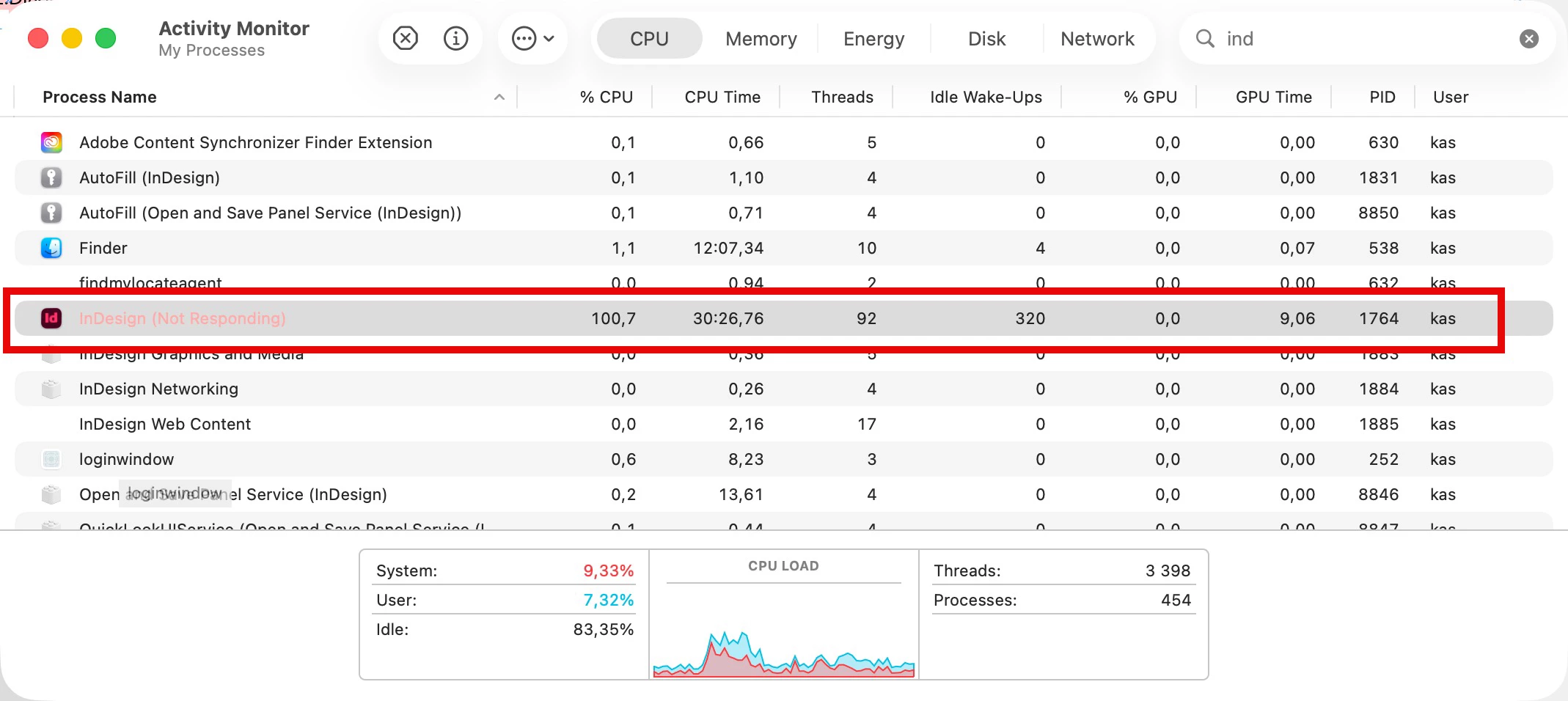
 

I think this is a problem with the recent InDesign versions (2025 & 2026), not the script.

Any ideas?

Below is the script:


var scriptName = "Relink images",
doc,
arr = [],

app.doScript(PreCheck, ScriptLanguage.JAVASCRIPT, undefined, ((File.fs == "Macintosh") ? UndoModes.ENTIRE_SCRIPT : UndoModes.FAST_ENTIRE_SCRIPT), "\"" + scriptName + "\" Script");

//===================================== FUNCTIONS ======================================
function Main() {
var link,
links = doc.links.everyItem().getElements(),
linksLength = links.length;

var progressWin, progressBar, progressTxt, countProgressBar;

progressWin = new Window("window", scriptName);
progressBar = progressWin.add("progressbar" , undefined, 0, linksLength);
progressBar.preferredSize.width = 800;
progressTxt = progressWin.add("statictext", undefined, "");
progressTxt.alignment = "fill";
progressWin.show();

var startTime = new Date();
arr.push(GetDate());
arr.push("\r\r------------------------------------------\rDocument name: " + doc.name + "\rDocument path: " + File(doc.filePath).fsName + "\r------------------------------------------");

for (var i = 0; i < links.length; i++) {
link = links[i];

countProgressBar = i + 1;
progressBar.value = countProgressBar;
progressTxt.text = "Relinking images: " + link.name + " (" + countProgressBar + " out of " + linksLength + ")";
$.writeln("# " + countProgressBar);

if (link.status == LinkStatus.LINK_MISSING) {
ProcessLink(link);
}
}

progressWin.close();

var endTime = new Date();
var duration = GetDuration(startTime, endTime);
var report = count + ((count == 1) ? " link was" : " links were") + " relinked.\n(time elapsed: " + duration + ")";
arr.push("\r=========================================================\r" + report + "\r=========================================================\r\r\r");
var text = arr.join("\r");
WriteToFile(text);
}

function ProcessLink(oldLink) {
var newFile = GetApproxNameFile(oldLink);

if (newFile != null) {
Relink(oldLink, newFile);
}
else {
arr.push("\rCan't get an image with approximate name for '" + oldLink.name + "'");
$.writeln("Can't get an image with approximate name for '" + oldLink.name + "'");
}
}

function GetApproxNameFile(oldLink) {
var jpegFile, newName, patt1, patt2, patt3, res1, res2, res3, str,
foundFile = null,
file = new File(oldLink.filePath),
folder = file.parent,
folderPath = folder.absoluteURI + "/",
oldName = decodeURI(oldLink.name);

if (folder.exists) {
var jpegFiles = folder.getFiles("*.jpg");

for (var i = 0; i < jpegFiles.length; i++) {
jpegFile = jpegFiles[i];
newName = decodeURI(jpegFile.name);

patt1 = /(.+?)([A-Z]{2,4})(.+?)(_(\d|X)(\d|X)(\d|X)(\d|X)\.(\d|X)(\d|X)\.(\d|X)(\d|X)_)(B[A-Z]{0,2}\d{1,4}.+?_)*(.+)/;
res1 = oldName.match(patt1);
if (res1 == null) {
continue;
}
str = decodeURI(res1[1] + "[A-Z]{2,4}" + res1[3] + res1[4] + "B[A-Z]{0,2}\\d{1,4}.+?_" + res1[14].replace(/^B[A-Z]{0,2}\d{1,4}.+?_/, ""));
patt2 = eval("/" + str + "/");
res2 = newName.match(patt2);
if (res2 != null) {
foundFile = jpegFile;
break;
}
else {
str = decodeURI(res1[1] + "[A-Z]{2,4}" + res1[3] + res1[4] + res1[14]);
patt3 = eval("/" + str + "/");
res3 = newName.match(patt3);
if (res3 != null) {
foundFile = jpegFile;
break;
}
}
} // end for
}
else {
arr.push("\rERROR: The folder where the link '" + oldName + "' originally was doesn't exist any more: '" + folderPath + "'");
$.writeln("Folder doesn't exist.");
}

return foundFile;
}

function Relink(oldLink, newFile) {
$.writeln("Relinking " + oldLink.name + ">" + newFile.name);
var oldPath = new File(oldLink.filePath).fullName;

oldLink.relink(newFile);
// oldLink.reinitLink("file:/" + newFile.fsName);

count++;
arr.push("\r" + oldLink.name + "\r" + "\tOld path: " + oldPath);
arr.push("\tNew path: " + newFile.fullName);
}

function PreCheck() {
if (app.documents.length == 0) ErrorExit("Please open a document and try again.", true);
doc = app.activeDocument;
if (doc.converted) ErrorExit("The current document has been modified by being converted from older version of InDesign. Please save the document and try again.", true);
if (!doc.saved) ErrorExit("The current document has not been saved since it was created. Please save the document and try again.", true);
Main();
}

function ErrorExit(error, icon) {
alert(error, scriptName, icon);
exit();
}

function GetDuration(startTime, endTime) {
var str;
var duration = (endTime - startTime)/1000;
duration = Math.round(duration);
if (duration >= 60) {
var minutes = Math.floor(duration/60);
var seconds = duration - (minutes * 60);
str = minutes + ((minutes != 1) ? " minutes, " : " minute, ") + seconds + ((seconds != 1) ? " seconds" : " second");
if (minutes >= 60) {
var hours = Math.floor(minutes/60);
minutes = minutes - (hours * 60);
str = hours + ((hours != 1) ? " hours, " : " hour, ") + minutes + ((minutes != 1) ? " minutes, " : " minute, ") + seconds + ((seconds != 1) ? " seconds" : " second");
}
}
else {
str = duration + ((duration != 1) ? " seconds" : " second");
}

return str;
}

function GetDate() {
var date = new Date();
if ((date.getYear() - 100) < 10) {
var year = "0" + new String((date.getYear() - 100));
}
else {
var year = new String((date.getYear() - 100));
}
var dateString = (date.getMonth() + 1) + "/" + date.getDate() + "/" + year + " " + date.getHours() + ":" + date.getMinutes() + ":" + date.getSeconds();
return dateString;
}

function WriteToFile(text) {
var file = new File("~/Desktop/" + scriptName + ".txt");
file.encoding = "UTF-8";
if (file.exists) {
file.open("e");
file.seek(0, 2);
}
else {
file.open("w");
}
file.write(text);
file.close();
}
 

    Correct answer Kasyan Servetsky

    Any conclusion on this?
    In my opinion, this is a bug introduced in InDesign 2025.

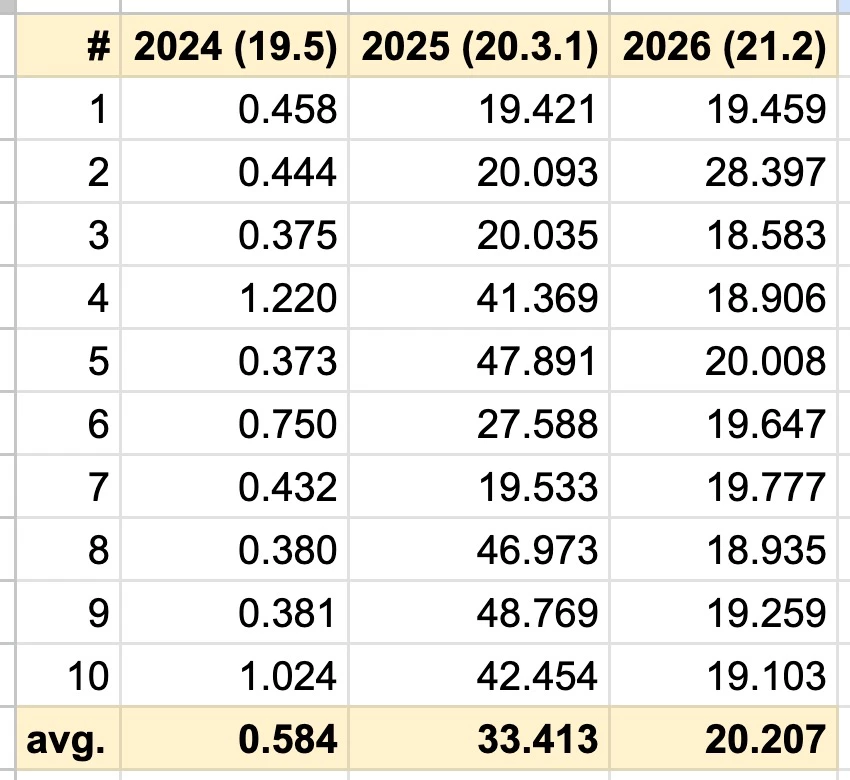
    Here I made a test, all conditions are the same but in different InDesign versions: 2024, 2025 and 2026.

    iMac, 3,3 GHz 6-Core Intel Core i5, 8 GB 2667 MHz DDR4, Tahoe 26.3.1

    Folder — “images” on thew desktop — contains 1400 JPEG files (2.46 GB in total)

    Here’s my script for testing:

    Main();

    function Main() {
    var startTime = new Date(),
    folder = new Folder("~/Desktop/images");

    if (folder.exists) {
    var jpegFiles = folder.getFiles("*.jpg");
    $.writeln(GetDuration(startTime, new Date(), false) + " - " + jpegFiles.length + " JPEGs were found");
    }
    }

    function GetDuration(startTime, endTime, round) {
    if (typeof round == "undefined") round = true;
    var str;
    var duration = (endTime - startTime)/1000;
    if (round) duration = Math.round(duration, 2);

    if (duration >= 60) {
    var minutes = Math.floor(duration/60);
    var seconds = duration - (minutes * 60);
    str = minutes + ((minutes != 1) ? " minutes, " : " minute, ") + seconds + ((seconds != 1) ? " seconds" : " second");
    if (minutes >= 60) {
    var hours = Math.floor(minutes/60);
    minutes = minutes - (hours * 60);
    str = hours + ((hours != 1) ? " hours, " : " hour, ") + minutes + ((minutes != 1) ? " minutes, " : " minute, ") + seconds + ((seconds != 1) ? " seconds" : " second");
    }
    }
    else {
    str = duration + ((duration != 1) ? " seconds" : " second");
    }

    return str;
    }

    I ran it 10 times in every version, and here are the results:

    Probably, there are some issues with my 2025 & 2026 installations, but I don’t think so because the problem with the script, posted in my OP,  happened on two different machines (one user in the USA, another in Japan).


    6 replies

    Kasyan Servetsky
    Kasyan ServetskyAuthorCorrect answer
    Legend
    March 27, 2026

    Any conclusion on this?
    In my opinion, this is a bug introduced in InDesign 2025.

    Here I made a test, all conditions are the same but in different InDesign versions: 2024, 2025 and 2026.

    iMac, 3,3 GHz 6-Core Intel Core i5, 8 GB 2667 MHz DDR4, Tahoe 26.3.1

    Folder — “images” on thew desktop — contains 1400 JPEG files (2.46 GB in total)

    Here’s my script for testing:

    Main();

    function Main() {
    var startTime = new Date(),
    folder = new Folder("~/Desktop/images");

    if (folder.exists) {
    var jpegFiles = folder.getFiles("*.jpg");
    $.writeln(GetDuration(startTime, new Date(), false) + " - " + jpegFiles.length + " JPEGs were found");
    }
    }

    function GetDuration(startTime, endTime, round) {
    if (typeof round == "undefined") round = true;
    var str;
    var duration = (endTime - startTime)/1000;
    if (round) duration = Math.round(duration, 2);

    if (duration >= 60) {
    var minutes = Math.floor(duration/60);
    var seconds = duration - (minutes * 60);
    str = minutes + ((minutes != 1) ? " minutes, " : " minute, ") + seconds + ((seconds != 1) ? " seconds" : " second");
    if (minutes >= 60) {
    var hours = Math.floor(minutes/60);
    minutes = minutes - (hours * 60);
    str = hours + ((hours != 1) ? " hours, " : " hour, ") + minutes + ((minutes != 1) ? " minutes, " : " minute, ") + seconds + ((seconds != 1) ? " seconds" : " second");
    }
    }
    else {
    str = duration + ((duration != 1) ? " seconds" : " second");
    }

    return str;
    }

    I ran it 10 times in every version, and here are the results:

    Probably, there are some issues with my 2025 & 2026 installations, but I don’t think so because the problem with the script, posted in my OP,  happened on two different machines (one user in the USA, another in Japan).


    Legend
    March 27, 2026

    Does your Windows machine still have ESTK? Try the profiler. Otherwise, use a bunch of $.writeln( $.hiresTimer,”After patt1”). Eventually add $.writeln([str].toSource())

    The building of regular expressions by eval is unusual. How about new RegExp(pattern,flags)  ?

    The REs are likely candidate because that could be an external dependency for ExtendScript.

    If your $.hiresTimer hints at one regular expression, feed it into an AI for discussion. Maybe one of the nested optional repetitions of lazy anything blows it up.

    Could be anything else, the relink itself? Measure execution times per line.

    As you mention Activity Monitor, the dropdown menu » “Analyze Process”  is worth another try to see where it is stuck.

    Legend
    March 27, 2026

    I realised after posting that the latest parts of the thread were nested thus cut off by the forum software. So it is FS access … 

    Kasyan Servetsky
    Legend
    March 27, 2026

    Thanks for your reply, Dirk!
    Yes, I still have and use ESTK on my Windows computers, but I got stuck there in InDesign 2024 because of outdated hardware.
    In VS Code, I'm missing the profiling feature available in ESTK. 

    leo.r
    Community Expert
    Community Expert
    March 25, 2026

    my client wrote me that running the script causes InDesign memory usage to bloat and finally run out of system memory. 

    8 GB


    I think anything can happen when operating with 8 GB of RAM (even if you didn’t have issues before InDesign 2025). I could be wrong, too. I wonder how much RAM your client has?

    Kasyan Servetsky
    Legend
    March 25, 2026

    I just wrote a simple script that only relinks missing images. With a test file with 50 images it worked quickly both in 2024 and 2026. So, I think I should figure out the exact part of the code that makes it fail in 2026. The first thing that catches my eye is the regExes.

    Abhishek Rao
    Community Manager
    Community Manager
    March 25, 2026

    Hi ​@Kasyan Servetsky,


    Thanks for sharing the detailed information and the script, really appreciate the effort you’ve taken to narrow this down.

    I’m checking this further with the product team and will keep you posted as soon as I have an update. In the meantime, could you please try the suggestions shared by Eugene and let me know if you notice any improvement?

    Regarding the issue with editing your post, we recently migrated to a new community platform to provide a better overall experience. The feedback you’ve shared is noted, and the team is actively working on improving these areas.


    Thanks again for your patience, I’ll update you soon.

    Abhishek

    Kasyan Servetsky
    Legend
    March 25, 2026

    Edit: I noticed a typo in the header, it should say ‘an old script’. But for some reason, I have no the Edit button to fix it anymore. 😡

    Also, I accidentally removed a line at the beginning of the script. It should be:

    var scriptName = "Relink images",
    doc,
    arr = [],
    count = 0;

    app.doScript(PreCheck, ScriptLanguage.JAVASCRIPT, undefined, ((File.fs == "Macintosh") ? UndoModes.ENTIRE_SCRIPT : UndoModes.FAST_ENTIRE_SCRIPT), "\"" + scriptName + "\" Script");

    Why am I not allowed to edit my own original post after the forum software update?

    Community Expert
    March 25, 2026

    The forum is going through some teething stages so we all have to wait for updates while they’re tested, I guess. 

    I wouldn’t jump straight to “InDesign 2025/2026 has a memory leak” from this script alone.

    The main thing that stands out to me is GetApproxNameFile(). It looks like res1 = oldName.match(...) is being run inside the JPG loop, so the same regex work is repeated for every file in the folder. On top of that, the folder is being scanned again for each missing link.

    So even if there is a regression in recent InDesign versions, this script is also doing a lot of repeated work, and newer versions may just be less tolerant of it.

    I’d first try

    moving res1 = oldName.match(...) outside the JPEG loop
    avoiding repeated folder.getFiles("*.jpg") calls where possible
    checking whether one particular link/file name is triggering the hang


    I’m not saying there isn’t a leak in 2025/2026 just wondering if it could be a bit cleaner.

    Kasyan Servetsky
    Legend
    March 25, 2026

    Thanks for your reply, Eugene!
    Images can be in different folders, but the new image— actually a new version of the old one with the file name changed according to certain rules—is always in the same folder as the old one. That's why I can't move the 'match' and 'getFiles' outside the loops.
    I tried to run the script from the Version 5.0 Scripts folder in 2026, as if it were run in 2024, but it didn't help.
    Also, I tried to run the script against the simplest possible file with only one link: in 2024, it takes less than 1 sec to relink, in 2026, the whole 21 secs!