
roozye
Inspiring
July 30, 2018
Answered

Script to apply an Object Style to the frames those has same specific link image?

  • July 30, 2018
  • 1 reply
  • 4631 views

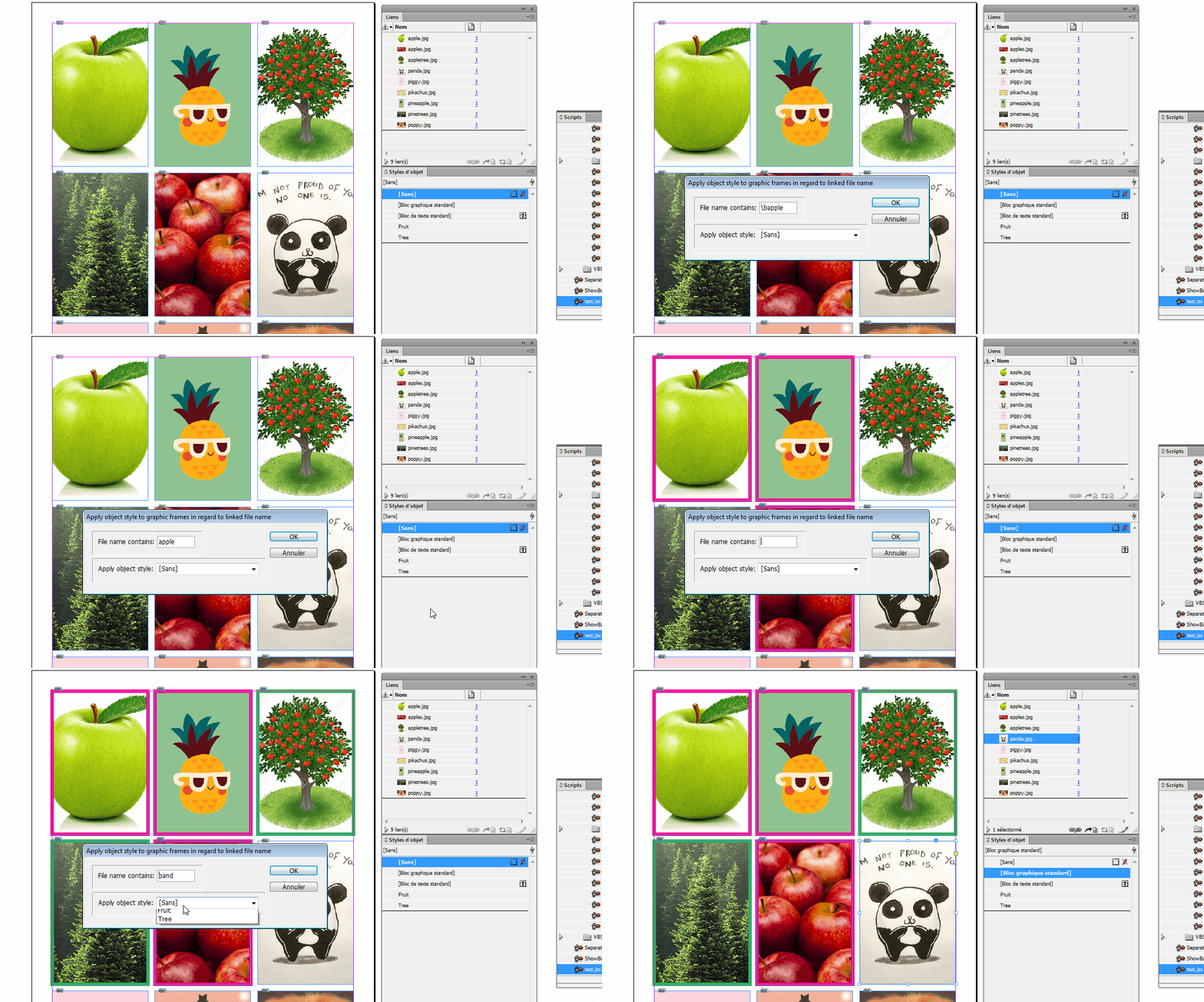
Script to select a specific link and an object style to apply to.

It searches document and applies the style to all frames contents that link.

This topic has been closed for replies.
Correct answer vinny38

In InDesign, How to apply an Object Style to the frames those has same specific link image? - Graphic Design Stack Excha…

Something like this maybe?

(comments from experts are more than welcome)

// [310718] Link2ObjectStyle

// Apply object style to graphic frames in regard to linked file name

// written by Vinny

if (parseFloat(app.version) < 6) {

    main();

} else {

    app.doScript(main, ScriptLanguage.JAVASCRIPT, undefined, UndoModes.ENTIRE_SCRIPT, "Link2ObjectStyle");

}

function main() {

    if (app.documents.length > 0) {

        //------------

        //Variables

        var

            myDoc = app.documents[0],

            myObjectStyles = myDoc.objectStyles.everyItem(),

            myLinks = myDoc.allGraphics;

        //------------

        //Dialog box 

        var myDialog = app.dialogs.add({

            name: "Apply object style to graphic frames in regard to linked file name",

            canCancel: true

        });

        with(myDialog) {

            with(dialogColumns.add()) {

                with(borderPanels.add()) {

                    with(dialogColumns.add()) {

                        staticTexts.add({

                            staticLabel: "File name contains:"

                        });

                    }

                    with(dialogColumns.add()) {

                        var myTextEditField = textEditboxes.add({});

                    }

                }

                with(borderPanels.add()) {

                    with(dialogColumns.add()) {

                        staticTexts.add({

                            staticLabel: "Apply object style:"

                        });

                    }

                    with(dialogColumns.add()) {

                        var myObjectStylesMenu = dropdowns.add({

                            stringList: myObjectStyles.name,

                            selectedIndex: 0

                        });

                    }

                }

            }

            if (myDialog.show() == true) {

                var myString, myObjectStyle, myObjectStylesMenu, fileName, j = 0;

                myString = myTextEditField.editContents;

                myObjectStyle = myDoc.objectStyles[myObjectStylesMenu.selectedIndex];

                myDialog.destroy();

                //------------

                //let's rock

                if (myString == "") {

                    alert("you didn't enter any string");

                    return null;

                } else {

                    for (i = 0; myLinks.length > i; i++) {

                        if (myLinks.itemLink.name.search(myString) != -1) {

                            myLinks.parent.applyObjectStyle(myObjectStyle);

                            j++;

                        }

                    }

                //------------

                //end

                    if (j == 0) {

                        alert("String could not be found\nScript ends");

                    } else {

                        alert(j + " objects found.\nYou're done");

                    }

                }

            } else {

                myDialog.destroy()

            }

        }

    } else {

        alert("Open a document");

        return null

    }

}
1 reply

Community Expert
July 31, 2018

What did you try so far?
Show us some code we can comment on.

Regards,
Uwe

vinny38
vinny38Correct answer
Legend
July 31, 2018

In InDesign, How to apply an Object Style to the frames those has same specific link image? - Graphic Design Stack Excha…

Something like this maybe?

(comments from experts are more than welcome)

// [310718] Link2ObjectStyle

// Apply object style to graphic frames in regard to linked file name

// written by Vinny

if (parseFloat(app.version) < 6) {

    main();

} else {

    app.doScript(main, ScriptLanguage.JAVASCRIPT, undefined, UndoModes.ENTIRE_SCRIPT, "Link2ObjectStyle");

}

function main() {

    if (app.documents.length > 0) {

        //------------

        //Variables

        var

            myDoc = app.documents[0],

            myObjectStyles = myDoc.objectStyles.everyItem(),

            myLinks = myDoc.allGraphics;

        //------------

        //Dialog box 

        var myDialog = app.dialogs.add({

            name: "Apply object style to graphic frames in regard to linked file name",

            canCancel: true

        });

        with(myDialog) {

            with(dialogColumns.add()) {

                with(borderPanels.add()) {

                    with(dialogColumns.add()) {

                        staticTexts.add({

                            staticLabel: "File name contains:"

                        });

                    }

                    with(dialogColumns.add()) {

                        var myTextEditField = textEditboxes.add({});

                    }

                }

                with(borderPanels.add()) {

                    with(dialogColumns.add()) {

                        staticTexts.add({

                            staticLabel: "Apply object style:"

                        });

                    }

                    with(dialogColumns.add()) {

                        var myObjectStylesMenu = dropdowns.add({

                            stringList: myObjectStyles.name,

                            selectedIndex: 0

                        });

                    }

                }

            }

            if (myDialog.show() == true) {

                var myString, myObjectStyle, myObjectStylesMenu, fileName, j = 0;

                myString = myTextEditField.editContents;

                myObjectStyle = myDoc.objectStyles[myObjectStylesMenu.selectedIndex];

                myDialog.destroy();

                //------------

                //let's rock

                if (myString == "") {

                    alert("you didn't enter any string");

                    return null;

                } else {

                    for (i = 0; myLinks.length > i; i++) {

                        if (myLinks.itemLink.name.search(myString) != -1) {

                            myLinks.parent.applyObjectStyle(myObjectStyle);

                            j++;

                        }

                    }

                //------------

                //end

                    if (j == 0) {

                        alert("String could not be found\nScript ends");

                    } else {

                        alert(j + " objects found.\nYou're done");

                    }

                }

            } else {

                myDialog.destroy()

            }

        }

    } else {

        alert("Open a document");

        return null

    }

}

Community Expert
July 31, 2018

Hi Vinny,

if you want also object styles in style groups loop the allObjectStyles array of the document to gather your string list.

Regards,
Uwe