
WCMProduction
Participant
May 8, 2025
Answered

Script to change a called out color swatch (VARIABLES 100K) CMYK values

  • May 8, 2025
  • 2 replies
  • 303 views

First let me say sorry for long post and THANKS ALL. Hello all, I need some help please. I do variable mailings. In doing so we have a QC process where we change all the variable type from 100K to 100 magenta so clients can see the variables easier. I am looking for a script where I can call out a swatch color name (VARIABLES 100K) and change the current swatch CMYK values without changing the name, adding another swatch or changing any other swatch CMYK values. I have the script below that does change the color of all process colors. For some jobs this will work because there is only one-color swatch being used.


var doc = app.activeDocument;

var swatches = doc.swatches;


for (var i = 0; i < swatches.length; i++) {

  var swatch = swatches[i];

  if (swatch.isValid && swatch.name != "[none]" && swatch.name != "[Black]" && swatch.name != "[Registration]" && swatch.name != "[Paper]") {

      swatch.properties = { colorValue: [0, 100, 0, 0] };

    }

  }


I have another script that I tried to call out the swatch name but I keep getting this error
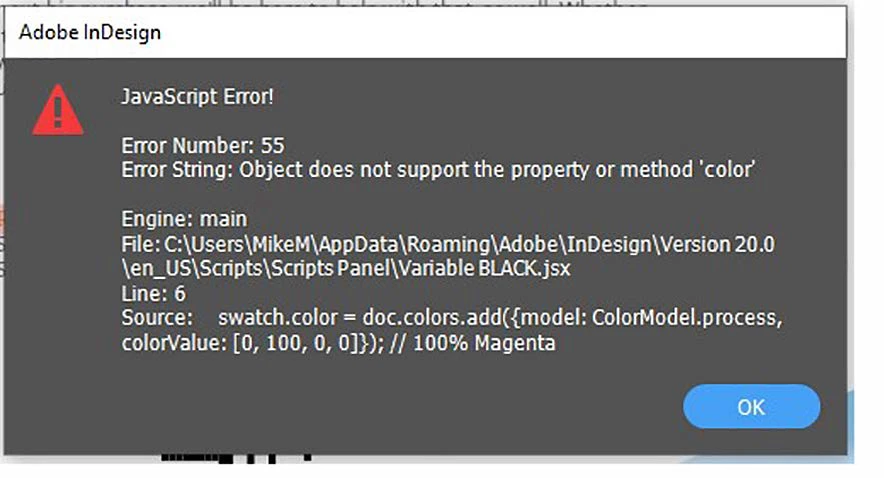
var doc = app.activeDocument;

var swatchName = "VARIABLES100K";


if (doc.swatches.itemByName(swatchName).isValid) {

    var swatch = doc.swatches.itemByName(swatchName);

    swatch.color = doc.colors.add({model: ColorModel.process, colorValue: [0, 100, 0, 0]}); // 100% Magenta

} else {

    alert("Swatch named " + swatchName + " does not exist.");

}

Correct answer rob day

I have another script that I tried to call out the swatch name but I keep getting this error


Hi @WCMProduction , Is this what you are trying to do? Looks like you want to change the values of a color that already exists?


var doc = app.activeDocument;
var swatchName = "VARIABLES100K";

if (doc.swatches.itemByName(swatchName).isValid) {
    var swatch = doc.swatches.itemByName(swatchName);
    swatch.properties = {model: ColorModel.process, space: ColorSpace.CMYK, colorValue: [0, 100, 0, 0]}
    //swatch.color = doc.colors.add({model: ColorModel.process, colorValue: [0, 100, 0, 0]}); // 100% Magenta
} else {
    alert("Swatch named " + swatchName + " does not exist.");
}


2 replies

rob day
Community Expert
rob dayCommunity ExpertCorrect answer
Community Expert
May 8, 2025

I have another script that I tried to call out the swatch name but I keep getting this error


Hi @WCMProduction , Is this what you are trying to do? Looks like you want to change the values of a color that already exists?


var doc = app.activeDocument;
var swatchName = "VARIABLES100K";

if (doc.swatches.itemByName(swatchName).isValid) {
    var swatch = doc.swatches.itemByName(swatchName);
    swatch.properties = {model: ColorModel.process, space: ColorSpace.CMYK, colorValue: [0, 100, 0, 0]}
    //swatch.color = doc.colors.add({model: ColorModel.process, colorValue: [0, 100, 0, 0]}); // 100% Magenta
} else {
    alert("Swatch named " + swatchName + " does not exist.");
}


WCMProduction
Participant
May 8, 2025

AWESOME!!!!!!!!!! Rob! that worked perfictly Thanks so much!

leo.r
Community Expert
Community Expert
May 8, 2025

Before getting deeper into your script:


As the error message says, swatch doesn't have the color property.


You explore further here:

https://www.indesignjs.de/extendscriptAPI/indesign-latest/#Application.html