
March 19, 2024
Answered

Script to Check if Parent Type is Master

  • March 19, 2024
  • 3 replies
  • 1209 views

Hello,

I'm using a script to resize objects in a document. Regarding primary text frames, the script edits both the frames present on the master pages and the occurrences on the linked pages. Therefore, the link is lost for position and size.

Is there a condition I could add to test whether the object's parent type is a master page, in order to target only these objects?
This topic has been closed for replies.
Correct answer Robert at ID-Tasker

@35626004 


https://www.indesignjs.de/extendscriptAPI/indesign-latest/#MasterSpread.html


primaryTextFrame


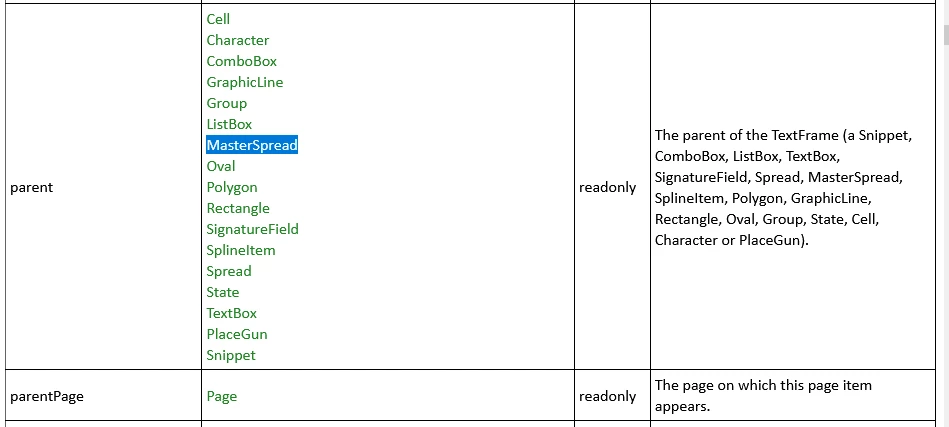
If you want to check if Parent is "master":

https://www.indesignjs.de/extendscriptAPI/indesign-latest/#TextFrame.html


and either by checking type of the parent directly - or parent of the parentPage.


3 replies

Robert at ID-Tasker
Legend
March 19, 2024

@35626004 


One more thing - for pages - pageItems - is a collection of items that are "directly" on the page - allPageItems - is a collection of all items that are "directly" and "indirectly" on the page(s) - anchored and grouped.


Of course, each object have its own pageItems and allPageItems collections - that works the same way - "direct" and "all" childrens.


Robert at ID-Tasker
Robert at ID-TaskerCorrect answer
Legend
March 19, 2024

@35626004 


https://www.indesignjs.de/extendscriptAPI/indesign-latest/#MasterSpread.html


primaryTextFrame


If you want to check if Parent is "master":

https://www.indesignjs.de/extendscriptAPI/indesign-latest/#TextFrame.html


and either by checking type of the parent directly - or parent of the parentPage.


March 20, 2024

@Robert at ID-TaskerWere you thinking of something like this?


if (textFrames[Id].parent == '[object MasterSpread]') {
  // true
}


Robert at ID-Tasker
Legend
March 20, 2024
quote

@Robert at ID-TaskerWere you thinking of something like this?


if (textFrames[Id].parent == '[object MasterSpread]') {
  // true
}
By @35626004


Yes.


But if your TF is anchored - parent will be Character - so you probably would need to ignore it as well.


Community Expert
March 19, 2024

Can you post the script. If I remember correctly the primary frame should not appear in the pages pageitem collection, that should work for you but we need to see what the script is exactly doing as well.

-Manan

-Manan
March 19, 2024

Hello @Manan Joshi

Below is the basis of the script. I removed the content from the loop, but in summary, each frame is resized to fit the page margins. I didn't apply the function to pageItems, but to textFrames and rectangles. Maybe this is my mistake?


function auto_size (collection) {
  for (Id = 0; Id < collection.length; Id++) {
      // Resize
  }
}

auto_size (app.activeDocument.textFrames);
auto_size (app.activeDocument.rectangles);


Community Expert
March 19, 2024

Did you trying using something like

auto_size (app.activeDocument.pageItems);

The pageItems collection should have both the textframes and rectangles as well. Try it and let us know

-Manan

-Manan