Janus Bahs Jacquet
Inspiring
June 19, 2024
Answered

Script to copy images into file and automatically distribute them in the target document

  • June 19, 2024
  • 2 replies
  • 445 views

I am facing a task I’ve faced many times before, but this time on rather a large scale and with very little available time, namely to generate files for a press proof of all the images that will appear in a book, so we can check colour accuracy, etc., before printing.


The book has around 600 images spread out over 18 different InDesign documents gathered in an InDesign book.


The goal is to take all those 600 images, copy them into a separate target document with the dimensions 700 × 1000 mm, and have them placed/distributed in the target document as few pages as possible by reducing white space between the images (but without overlapping or changing their size from the source documents). Ideally each image should have a caption that includes its file name and the page number it appears on in the source document.


This sounds very much like a job for a script, but there are quite a few elements of it that would be unfamiliar territory for me, in particular distributing the images to minimise white space – I have absolutely no idea how to even start approaching that.


Does anyone know of a script that does something along those lines that I could tweak to make it do what I’m after?


(ExtendScript preferred, since I’ve still not got the hang of the UXP workflow.)

This topic has been closed for replies.
Correct answer Robert at ID-Tasker

@Janus Bahs Jacquet 


Do you still need solution for your task?


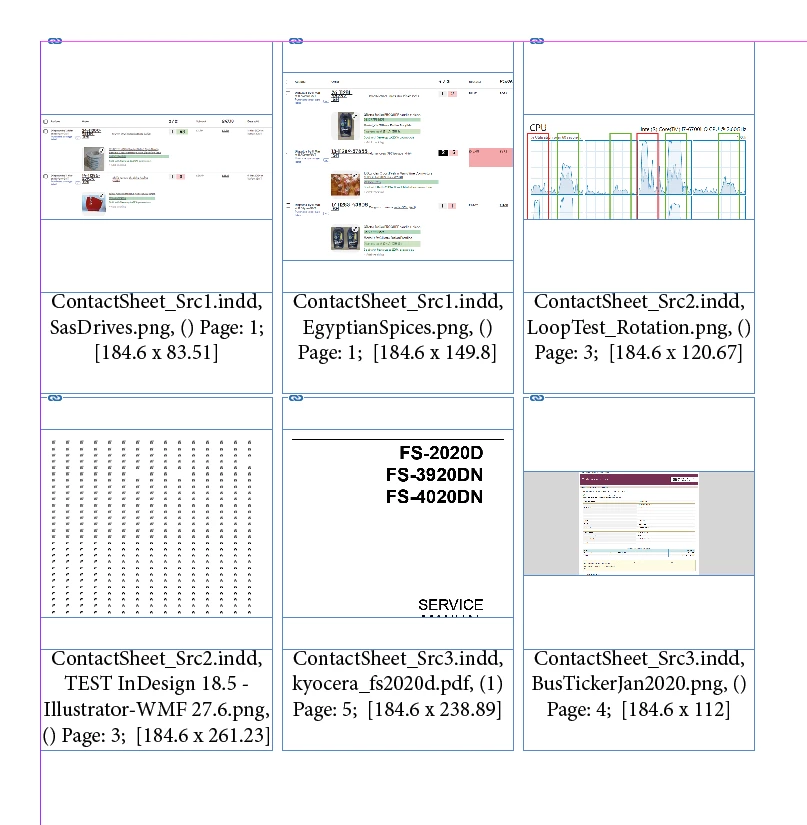
Example output - each box consists of:

- copy of the placed object - its parent container, not the link itself, so any cropping / distortion / Object properties / etc. will be "preserved",

- INDD file name,

- in case of PDF or INDD file - imported page in (),

- name of the page object is on in the source document,

- [width x height]:


Of course, you can sort and filter any way you want - by any of the 800+ object properties available - and extract any of those 800+ properties as "description" for each object - in any order.


I've made it the "easy way" but I'm pretty sure extremely useful way - each box is placed as InLine graphic in the Story - so if you will need to delete something at the last moment - everything else will reflow automatically. Or if you add some tites, comments, etc.


Size of the box and formatting of the "description" - it's 100% up to you - it's a group / template of two objects:

so you can format it any way you want - smaller today - bigger tomorrow, square / rectangle / oval / star / whatever shape you like, add shadow, transparency, whatever - my tool is just populating top and bottom objects with "information".


More info and more details how it works:

https://id-tasker.com/2024/06/21/contact-sheet-from-images-placed-in-indd-documents/


2 replies

Robert at ID-Tasker
Robert at ID-TaskerCorrect answer
Legend
June 20, 2024

@Janus Bahs Jacquet 


Do you still need solution for your task?


Example output - each box consists of:

- copy of the placed object - its parent container, not the link itself, so any cropping / distortion / Object properties / etc. will be "preserved",

- INDD file name,

- in case of PDF or INDD file - imported page in (),

- name of the page object is on in the source document,

- [width x height]:


Of course, you can sort and filter any way you want - by any of the 800+ object properties available - and extract any of those 800+ properties as "description" for each object - in any order.


I've made it the "easy way" but I'm pretty sure extremely useful way - each box is placed as InLine graphic in the Story - so if you will need to delete something at the last moment - everything else will reflow automatically. Or if you add some tites, comments, etc.


Size of the box and formatting of the "description" - it's 100% up to you - it's a group / template of two objects:

so you can format it any way you want - smaller today - bigger tomorrow, square / rectangle / oval / star / whatever shape you like, add shadow, transparency, whatever - my tool is just populating top and bottom objects with "information".


More info and more details how it works:

https://id-tasker.com/2024/06/21/contact-sheet-from-images-placed-in-indd-documents/


rob day
Community Expert
Community Expert
June 19, 2024

Hi @Janus Bahs Jacquet , You can try this script, which is a variation on the ImageCatalog.jsx script that ships with InDesign


https://www.dropbox.com/scl/fo/yga2uuc0c1sqvh7nj4uyb/AGul7Z5qI1lGwsUw9OnwBAY?rlkey=dvyou9c467uka05c16pomym1w&dl=0


The dialog will accept any unit. The images get an Object Style applied, and if you include Labels they are also styled:


Robert at ID-Tasker
Legend
June 19, 2024

@rob day 


Unfortunately, I don't think it will fulfill the needs:


[...] Ideally each image should have a caption that includes its file name and the page number it appears on in the source document. [...]


@Janus Bahs Jacquet 


Do you have access to a PC? My tool would do that easily - but it's PC only...


Unless, you are able to share just INDD files with me - I don't need linked files - on priv of course.