
Inspiring
December 22, 2024
Answered

Script to create circle on correct alternative. Help?

  • December 22, 2024
  • 2 replies
  • 1189 views

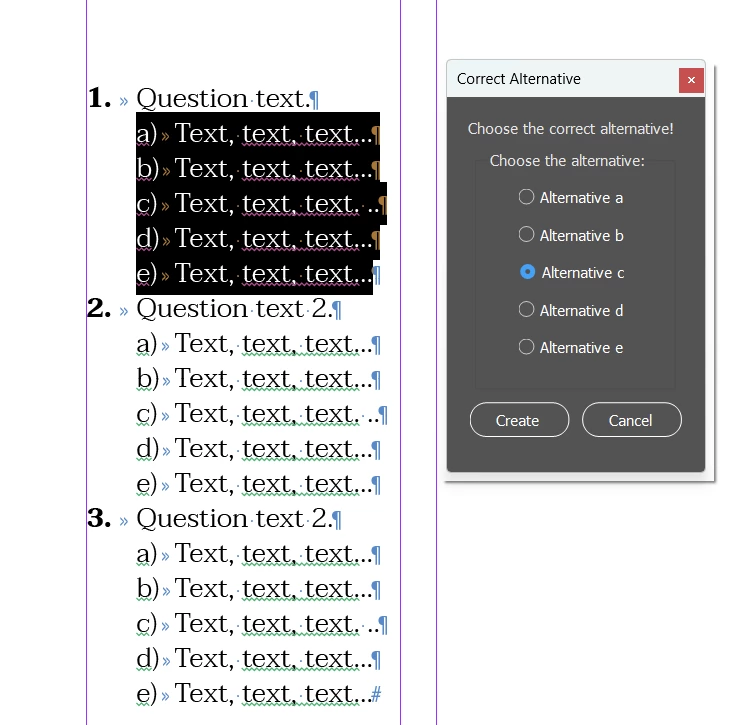
Can anyone help me create a script for InDesign? I've tried a few things, but I couldn't get everything to work properly or without causing errors.

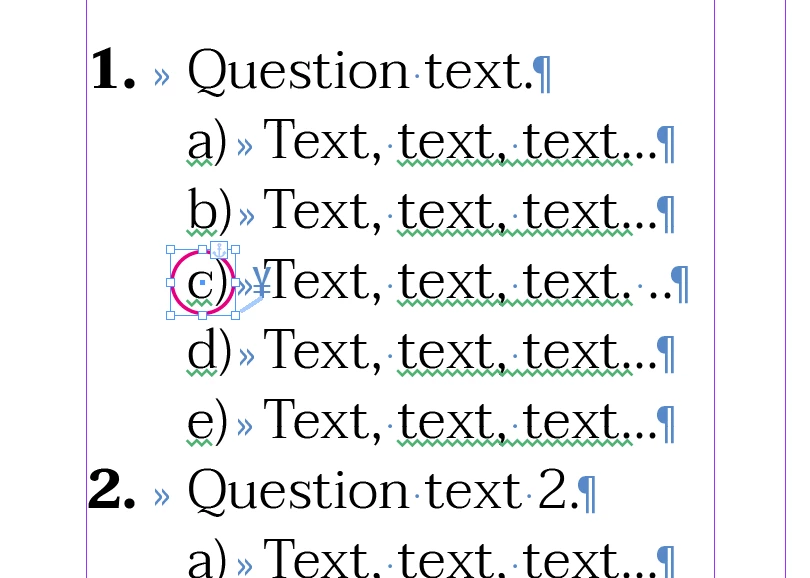
How it should work: Objective: Create a circle over an item. This circle will represent the correct answer to the test questions I'm creating.

I select the text with itens (alternatives) and run the script. The script will ask me which answer is correct. I choose an answer (from 5 options), and it will create a circle over the selected item and anchor this circle right at the beginning of the text.

In the future, I'll apply a condition (Conditional Text) to this anchor, so I can hide the answer whenever I want.

This topic has been closed for replies.
Correct answer Robert at ID-Tasker

@eusoujp


That's why my first question was - if you know which answer is correct.


Because if you do - then you could apply dedicated ParaStyle to those answers - and then use F&C to anchor object from the clipboard. 


And even if you don't - applying dedicated ParaStyle first and then doing F&C to anchor - will be much quicker - as a workflow. 


You can even apply shortcut to the "correct answer" ParaStyle - and just use Ctrl+[down arrow] to jump between beginnings of the paragraphs and apply this style using shortcut. 


And, as you don't want answers to be always visible - you can modify applied ObjectStyle to shift those circles outside of the print area - outside of the page.  


Or simply remove stroke color / thickness - if it's just a circle. 


2 replies

Robert at ID-Tasker
Legend
December 22, 2024

@eusoujp


Do you know in advance - when preparing your text - which answers are correct?


If you do - then you could create a dedicated Style for it - so no need for a script. 


And even if you don't know and need to decide "at the end" - you can still create a dedicated Style and just apply it to the correct answer - way quicker than selecting text, running script, selecting option and then confirming your choice. 


And if you need a special circle - then after applying dedicated Style - you could use F&C to add object, copied to the clipboard first, at the beginng of your correct answers - as an Anchored Object. 


eusoujpAuthor
Inspiring
December 22, 2024

Ok, but I would still need to anchor the item text to the answer so that the position is always correct.

Robert at ID-Tasker
Legend
December 22, 2024
quote

Ok, but I would still need to anchor the item text to the answer so that the position is always correct.


By @eusoujp


No, because if you set Anchoring position in applied ObjectStyle - it will automatically position itself correctly. 


brian_p_dts
Community Expert
Community Expert
December 22, 2024

You should paste the script you've tried so we can potentially help you debug. Be specific about what doesn't work. No one is likely to rewrite it from scratch for free. 

eusoujpAuthor
Inspiring
December 22, 2024

Yes of course. I was trying to create an object style so I could position it in the correct location, but it's a bit difficult to activate that option for me.


Robert at ID-Tasker
Legend
December 22, 2024

@eusoujp


There are two problems with your script: 

- it replaces text modifying contents - instead of working on the text as an Object,

- I'm pretty sure, you are using automatic numbering - so your letters a, b, c etc. are "virtual" and it won't find them,