

Question
Script to make custom size rectangular box shape
Hi,
Could anyone guide me with making a script that would generate a rectangle shape, where the user could specify:
Width, height, linetype (defaults to dashed), outline thickness, outline color (defaults to black), no fill or fill color (but defaults to no fill), bleed size (defaults to 1/2")
Ideally the script would generate a graphic template like the sample below: a dashed line black rectangle (Finished Size Rectangle) based on the the user inputted width and height, but would also generate two more rectangles:
- Bleed Rectangle: a second larger outline only red rectangle (with a 50% transparency) that is offset outward by the bleed size on each of the 4 sides, and that has a line thickness equal to the bleed size.
- Safe Zone Rectangle: a third smaller green outline only that is offset inward by 1" on each of the 4 sides.
- And also fill in the Text Variables circled in red on my sample attached, based on the inputted values
As a bonus it would be great if the Document Setup dimensions would be able to update automatically to the values of the red Bleed Rectangle.
Thanks for any help you can provide on this!!!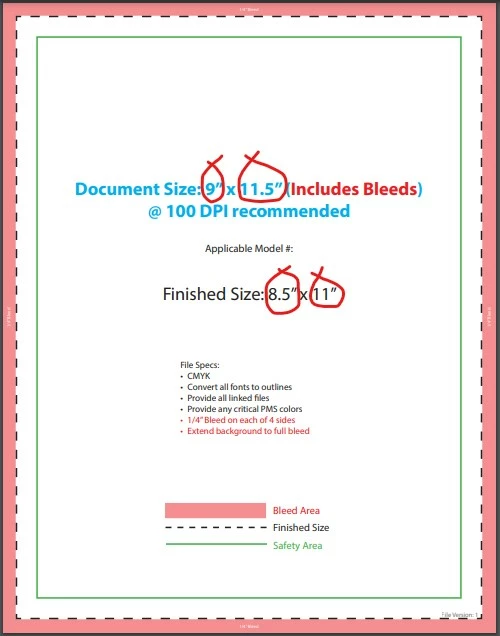
 AdChoices