Inspiring
May 24, 2023
Answered

Script to move colors

  • May 24, 2023
  • 5 replies
  • 1569 views

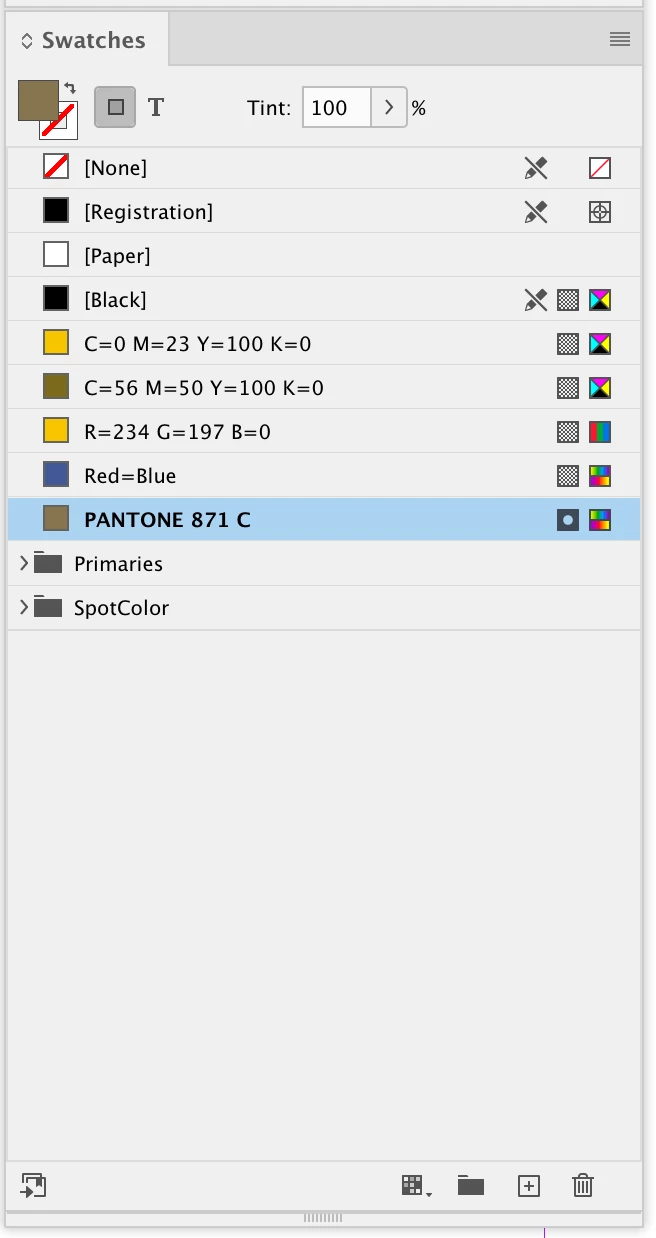
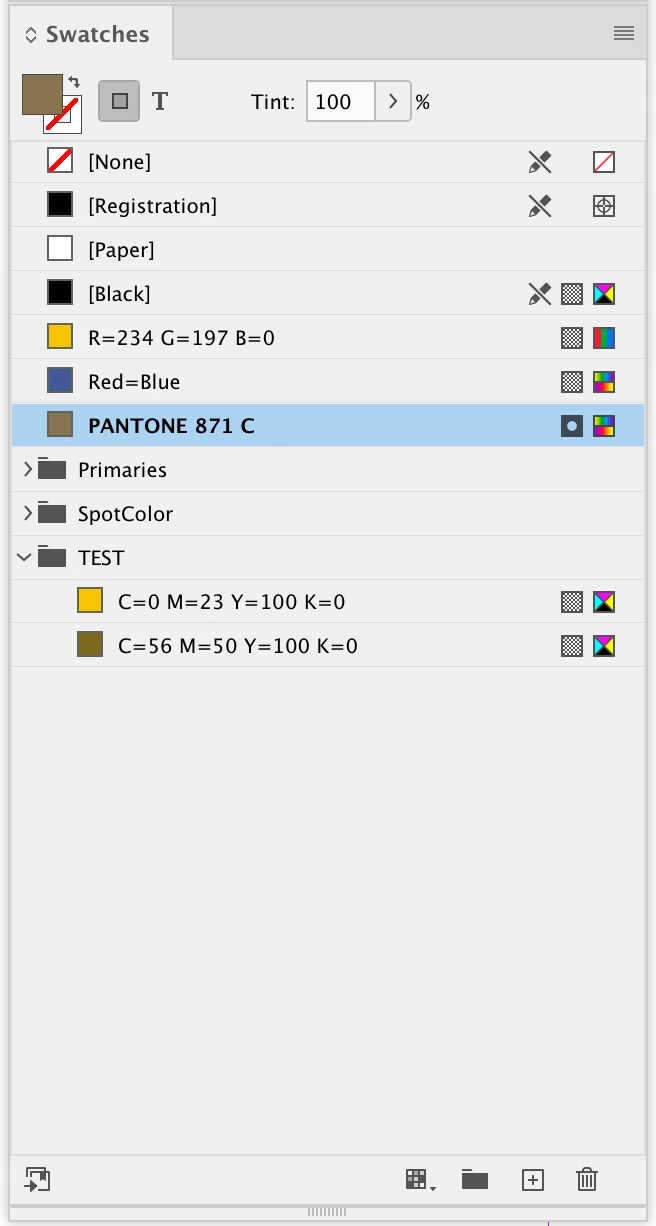
I've been trying for a few days to create a script Java code to indesign: to move all colors in the document that have the form [x,x,x,x] to a folder (color group). What I want is to organize my color swatches, moving all the colors that have the "name with color value" label turned on into a folder (color group) named TEST (for example). can anybody help me?

This topic has been closed for replies.
Correct answer rob day


I'm work with CMYK colors - [C,M,Y,K] ~ [x,x,x,x]


Hi @eusoujp , Try this:


var groupName = "TEST"

var ds = app.activeDocument.swatches.everyItem().getElements();
var cg = makeColorGroup(app.activeDocument, groupName)
var gs = cg.colorGroupSwatches
for (var i = 0; i < ds.length; i++){
    if (isColorValue(ds[i].name)) {
        gs.add(ds[i])
    } 
};   


/**
* Check if a CMYK color is named with its values 
* @ param the swatch’s name 
* @ return true if the swatch is named with its values 
* 
*/
function isColorValue(cn){
    var ca = cn.split("=");
    var n = []
    for (var i = 0; i < ca.length-1; i++){
        n.push(ca[i][ca[i].length-1])
    }; 
    if (n.toString() == "C,M,Y,K") {
        return true
    }  else {
        return false
    }
}


/**
* Makes a new color group
* @ param the document to add the color group to 
* @ param color group name 
* @ return the new group 
*/

function makeColorGroup(d, n){
    if (d.colorGroups.itemByName(n).isValid) {
        return d.colorGroups.itemByName(n);
    } else {
        return d.colorGroups.add({name:n});
    }
}


Before run:


After:
 

5 replies

Inspiring
May 24, 2023

hi @eusoujp 

try this

var doc = app.activeDocument;
var docColors = doc.colors;

doc.colorGroups.add('Variadas', valueColors(docColors), undefined);

function valueColors(arr) {
  var temp = [];
  for (var i = 0; i < arr.length; i++) {
    var name = arr[i].properties.name;
    var valueName = name.indexOf('=');
    if (valueName != -1) {
      temp.push(arr[i]);
    }
  }
  return temp;
}


Inspiring
May 24, 2023

Change valueColors function for only CMYK colors:

function valueColors(arr) {
  var temp = [];
  for (var i = 0; i < arr.length; i++) {
    var name = arr[i].properties.name;
    var valueName = name.search(/C=\d+ M=\d+ Y=\d+ K=\d+/);
    if (valueName != -1) {
      temp.push(arr[i]);
    }
  }
  return temp;
}


eusoujpAuthor
Inspiring
May 27, 2023

Thanks!!! Great

rob day
Community Expert
rob dayCommunity ExpertCorrect answer
Community Expert
May 24, 2023


I'm work with CMYK colors - [C,M,Y,K] ~ [x,x,x,x]


Hi @eusoujp , Try this:


var groupName = "TEST"

var ds = app.activeDocument.swatches.everyItem().getElements();
var cg = makeColorGroup(app.activeDocument, groupName)
var gs = cg.colorGroupSwatches
for (var i = 0; i < ds.length; i++){
    if (isColorValue(ds[i].name)) {
        gs.add(ds[i])
    } 
};   


/**
* Check if a CMYK color is named with its values 
* @ param the swatch’s name 
* @ return true if the swatch is named with its values 
* 
*/
function isColorValue(cn){
    var ca = cn.split("=");
    var n = []
    for (var i = 0; i < ca.length-1; i++){
        n.push(ca[i][ca[i].length-1])
    }; 
    if (n.toString() == "C,M,Y,K") {
        return true
    }  else {
        return false
    }
}


/**
* Makes a new color group
* @ param the document to add the color group to 
* @ param color group name 
* @ return the new group 
*/

function makeColorGroup(d, n){
    if (d.colorGroups.itemByName(n).isValid) {
        return d.colorGroups.itemByName(n);
    } else {
        return d.colorGroups.add({name:n});
    }
}


Before run:


After:

 

eusoujpAuthor
Inspiring
May 24, 2023

Ow man, amazing! God bless u.
It worked!

Community Expert
May 24, 2023

Hi @eusoujp ,

colors have no method move() and color.parentColorGroup is read-only.

Also colorGroup.colorGroupSwatches is read-only. So it seems that you cannot assign an array of colors to that property. Or push() individual colors to the array or collection.


All in all, without any tests at all, I think that you have to add the colors while you add a new color group to the document. Method add() with colorGroups has an argument for this, an array, that should contain named and visible colors. When adding the colorGroup with the specified colors in that array should release the said colors from an already existing group. Why? Because a specific color with a specific name can only exist once in the document. In contrast to e.g. character styles where styles with the same name can exist in different character style groups.


https://www.indesignjs.de/extendscriptAPI/indesign-latest/#Color.html

https://www.indesignjs.de/extendscriptAPI/indesign-latest/#ColorGroup.html


Regards,
Uwe Laubender
( Adobe Community Expert )

eusoujpAuthor
Inspiring
May 24, 2023

Thanks so much! I will see another methody!

brian_p_dts
Community Expert
Community Expert
May 24, 2023

What code have you tried? 

eusoujpAuthor
Inspiring
May 24, 2023

The first step I added was the creation of the color group (if it doesn't exist). I called this group of colors VARIADAS. On second start, I tried to have it move all CMYK colors in [C,M,Y,K] format to this new color group. But I believe it has the wrong code (in addition to giving an error on the line cmykColors[k].move(LocationOptions.AT_END, existingGroup); I tried using GPT to see if it gave me that line or the rest of the code that would move, but without success .


var doc = app.activeDocument;
var groupName = "VARIADAS";
var existingGroup = null;

// Find the "VARIADAS" color group
for (var i = 0; i < doc.colorGroups.length; i++) {
var group = doc.colorGroups[i];

if (group.name === groupName) {
existingGroup = group;
break;
}
}

// If the color group exists, move CMYK colors into it
if (existingGroup) {
var cmykColors = [];

// Find all CMYK colors in the document
for (var j = 0; j < doc.colors.length; j++) {
var color = doc.colors[j];
if (color.space === ColorSpace.CMYK && color.model === ColorModel.PROCESS) {
cmykColors.push(color);
}
}

// Move the CMYK colors into the existing group
for (var k = 0; k < cmykColors.length; k++) {
cmykColors[k].move(LocationOptions.AT_END, existingGroup);
}

alert("Moved " + cmykColors.length + " CMYK colors into the color group '" + groupName + "'.");
} else {
alert("The color group '" + groupName + "' does not exist in the document.");
}

eusoujpAuthor
Inspiring
May 24, 2023

I'm work with CMYK colors - [C,M,Y,K] ~ [x,x,x,x]