Participant
March 2, 2024
Answered

Script to place circles at random locations of the page to cover text

  • March 2, 2024
  • 1 reply
  • 310 views

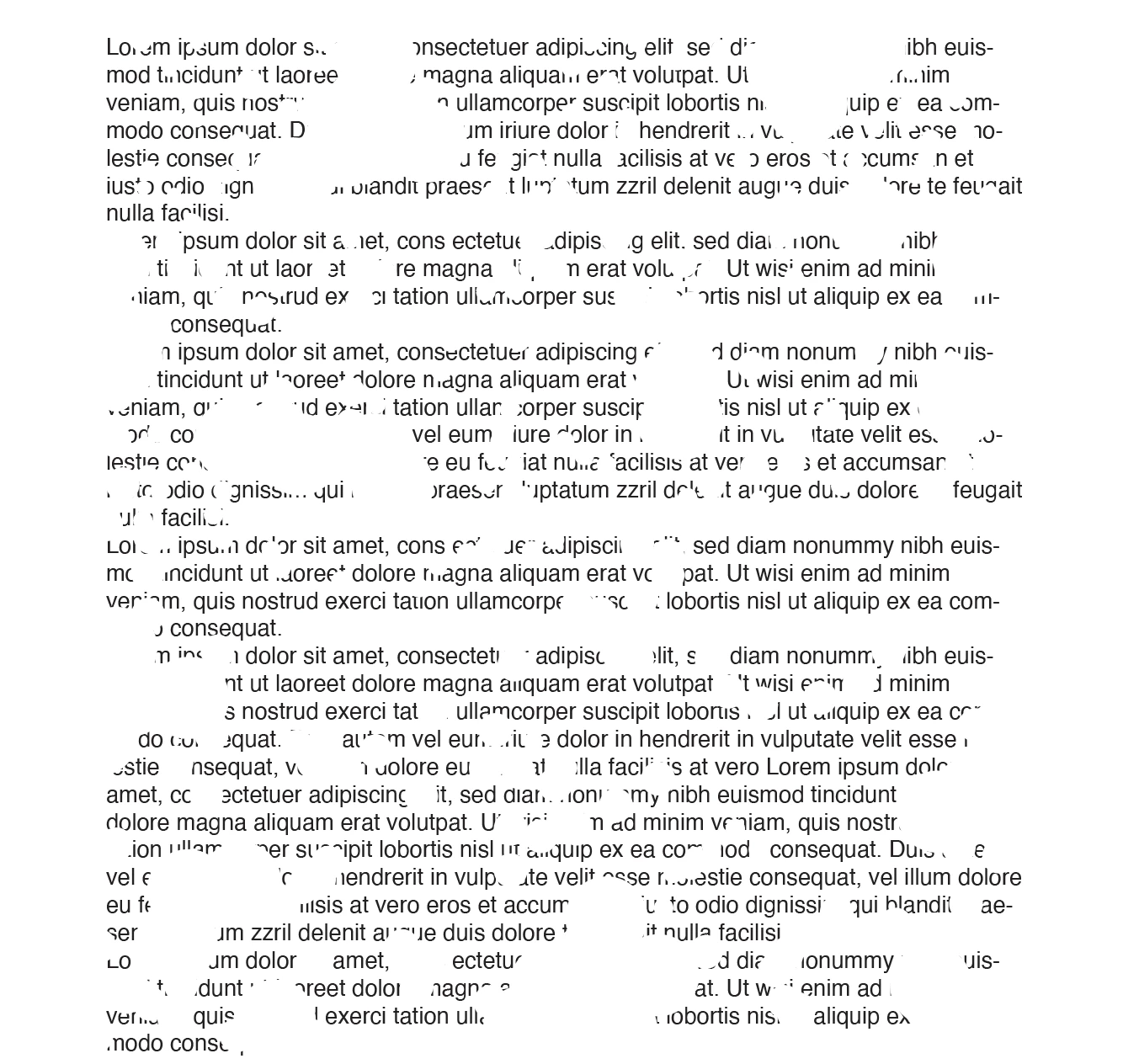
Hey! I'm trying to wrtie a script where I can generate a certain number of white circles(I'm not sure of this number yet, I'm hoping there is a way to make this number variable?) at random loactions of the page like shown in the photo. Basically with the variable number of circles, I want to be able to achieve the different levels/stages of the text being eaten away(more circles means less text), and eventually to a point that makes the text not readable.


I'm very new to scripting, is this achievable by any means? Many thanks in advance!

This topic has been closed for replies.
Correct answer Marc Autret

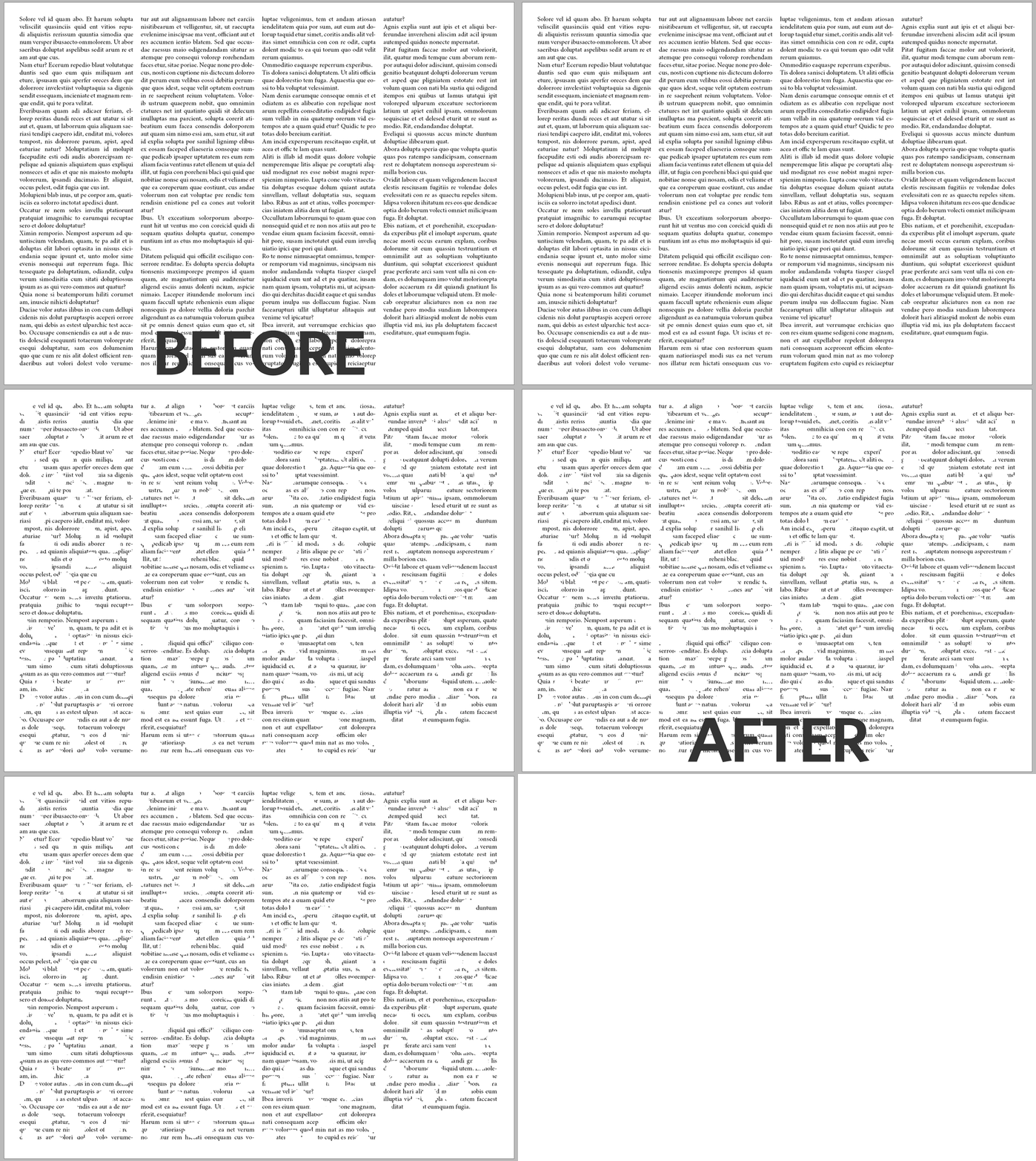
Fun exercise! Here's one approach:


function addCircles(/*(num|str)=auto*/diameter,/*uint=auto*/count,  pg,DX,DY,dm,pp,shft,dx,dy,k,t)
//----------------------------------
// Add masking circles on the active page, that is, [Paper]-filled ovals.
// - diameter [opt] : diameter of each circle, either as a number in default
//   measurement unit, or as a val-unit string e.g. "1.5mm" or "28pt". If not
//   supplied, some diameter is automatically determined.
// - count [opt] : number of circles. If not supplied, a huge count is taken.
// => undef
{
   pg = 'LayoutWindow'==(t=app.properties.activeWindow||0).constructor.name && (t.properties.activePage);
   if( !(pg||0).isValid ){ alert("Please, make a page active."); return; };

   // [REM] Assumes DX,DY have the same MU.
   t = pg.bounds;
   DX = t[3]-t[1];
   DY = t[2]-t[0];

   // Diameter
   if( 'string' == typeof diameter && isFinite(t=parseFloat(diameter||'0')) && 0 < t )
   {
      dm = '?' != UnitValue(diameter).type && diameter;
   }
   else
   {
      t = +(diameter||0);
      dm = 0 <= t && t < (DX>>>1) && t < (DY>>>1) && t;
   }
   dm || (dm=Math.min(DX,DY)/10); // Fallback?

   // Oval props
   pp =
   {
      transparencySettings:null,
      strokeTransparencySettings:null,
      fillTransparencySettings:null,
      contentTransparencySettings:null,
      textWrapPreferences:{textWrapMode:+TextWrapModes.NONE},
      contentType:+ContentType.UNASSIGNED,
      geometricBounds:[0, 0, dm, dm],
      fillColor:'Paper',
      fillTint:-1,
      strokeWeight:0,
   };
   
   // Optimal count?
   (count>>>=0) || (t=parseFloat(dm), count=Math.round(DX*DY/(t*t)));
   
   // Create a set of sparse [dx,dy] shifts.
   // (Reduces the number of close circles.)
   const MR = Math.random;
   const SQ = 1.2*Math.sqrt(count); // must be > √count and < 0xFFFE
   const CHR = String.fromCharCode;
   for( shft={} ; shft.__count__ < count ; shft[k]=[ DX*dx, DY*dy ] )
   {
      do{ dx=MR(), dy=MR(), k=CHR( 1+(SQ*dx)>>>0, 1+(SQ*dy)>>>0) }
      while( shft.hasOwnProperty(k) );
   }

   // Generate the circles.
   with( Window.splash=new Window('palette','',void 0,{borderless:true}) )
   {
      margins=50;
      add('statictext',void 0,"Generating "+count+" circles...");
      show();
      update();
   }
   app.scriptPreferences.enableRedraw = false;
   for each( t in shft ) pg.ovals.add(pp).move(t);
   app.scriptPreferences.enableRedraw = true;
   Window.splash.hide();
};
app.doScript
(
   "addCircles( '25px', 200 )",
   void 0, void 0, +UndoModes.ENTIRE_SCRIPT,
   "Add Circles"
);


Best,

Marc

1 reply

Marc Autret
Marc AutretCorrect answer
Legend
March 3, 2024

Fun exercise! Here's one approach:


function addCircles(/*(num|str)=auto*/diameter,/*uint=auto*/count,  pg,DX,DY,dm,pp,shft,dx,dy,k,t)
//----------------------------------
// Add masking circles on the active page, that is, [Paper]-filled ovals.
// - diameter [opt] : diameter of each circle, either as a number in default
//   measurement unit, or as a val-unit string e.g. "1.5mm" or "28pt". If not
//   supplied, some diameter is automatically determined.
// - count [opt] : number of circles. If not supplied, a huge count is taken.
// => undef
{
   pg = 'LayoutWindow'==(t=app.properties.activeWindow||0).constructor.name && (t.properties.activePage);
   if( !(pg||0).isValid ){ alert("Please, make a page active."); return; };

   // [REM] Assumes DX,DY have the same MU.
   t = pg.bounds;
   DX = t[3]-t[1];
   DY = t[2]-t[0];

   // Diameter
   if( 'string' == typeof diameter && isFinite(t=parseFloat(diameter||'0')) && 0 < t )
   {
      dm = '?' != UnitValue(diameter).type && diameter;
   }
   else
   {
      t = +(diameter||0);
      dm = 0 <= t && t < (DX>>>1) && t < (DY>>>1) && t;
   }
   dm || (dm=Math.min(DX,DY)/10); // Fallback?

   // Oval props
   pp =
   {
      transparencySettings:null,
      strokeTransparencySettings:null,
      fillTransparencySettings:null,
      contentTransparencySettings:null,
      textWrapPreferences:{textWrapMode:+TextWrapModes.NONE},
      contentType:+ContentType.UNASSIGNED,
      geometricBounds:[0, 0, dm, dm],
      fillColor:'Paper',
      fillTint:-1,
      strokeWeight:0,
   };
   
   // Optimal count?
   (count>>>=0) || (t=parseFloat(dm), count=Math.round(DX*DY/(t*t)));
   
   // Create a set of sparse [dx,dy] shifts.
   // (Reduces the number of close circles.)
   const MR = Math.random;
   const SQ = 1.2*Math.sqrt(count); // must be > √count and < 0xFFFE
   const CHR = String.fromCharCode;
   for( shft={} ; shft.__count__ < count ; shft[k]=[ DX*dx, DY*dy ] )
   {
      do{ dx=MR(), dy=MR(), k=CHR( 1+(SQ*dx)>>>0, 1+(SQ*dy)>>>0) }
      while( shft.hasOwnProperty(k) );
   }

   // Generate the circles.
   with( Window.splash=new Window('palette','',void 0,{borderless:true}) )
   {
      margins=50;
      add('statictext',void 0,"Generating "+count+" circles...");
      show();
      update();
   }
   app.scriptPreferences.enableRedraw = false;
   for each( t in shft ) pg.ovals.add(pp).move(t);
   app.scriptPreferences.enableRedraw = true;
   Window.splash.hide();
};
app.doScript
(
   "addCircles( '25px', 200 )",
   void 0, void 0, +UndoModes.ENTIRE_SCRIPT,
   "Add Circles"
);


Best,

Marc