

alisona68897270
Known Participant
January 16, 2020
Answered

Script to select all images in document?

  • January 16, 2020
  • 3 replies
  • 8282 views

Does anyone know of an existing script that will select all image frames in an entire Indesign document? All I need is to select them so I can then manually perform an action such as apply an object style or "fit frame to content." Thanks for your time.
This topic has been closed for replies.
Correct answer rob day

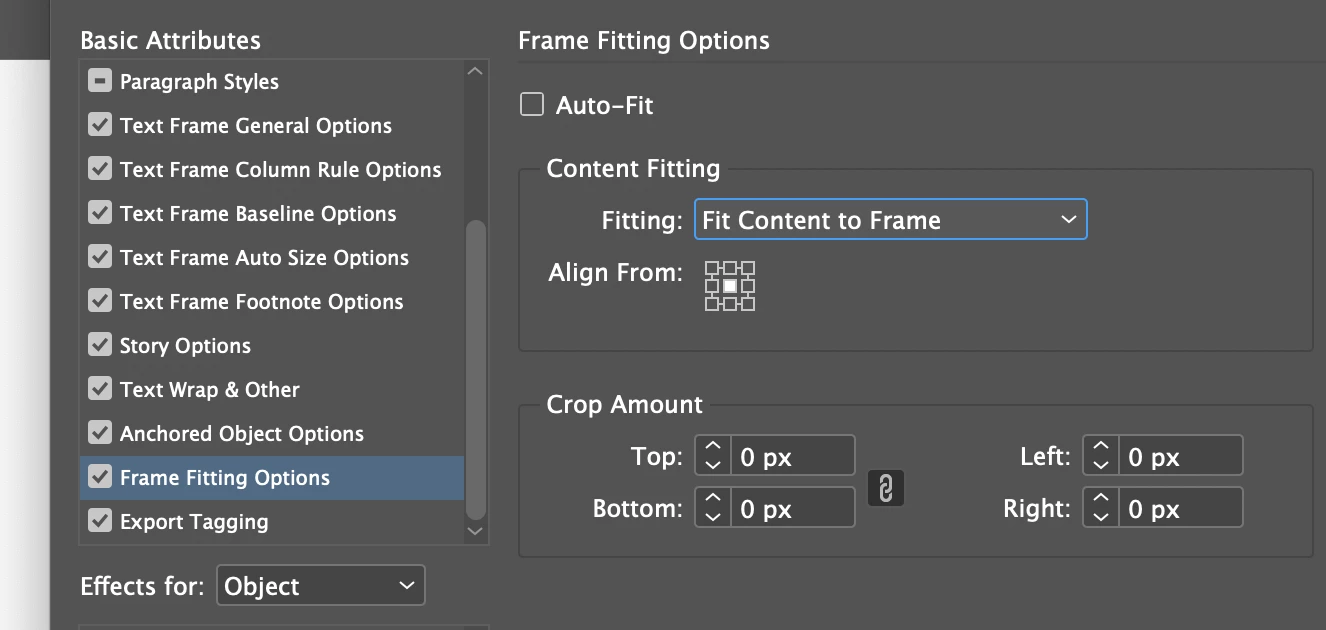
You can set an object style with Frame Fitting Options: Content to Frame. 


You can also use this one-line script: 


app.activeDocument.rectangles.everyItem().fit(FitOptions.CONTENT_TO_FRAME);


I can fit the content to the frame, but not the other way round.


I think Alison wants to fit the frame to the content? That would be:


app.activeDocument.rectangles.everyItem().fit(FitOptions.FRAME_TO_CONTENT);

3 replies

Community Expert
January 16, 2020

Hi Alison,

if  you want to do a specific thing to all container frames of all graphics in the document a script is the solution.

As a start I would begin with the allGraphics array of the active document. That will contain all graphics, linked or not.


You could apply an object style to all container frames of all graphics. That object style could contain a frame fitting option. In essence you will automatically access every item in the allGraphics array and do something to the parent of every graphic stored. That particular parent is the container frame holding a particular graphic.


Code is below and is working with an object style.

It's up to you to set the right name for the object style you want to apply to.

Oh, and it comes with one single undo for the whole action:


( function()
{
	var objectStyleName = "YourObjectStyleNameYouWantToApply";
	
	app.scriptPreferences.userInteractionLevel = UserInteractionLevels.interactWithAll;
	app.doScript
		(
		
		applyObjectStyleAndClearOverridesToAllContainersOfGraphics , 
		ScriptLanguage.JAVASCRIPT, 
		[], 
		UndoModes.ENTIRE_SCRIPT, 
		"Apply Object Style And Clear Overrides to ALL Containers of Graphics | SCRIPT"
		
		);
		
	function applyObjectStyleAndClearOverridesToAllContainersOfGraphics()
	{
	
		// No document is open, do nothing:
		if( app.documents.length == 0 ){ return };
		
		var objectStyleForAllContainersOfGraphics = app.documents[0].objectStyles.itemByName( objectStyleName );
		
		// If object style is not found, do nothing:
		if( !objectStyleForAllContainersOfGraphics.isValid ){ return };
		
		var allGraphicsInDoc = app.documents[0].allGraphics ;
		var allGraphicsInDocLength = allGraphicsInDoc.length ;
		
		for( var n=0; n<allGraphicsInDocLength; n++ )
		{
			allGraphicsInDoc[n].parent.applyObjectStyle( objectStyleForAllContainersOfGraphics , true , false ) ;
		};
	
	};

}() )


FWIW: It's also possible to literally select the container frames of all graphics in a document:

One by one, spread by spread by executing the same script over and over again. If you are interested I will post the script after its finished. Its just a fun project without any priority.


Of course one could select a single container frame of a linked graphic also using the Links panel.

The 3 steps doing it without a script are:


1. Select the link of the placed graphic in the Links panel

2. Invoke the command: Go to link ( you could use the context menu as well )

3. Hit the Esc key to select the container frame


Then do what you want with the frame:

Apply an object style, scale the frame, etc., etc.


Regards,
Uwe Laubender

( ACP )

Participating Frequently
January 17, 2024

Fantastic, thank you so much!

jmlevy
Community Expert
Community Expert
January 16, 2020

You do not need any script: use the find change command, it allows you to select all the graphic frames in a document and apply an object style to them.

alisona68897270
Known Participant
January 16, 2020

Thanks for the response! Find/change will work to apply an object style. However, one of the things I need to do frequently is to select all the image frames in a several-hundred-page catalogue and then choose "fit to frame." I can't figure a way to do that using find/change. I can fit the content to the frame, but not the other way round. 

brian_p_dts
Community Expert
Community Expert
January 16, 2020

You can set an object style with Frame Fitting Options: Content to Frame. 


You can also use this one-line script: 


app.activeDocument.rectangles.everyItem().fit(FitOptions.CONTENT_TO_FRAME);

brian_p_dts
Community Expert
Community Expert
January 16, 2020

Edit: Select won't work across multiple pages/spreads. TIL. You'd have to build out the script to perform the other desired actions without select, or use Find/Change as suggested.


app.select(app.activeDocument.rectangles);

....will get you all rectangles. If you want to get only rectangles with images, a bit more complicated. You can try something like: 

var graphics = app.activeDocument.allGraphics;
for (var i = 0; i < graphics.length; i++) {
    app.select(graphics[i].parent, SelectionOptions.ADD_TO);
}

...will get the parent frame of all linked items (most of the time, depending on doc setup). It will get Polygons if the image is in a polygon, or rectangle if it's in a rectangl, etc. 


Mike Witherell
Community Expert
Community Expert
January 16, 2020

In my experience, scripts can only operate on the active spread or page. Find and change using Object styles would be better.

Mike Witherell
brian_p_dts
Community Expert
Community Expert
January 16, 2020

Edit: I stand corrected, when it comes to select(). You cannot select across multiple pages/spreads.