
Participating Frequently
May 6, 2020
Answered

Script to show what colors are used in Indesign document

  • May 6, 2020
  • 3 replies
  • 2177 views

Hi I make proofs for clients and manually need to check what swatches are used and add this info in the proof.

is there a script available that can list all colors used in linked files?


In the attached proof you can see on the bottom left color what Pantone color was used.

This topic has been closed for replies.
Correct answer rob day

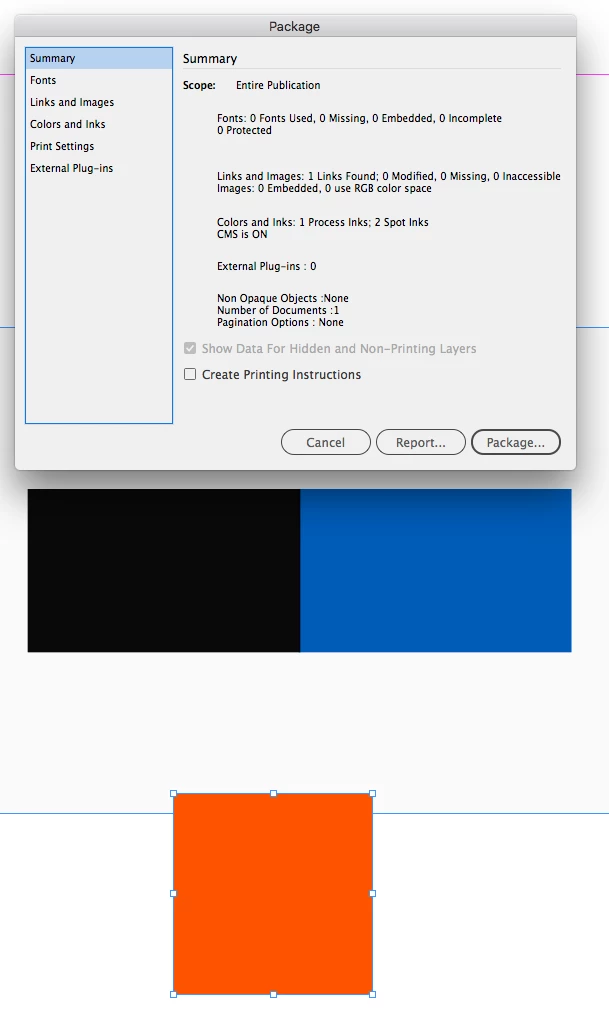
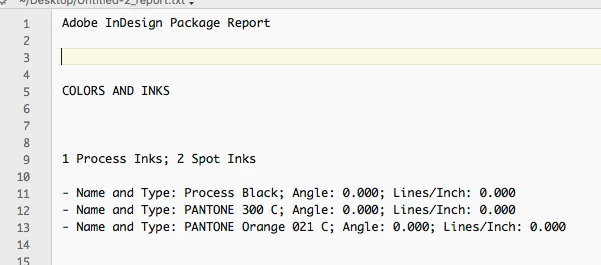
From your PDF it seems like you are looking for a list of used Spot and Process Inks. If that’s the case you can get it from the Package Report file—you don’t need to output the Package, just click Report:


3 replies

rob day
Community Expert
rob dayCommunity ExpertCorrect answer
Community Expert
May 7, 2020

From your PDF it seems like you are looking for a list of used Spot and Process Inks. If that’s the case you can get it from the Package Report file—you don’t need to output the Package, just click Report:


Participating Frequently
May 7, 2020

Thanks everyone for the comment and tips. Rob it looks like I need what you suggested, but visually it would look nicer if this is shown in the file as a list or rather as a small colored square or so with the color listed.

But I guess the simplest way to get this info is indeed the report. 

Peter Kahrel
Community Expert
Community Expert
May 7, 2020

You can export pages to EPS and read the colours from there.

Community Expert
May 6, 2020

Hi boismit,

what do you mean by "colors used in linked files"?


Do you mean placed graphics?


The answer: No. At least not sufficiently.

One perhaps could tell if a placed image is using RGB or CMYK colors, but you cannot tell if a placed PDF is using RGB, CMYK, Lab or Spot Colors of any kind. For that you need to analyse an exported PDF with Acrobat Pro's preflight functionality or a tool like pdfToolbox.


Regards,
Uwe Laubender

( ACP )