
sergio-cz
Participating Frequently
April 5, 2022
Answered

Script to switch object color to another swatch

  • April 5, 2022
  • 7 replies
  • 616 views

Hello guys,

I'm trying to put together the script which change color to another swatch color. 

So for example in this case, it should change stroke color to green:
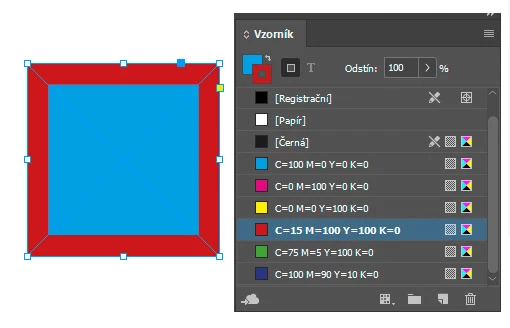
I have this, I tried to modify it in a couple of ways, but it still doesnt work:

var swatches = app.activeDocument.swatches;

for (i=0; i<app.selection.length; i++)  
{  
if (app.selection[i].swatches.index < app.swatches.length-1)  
  app.selection[i].swatches = app.swatches.nextItem(app.selection[i].swatches);  
}  


This topic is closed to new replies. Start a new post to keep the conversation going.
Correct answer brian_p_dts

A PageItem does not have a swatches property. It has a .fillColor and .strokeColor property. So, you might do something like: 


for (i=0; i< app.selection.length; i++)  
{  
    try { app.selection[i].fillColor = app.activeDocument.swatches.nextItem(app.selection[i].fillColor); } 
    catch(e) {}
}  

7 replies

rob day
Community Expert
Community Expert
April 6, 2022

Hi @sergio-cz , In this case I’m not sure you need the loop for a single selected page item. You could get your green swatch by name and apply it to selection[0]


c = app.activeDocument.swatches.itemByName("C=75 M=5 Y=100 K=0")
app.activeDocument.selection[0].strokeColor = c 


or for a selection of more than one


c = app.activeDocument.swatches.itemByName("C=75 M=5 Y=100 K=0")
var s=app.activeDocument.selection; 
for (var i = 0; i < s.length; i++){
    s[i].strokeColor = c 
};  


sergio-cz
sergio-czAuthor
Participating Frequently
April 6, 2022

Hi, @rob day  thank you for your answer, but I think I need the loop, because its about 50 predefined colors in the Swatch. I have to create document with 50 pages, and I need the certain objects in all of those colors (always 1 page for 1 color). So I do it this way: (create the first page), copy the whole page, make some edits (like different text for everypage, etc...), select the object: and there is the time for the script: I'd like to press the shortcut to switch to the next swatch for the object. And then again: copy the whole page, ...
I can use the suggestion from brianp311 in the first answer, but it means I'll need different scripts for fill color, stroke color and text color (in case I have to color also text). So I think the better solution is one script based on active swatch (if stroke color is selected, it switches only stroke color, if fill color is active, script switches fill color).

Peter Kahrel
Community Expert
Community Expert
April 6, 2022

Swatches can be reordered in the panel, so using .nextItem is dangerous. As Brian mentioned, 'swatch' is not a property of page item, but you can create an object style, apply the swatch, and apply the object style to the page item.


P.

sergio-cz
sergio-czAuthor
Participating Frequently
April 6, 2022

Thank you @Peter Kahrel, but I dont think I can use object style for my intention, because I alredy use for those items object styles which defines size of the object, but the color is everytime different, actually I need those objects in every color of the predefined Swatch list, so I think the best way is just copy the object (actually I copy the whole page) and then press the shortcut for switching between swatches.

brian_p_dts
Community Expert
brian_p_dtsCommunity ExpertCorrect answer
Community Expert
April 5, 2022

A PageItem does not have a swatches property. It has a .fillColor and .strokeColor property. So, you might do something like: 


for (i=0; i< app.selection.length; i++)  
{  
    try { app.selection[i].fillColor = app.activeDocument.swatches.nextItem(app.selection[i].fillColor); } 
    catch(e) {}
}  
sergio-cz
sergio-czAuthor
Participating Frequently
April 6, 2022

Thank you, @brian_p_dts , this works, but my idea was the script switch the active swatch (of selected object). If I'll follow your idea, it means I'll need another scripts like this for .strokeColor and also for text .fillColor (if text is selected), which means too much shortcuts (I'll also go to create backward script for previousItem) for all of those scripts, I'd like to avoid that. 🙂

brian_p_dts
Community Expert
Community Expert
April 6, 2022

Sure. I don't know exactly what your goal is by use of NextItem. Just wanted to show the correct properties to use.