runew73276507
Known Participant
February 5, 2016
Answered

Script which substract current page number with 2

  • February 5, 2016
  • 3 replies
  • 944 views

I have a standard page which uses the InDesign function "Current Page Number"

I need a script which can substract current page number with 2 - so if the InDesign document open as page 5 the script need to chance that number to 3:

This topic has been closed for replies.
Correct answer Laubender

Hi runew,

do you want the document start with a different page number?

Hi Loic,

InDesign CS3 has no property startPageNumber with documentPreferences .

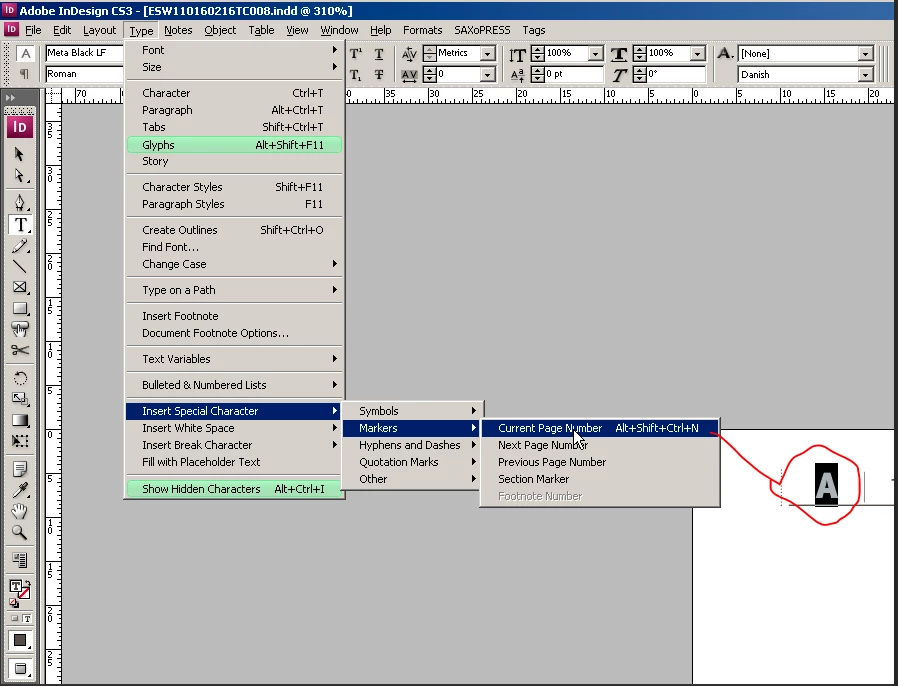
Example for CS3 (the screenshot is showing InDesign CS3):

Document starts with page number 5.

You want to start with page number 3.

Code for that:

// Number to decrement:

var nDecrement = 2;

// pageNumberStart for a section is only valid, when continueNumbering is set to false

app.documents[0].sections[0].continueNumbering = false;

var myCurrentNumber = app.documents[0].sections[0].pageNumberStart;

if(myCurrentNumber>nDecrement+1)

{

    app.documents[0].sections[0].pageNumberStart = myCurrentNumber - nDecrement

};

If there is more than one section in the document, you have to add code.

See the DOM discription for CS3 and other InDesign versions here:

Indesign JavaScript Help

Uwe

3 replies

LaubenderCommunity ExpertCorrect answer
Community Expert
February 5, 2016

Hi runew,

do you want the document start with a different page number?

Hi Loic,

InDesign CS3 has no property startPageNumber with documentPreferences .

Example for CS3 (the screenshot is showing InDesign CS3):

Document starts with page number 5.

You want to start with page number 3.

Code for that:

// Number to decrement:

var nDecrement = 2;

// pageNumberStart for a section is only valid, when continueNumbering is set to false

app.documents[0].sections[0].continueNumbering = false;

var myCurrentNumber = app.documents[0].sections[0].pageNumberStart;

if(myCurrentNumber>nDecrement+1)

{

    app.documents[0].sections[0].pageNumberStart = myCurrentNumber - nDecrement

};

If there is more than one section in the document, you have to add code.

See the DOM discription for CS3 and other InDesign versions here:

Indesign JavaScript Help

Uwe
Community Expert
February 5, 2016

Note 1: You could change continueNumbering to true afterwards.

In case you are using the documents as part of an InDesign book file and continue numbering is required.

Note 2: Every InDesign document has at least one section. The one that starts on the first page of the document.

Uwe

//EDIT: Note 2 added…

Loic.Aigon
Legend
February 5, 2016

var ps = app.activeDocument.documentPreferences.startPageNumber;

if (ps<3) {

     alert("Can't decrement pages sorry :(" );

}

else app.activeDocument.documentPreferences.startPageNumber -= 2;

HTH

Loic

www.ozalto.com

runew73276507
Known Participant
February 5, 2016

Hi Loic,

It dosent work for me - I get this error:

Community Expert
February 5, 2016

Hi runew,

you missed my note on startPageNumber with the documentPreferences of InDesign CS3.

Uwe

Legend
February 5, 2016

Hi,

Somme questions :

- What if current page number < 3 ?

- How many pages in a document (one or more ...) ?

- There any section in the numbering ?

runew73276507
Known Participant
February 5, 2016

Hi Ronald,

1. Current page number will always at least be 4

2. Only one page pr. document always

3. There are no section in the numbering