I found the solution in these forum posts: ConvertToButton using script and How to convert textframe to button.
In case anybody else needs this, I try to document, what I put together.
--
It seems not to be possible trough the DOM. One can use a MenuAction, to invoke a menu item via script.
This is (to my understanding) identical to selectiong the menu by hand.
A minimal script could look like this (heavily inspired by the mentioned posts):
#targetengine "session";

function rect_to_checkbox(rect){
    var to_checkbox = app.menuActions.item("$ID/$$$/Menu/CreateCheckBox");

    // select the rectangle
    rect.select();

    // menu item is only available, if something is selected.
    if( !to_checkbox.isValid ) return false;

    // Invoke the menu action:
    to_checkbox.invoke();
}

function main(){
    var rect  = app.documents[0].rectangles[0];
    rect_to_checkbox(rect);
}

main();
To make this work:
- you need the menu string ("$ID/...", see below)
- the item must be selected before invoking the menu item.
A big drawback is the necessity of a selection. This will slow down a script dramatically. And it looks ugly.
--
In the post invoking menu - language it is described, how to get the locale-independent version of a menu string.
From what I understood, the ID of a menu action is not reliable. Obviousely the same applies to localized menu strings.
I made a small script, to get a list of all menu strings. The basic idea is from How to open any menu item …
My script uses Peter Karels scrollable alert to show the result.
The result is tab-delimited and can be pasted to a spreadsheet:
// Based on:
// http://kasyan.ho.ua/tips/indesign_script/all/open_menu_item.html

var myActions = app.menuActions;
var myActionsList = Array();

myActionsList.push("area\tname\tid\tkey");

for(var i = 0; i < myActions.length; i++){

    try{
        var key = app.findKeyStrings(String(myActions[i].title));
    } catch(e){
        key = "";
    }

    var this_line  = String(myActions[i].area) + "\t";
        this_line += String(myActions[i].name) + "\t";
        this_line += String(myActions[i].id) + "\t";
        this_line += key;

    myActionsList.push(this_line);
}

// Scrollable alert function (by Peter Kharel)
function alert_scroll (title, input){
    if (input instanceof Array) {
        input = input.join ("\r");
    }
    var w = new Window ("dialog", title);
    var list = w.add ("edittext", undefined, input, {multiline: true, scrolling: true});
    list.maximumSize.height = w.maximumSize.height-100;
    list.minimumSize.width = 800;
    w.add ("button", undefined, "Close", {name: "ok"});
    w.show ();
}

alert_scroll("MenuActions", myActionsList);
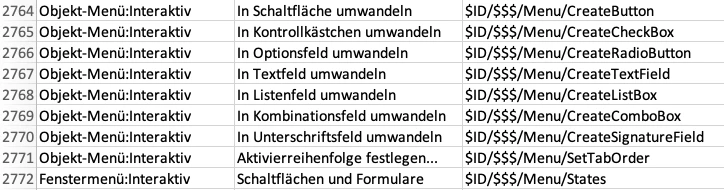
Here are the menu strings to convert an object to any interactive item:



 AdChoices