
Question
Scripting: Gridalingment of UI elements in dialogs
The following code creates a simple dialog for layers:
	var doc = app.activeDocument;
	var dlg = new Window ("dialog", "Select Export Layers");

	var layerSelect = dlg.add("group");
	layerSelect.orientation = "column";
	layerSelect.alignChildren = "fill";

	for (var i = 0; i < doc.layers.length; ++i) {
		var layerRow = layerSelect.add("group");
		layerRow.add('statictext {text:"'+doc.layers[i].name.substring(0,10)+'",justify:"left",characters:10}');
		layerRow.add('checkbox', undefined, "");
		layerRow.add('checkbox', undefined, "");
	}
The UI elements are strangely aligned, perhaps someone can give some insight:
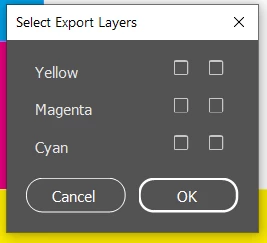
a) checkboxes and static text dont have vertical central alignment, can I set this somehow, so that either the middle of the checkbox is the vertical middle of text or that the baseline of the static text is the bottom of the checkboxes quare.
b) they all look different, is this a poor GUI rendering or something I was doing wrong?
c) what is the coordinate-system for "characters:10", is there a better way to do this?
 AdChoices