ScriptUi listbox extending beyond window until resize
I know this is not specifically about InDesign scripting but it will be incorporated into an InDesign script and InDesign scripters have a reputation as being the smartest!
What I am finding is when a listbox is larger than the window it extends beyond the window and is not reachable. If I apply a layout.resize() function to the window onResize event, the listbox fixes its self when I resize the window.
var w = new Window('dialog', undefined, undefined, {
        resizeable: true
    });

    w.orientation = 'row';
    w.alignChildren = 'top';
    w.maximumSize.height = 400;

    var myList = w.add ('listbox');
    myList.alignment = ['fill', 'fill'];

    var item;
    for (var i = 0; i < 200; i ++) {
        item = myList.add('Item', i);
        item.checked = true;
    }

    w.onResizing = w.onResize = function() {
        this.layout.resize();
    }

w.show ();
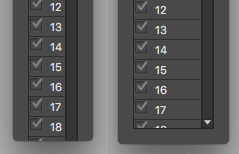
How do I make it so that the listbox fits within the window on show?
Also a second little issue: I am having troubles where the checks are not displaying when I scroll through them quickly. When I click on the item with the missing check marks they suddenly appear. This seems like a refresh issue. Is there something I can do to fix this as well?
 AdChoices