
Inspiring
April 11, 2016
Question

ScriptUi listbox items missing check marks when preceeded by a dialog window

  • April 11, 2016
  • 2 replies
  • 2560 views

I have been having a persistent issue that I have only just been able to reproduce with simple enough code to post. What I am finding is that check marks in list items do not show up if there was a dialog box immediately preceding them (I am running Mac OS and have not tested on Windows yet)

file = File.openDialog();

var w = new Window('dialog', undefined, undefined, {

    resizeable: true

  });

  var myList = w.add ('listbox');

  myList.preferredSize = [300, 400];

  var item;

  for (var i = 0; i < 200; i ++) {

  item = myList.add('Item', i);

  item.checked = true;

  }

  w.onResizing = w.onResize = function() {

  this.layout.resize();

  }

w.show ();

If I click in the list box, scroll or resize the window the items redraw and the check boxes all of a sudden appear!
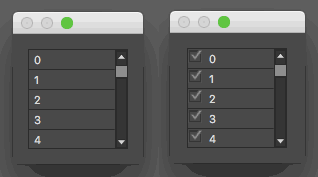
If anybody can think of some ideas to fix this I would appreciate the help.

This topic has been closed for replies.

2 replies

Peter Kahrel
Community Expert
Community Expert
April 11, 2016

Works fine on Windows (Windows 10 and CC2015). Maybe if you rattle the list box a bit you might solve that. See http://www.kahrel.plus.com/indesign/scriptui.html, p. 43.

Inspiring
April 11, 2016

peter,

if you'll have a time and will be interested with this issue I think if you'll defined window as a palette then you'll get exactly the same behaviour on win, cant check it now but think it will works (not works )

btw. many thanks for your's scriptui publication...it giving a lot of light and saving lot of time. it was mine primary book as well as your's extendscript book for all my experiences in InDesign scripting.

Peter Kahrel
Community Expert
Community Expert
April 11, 2016

As I said, pav, it works fine on Windows, palette or dialog.

Glad to hear that those titles are of some use!

P.

Inspiring
April 11, 2016

Hi McShaman,

Probably will not help you but maybe some new horizon will be uncovered for you.

I tried to make one script with icons in list box and everything works fine to CC 2014 then I started to looking for answers for the same question as you.

So one of most fitting answer I found was

"Refresh" listbox to show array images

but it was on the time before CC 2015. When CC 2015 been published my script with icons start works...but on windows platform only, but didnt give up and then found this: Re: UI panel and document CS4

it rendering ikons on every platform and every version. maybe it will help you somehow.

I know you can think you have checkboxes not icons/images.

It doesn't matter. I thought maybe colorful icons rendering is much more time taking and made tests with checkboxes instead and had exactly the same result - the same as you have.

My conclusion is all graphics (think checkbox is graphic as well) should be rendered somehow with ScriptUIGraphics, but I dont know how. Whatever I tried to do  gave me the same result.

What I did was make listbox with another column where displaying texts "ok" and "x" as a condition in your case it could correspond to checked and unchecked.


cheers

pav