Participant
February 16, 2017
Answered

Search bar function is missing. Indesign CC 2017

  • February 16, 2017
  • 5 replies
  • 4501 views

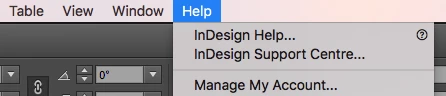
I can't find the search bar function (it helps you finding shortcuts etc) in the help menu. What should I do?
Correct answer Antoni Ryniak

Hi

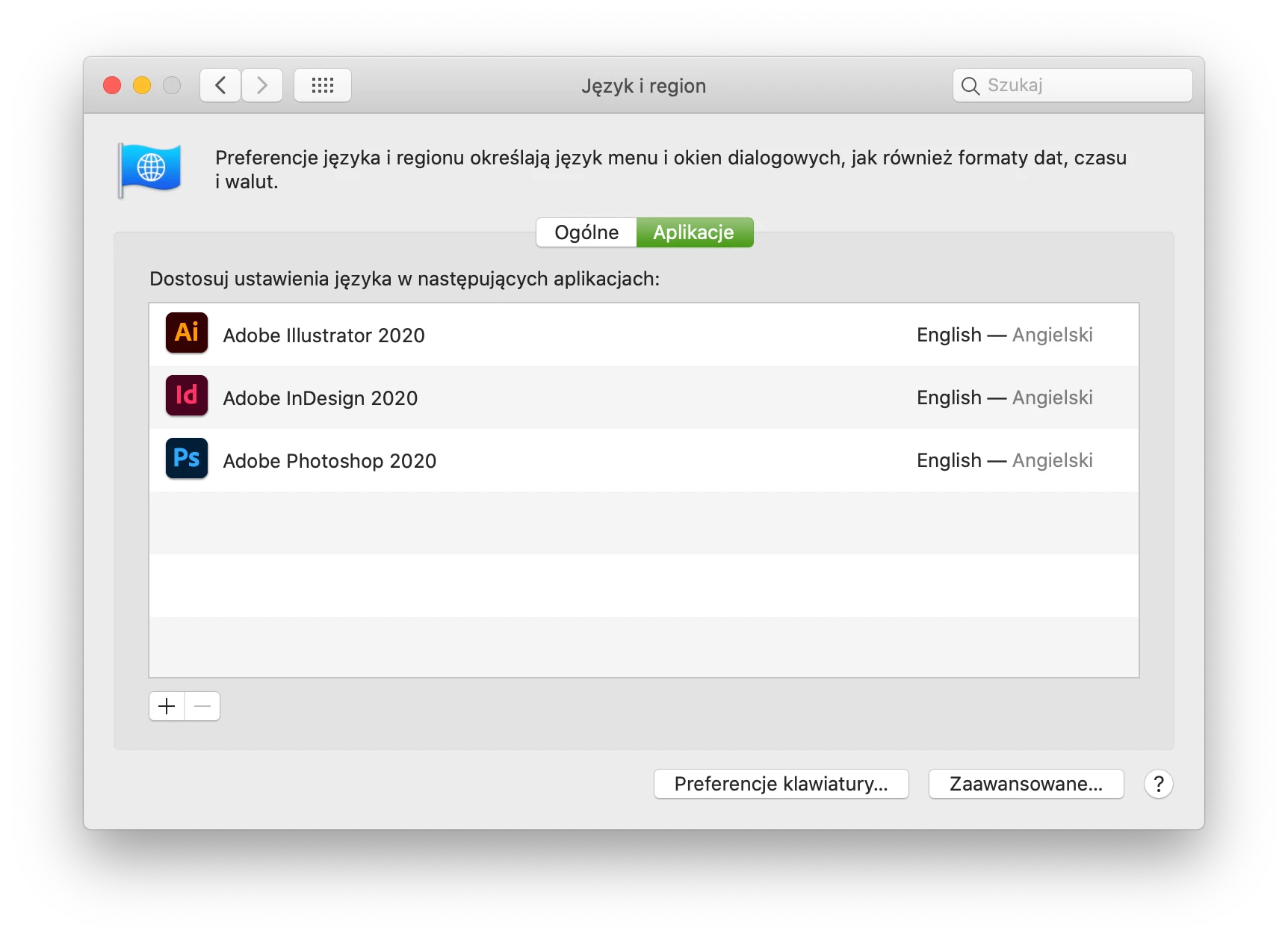
I had the same problem using InDesign 2020. I solved it by changing Mac preferences.

Go to Preferences > Language&Region > Apps (I'm not sure if they call it that way in English, my language is set to Polish) and manually set the language of InDesign to English.  

Sorry for the screenshot in Polish.
 

5 replies

Community Expert
September 8, 2020

FWIW: I gave Antoni the "Correct Answer".

Thank you very much, Eric, for your test and to confirm the solution!


Regards,
Uwe Laubender

( ACP )

Antoni Ryniak
Antoni RyniakCorrect answer
Participant
August 13, 2020

Hi

I had the same problem using InDesign 2020. I solved it by changing Mac preferences.

Go to Preferences > Language&Region > Apps (I'm not sure if they call it that way in English, my language is set to Polish) and manually set the language of InDesign to English.  

Sorry for the screenshot in Polish.


Participant
September 8, 2020

Amazing, it works! Thank you. 

Participant
February 22, 2017

I installed the InDesign CC 2017 (English International version) via the Creative Cloud for desktop app. I'm using Mac OS 10.12 (Norwegian). The search bar is working in the other programs, like Lightroom and Photoshop, but not in InDesign.

Community Expert
February 22, 2017

Hi kri,

that's interesting. You are on a Norwegian OSX, I am on a German OSX. We both share the problem with the Search bar.

Steve—who is on a US English OSX—is not missing the Search bar with InDesign.

Regards,
Uwe

Damien Berest
Adobe Employee
Adobe Employee
February 22, 2017

Hi

It does not show in French either. I am making some queries internally.

Participant
February 17, 2017

I've tried to restore the preferences. The search bar is still missing.

Steve Werner
Community Expert
Community Expert
February 17, 2017

The article on restoring suggests two methods. Try the one you didn't try.

If that doesn't work, try uninstalling and then install again. Pretty easy using the CC desktop app.

Participant
February 18, 2017

None of the methods are working. Neither reinstalling the program. Maybe there is a problem with the version upgrade?

Steve Werner
Community Expert
Community Expert
February 16, 2017

It's shows up for me on my MacBook Pro in CC 2017.

Try restoring your InDesign preferences:

Trash, Replace, Reset, or Restore the application Preferences

Legend
February 17, 2017

Seems like the url Trash, Replace, Reset, or Restore the application Preferences is hardwired to Steve Werner​ 's clipboard

I would suggest Adobe to enhance their Preferences-tech, to eleminate these piling up nags and bugs upon version upgrade.

Steve Werner
Community Expert
Community Expert
February 17, 2017

I get more positive responses to that solution than anything else that I suggest.
