Inspiring
June 28, 2023
Question

Section start not working?

  • June 28, 2023
  • 6 replies
  • 1313 views

I haven't run into this before, but I've started a section (to restart page numbering) and... it has no effect.
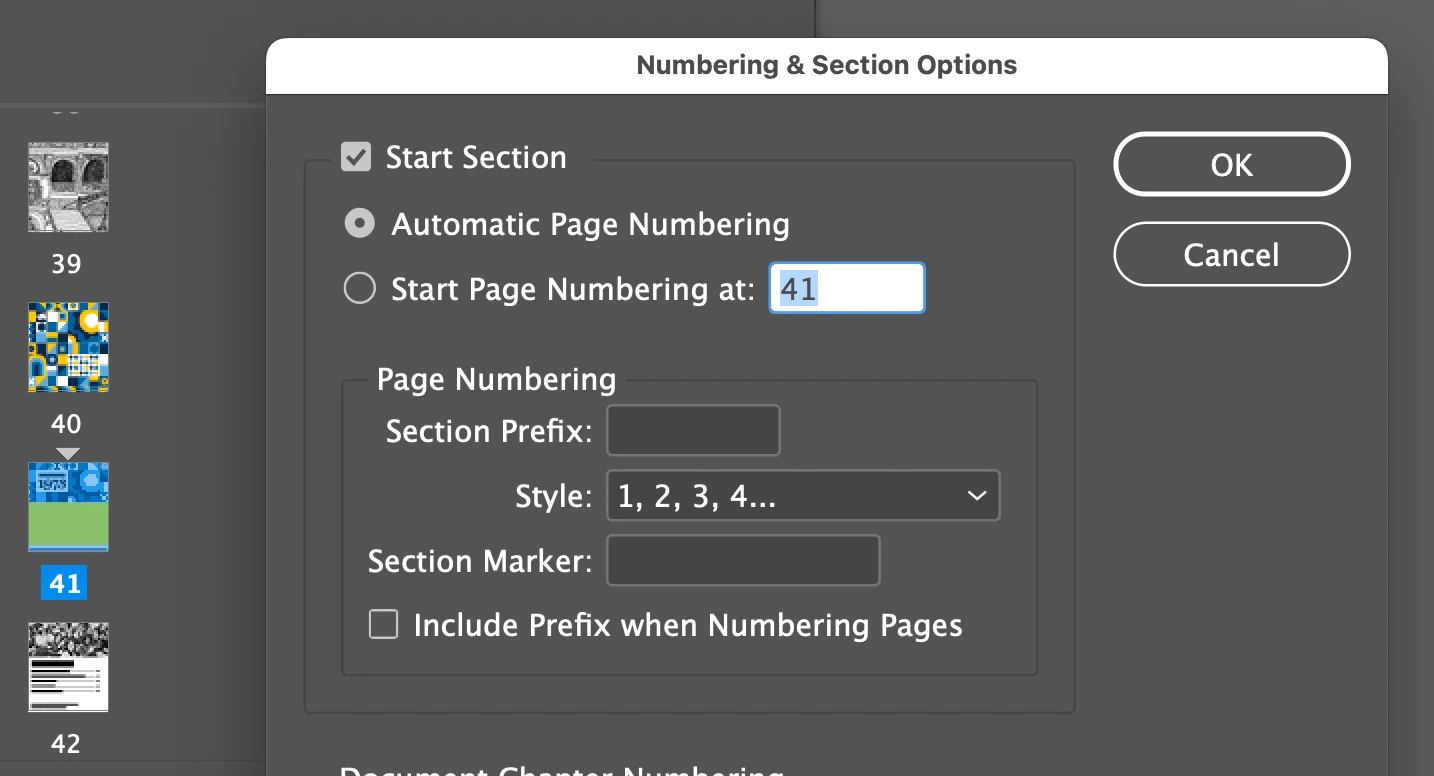
 

I'm sure I'm missing something, but I'm not sure what it is...

thanks

This topic has been closed for replies.

6 replies

Participant
July 1, 2023

Apk apkparadise seems to be experiencing an issue with its Section start functionality. Users have reported difficulties in navigating to specific sections of the website, hindering their browsing experience. It's crucial for the team to address this problem promptly to ensure seamless navigation and optimize user satisfaction.


Barb Binder
Community Expert
Community Expert
June 28, 2023

Books do have a sync function—but as I believe you said originally, it is a manual sync. It's not automatic, but it's pretty darn easy. If you need help with that function, let us know.


~Barb

~Barb at Rocky Mountain Training
turner111Author
Inspiring
June 29, 2023

Thanks Barb - I've used it a lot. (10 minutes ago, actually, though just to update page numbering.) Which is why I know it needs some significant improvement 😉
At least, the option to automatically sync styles regardless of which document is the Style Source - if there even would need to be, in that case. Ultimately it would be great to be able to edit contents of a book file in what appears to be a single continuous volume.

Peter Spier
Community Expert
Community Expert
June 29, 2023
quote

At least, the option to automatically sync styles regardless of which document is the Style Source - if there even would need to be, in that case.


By @turner111

I'm curious as to how you think you could synch styles without specifying which style to use if there happens to be more than one definition. If all styles are already defined the same way you don't need to synch.


You could be using a template as the basis for your individual documents. Templates can contain layout elements, and more importanly for you, predefined styles.

turner111Author
Inspiring
June 28, 2023

Hi all - FWIW, I'm not concerned about confusing page numbers... I'm splitting the document in half, into two separate full documents, each with its own TOC. The volumes are simple, so I'm using xrefs for the TOC.
There are two tables of contents set up...
If ID had the ability to use a global style sheet, or equivalent way of keeping a group of docs or chapters in sync with styles, I might not have to do it this way... 🙂

rob day
Community Expert
Community Expert
June 28, 2023

FWIW, I'm not concerned about confusing page numbers


Then ignore the warning and set the page start to 1.


If ID had the ability to use a global style sheet, or equivalent way of keeping a group of docs or chapters in sync


The Book panel will do that.

turner111Author
Inspiring
June 29, 2023

Hey Rob,

"Then ignore the warning and set the page start to 1."
Done.


"The Book panel will do that."
Manually, kind of. But only within a book file, and not in the "live" way a global style sheet does... and it's not bi- or multi-directional.
A global style sheet method would also make managing large numbers of documents, at least in terms of styles, far easier, too.

Barb Binder
Community Expert
Community Expert
June 28, 2023

Hi @turner111:


So that means you have a second page 1 in the file, which could be confusing to navigate. IIRC, when you OK that message you will have both page 1s. Is that working for you? 


~Barb

~Barb at Rocky Mountain Training
turner111Author
Inspiring
June 28, 2023

Yes, works fine. Exactly what I want, really. See follow-up below...

James Gifford—NitroPress
Legend
June 28, 2023

Automatic page numbering will continue numbering from the last section. Select Restart Numbering. 

turner111Author
Inspiring
June 28, 2023

Thanks James - do you mean to say to choose "Start Page Numbering at:" ?

Barb Binder
Community Expert
Community Expert
June 28, 2023

When you start a new section, footnotes will start over at 1 but page numbers continue, unless you choose Start Page Numbering at: 1.


~Barb

~Barb at Rocky Mountain Training
turner111Author
Inspiring
June 28, 2023

Thanks Barb - I think I got thrown off by this warning, which I don't recall ever seeing before:


Is that new? Maybe I just disabled it like 15 years ago...


rob day
Community Expert
Community Expert
June 28, 2023

I think I got thrown off by this warning,


Hi @turner111 , The warning is letting you no that sometime in the future you might have problems distinguishing the pages with the same page numbers when you try to print. If your Preferences>General>Page Numbering>View is set to Section Numbering, and you try to print page 1, you’ll get this warning:


In this case I would have to set the Range to 7+ in order to print the 2nd page 1. Or, if I have my View Preference set to Absolute Numbering, I could use 7—the absolute page number—and would not get the print warning.