

tlmurray23
Inspiring
May 17, 2018
Answered

Seeing a cross-reference on the screen

  • May 17, 2018
  • 2 replies
  • 1400 views

I have not checked every cross-reference type, but most of my cross-references cannot be easily spotted unless specifically selected in the Cross-References panel. It appears the only one I can spot is the page number, as it has a light blue box around it. I don't see a preference for any kind of highlighting, nor even a Find option, if I just want to blast through a file and find them.

Is there a setting I'm missing?
This topic has been closed for replies.
Correct answer Steve Werner

Two ways to view your cross-refererences:

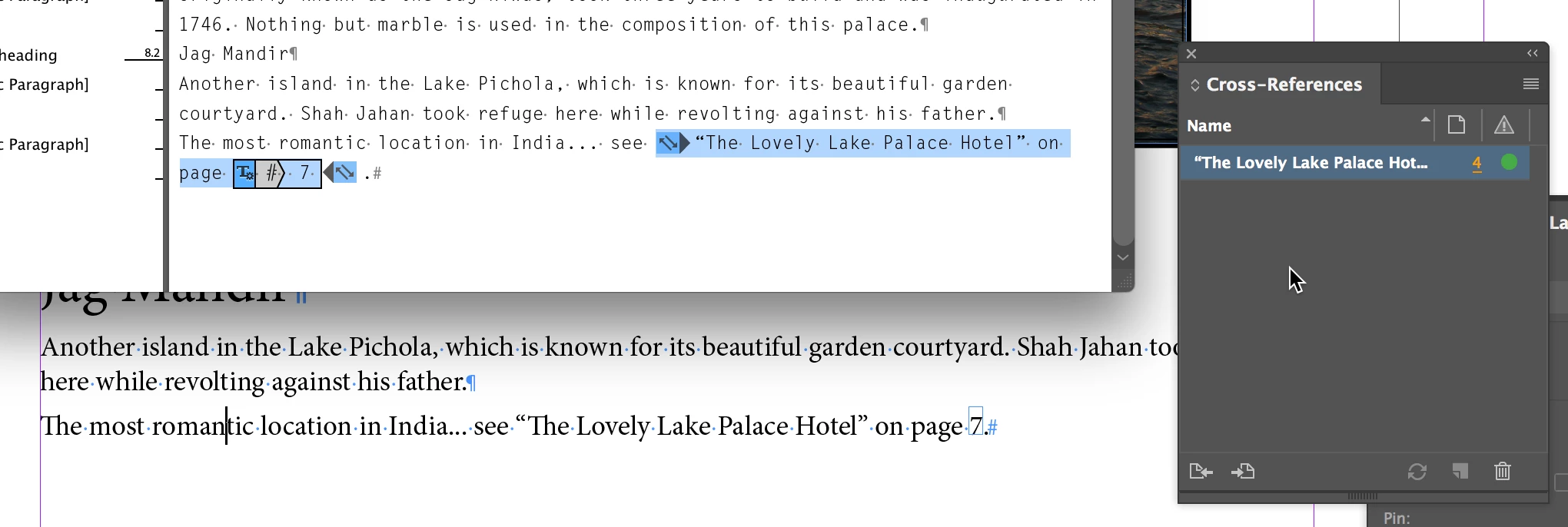
(1) In the Cross-References panel, you'll see a list of your cross-references. When you highlight one, the left arrow (at the bottom left of the panel) takes you to the source of the cross-reference, and the right arrow takes you to the destination of the cross-reference. So you can click on each successive cross-reference in the panel.

(2) To better see the cross-reference source, view the story in the Story Editor (Edit > Story Editor) as shown below.

2 replies

Steve Werner
Community Expert
Steve WernerCommunity ExpertCorrect answer
Community Expert
May 17, 2018

Two ways to view your cross-refererences:

(1) In the Cross-References panel, you'll see a list of your cross-references. When you highlight one, the left arrow (at the bottom left of the panel) takes you to the source of the cross-reference, and the right arrow takes you to the destination of the cross-reference. So you can click on each successive cross-reference in the panel.

(2) To better see the cross-reference source, view the story in the Story Editor (Edit > Story Editor) as shown below.

Eric Dumas
Community Expert
Community Expert
May 17, 2018

Hi,

Can you confirm the InDesign and OS version your using?

Did you create a specific text formatting style for your cross references?.

tlmurray23
Inspiring
May 17, 2018

1. InDesign CC 13.1 for Mac

2. No . . . but besides the Story Editor, this made me think of a way: Make a color named CrossRef, say, red, then redefine it to black before printing.

Legend
May 17, 2018

Hi,

We have a script that navigates cross-refs. I didn't get to finish it, if you are interested I could finish it off.

P.