Answered
Select object
Hi, I noticed that when I click inside an object with outline only it selects the object. It didn't use to do that. In order to select it you had to click on the outline only. Do you know how can I revert that?

Hi, I noticed that when I click inside an object with outline only it selects the object. It didn't use to do that. In order to select it you had to click on the outline only. Do you know how can I revert that?
Hi Theo,
it depends of the tool that created the object.
Basically it's the difference between the tools that have "frame" in the name and the ones with similar names not containing the word "frame". Like the Rectangle Frame tool vs the Rectangle tool. The rectangle you have done with the Rectangle tool is the one you cannot select when you click inside if there is no fill color. The one done with the Rectangle Frame tool are selectable inside even if there is no fill:
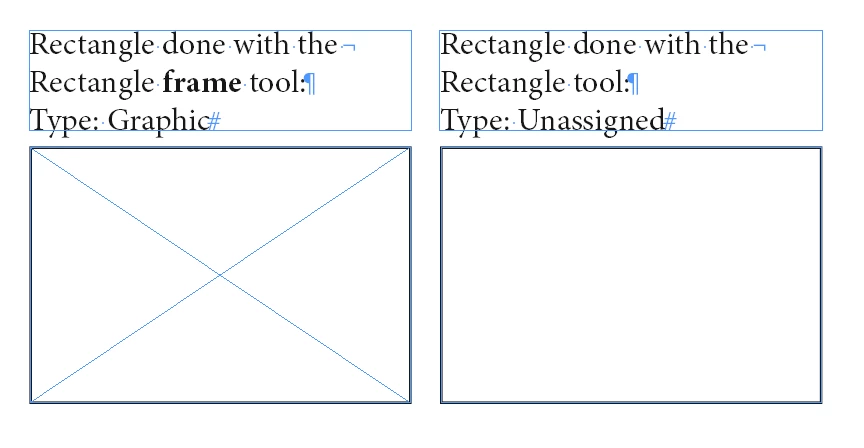
You could convert between the three kind of frames, Text, Graphic and Unassigned.
So you want to convert from Graphic to Unassigned.
Select the object and go to:
Object > Content > and choose Unassigned
FWIW: A text frame's story must not contain any text if you want to convert it to Graphic or Unassigned.
Regards,
Uwe Laubender
( ACP )
Already have an account? Login
Enter your E-mail address. We'll send you an e-mail with instructions to reset your password.
 AdChoices