

SumitKumar
Inspiring
December 25, 2016
Answered

Select xml element in structure pane by javascript

  • December 25, 2016
  • 2 replies
  • 3701 views

Dear All,

Is it possible to select multiple xml elements with their names in structure pane with js?

Below is my attachment:
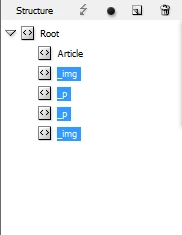
I have a script that select only one element, _p or _img. I need to select all tags except "Article" tags.

var doc = app.activeDocument;

var rt = doc.xmlElements[0];

var _p = rt.xmlElements.item("_p");

var _img = rt.xmlElements.item("_img");

_p.select();

_img.select();

Thanks,

Sumit

This topic has been closed for replies.
Correct answer Loic.Aigon

var doc = app.activeDocument; 

var rt = doc.xmlElements[0];

var allButArticle = rt.evaluateXPathExpression (".//*[name()!='Article']" );

if ( allButArticle.length ) app.select ( allButArticle );

2 replies

Participant
April 14, 2020

Hello, this question is really late, but do you know how I may select a XML tag in the story.

I need to import an XML file with specific tags on words, and to be able to generate shape around those words, I need to get their bounds.

I cannot find any example, and the lack of documentation conducted me here.

Thanks in advance.
Loïc (me too)

Loic.Aigon
Loic.AigonCorrect answer
Legend
December 26, 2016

var doc = app.activeDocument; 

var rt = doc.xmlElements[0];

var allButArticle = rt.evaluateXPathExpression (".//*[name()!='Article']" );

if ( allButArticle.length ) app.select ( allButArticle );

SumitKumar
Inspiring
December 26, 2016

Thank you so much Loic!

-Sumit