
Known Participant
April 22, 2024
Answered

Selecting all text between paragraph styles

  • April 22, 2024
  • 2 replies
  • 839 views

Hi,

For a bibliography I'm working on, I'd need to select all text between paragraph styles and have that text crossed-out or have the formatting changed so that it won't be picked up by an indexing program. 

For instance:

TITLE 1 (paragraph style 1 or 2) [paragraph break]

Text text text text text text (paragraph style 3)

TITLE 2 (paragraph style 1 or 2) [paragraph break]

Text text text text text text (paragraph style 3)

TITLE 3 (paragraph style 1 or 2) [paragraph break]

Text text text text text text (paragraph style 3)


This should become:

TITLE 1 (paragraph style 1 or 2) [paragraph break]

Text text text text text text (paragraph style 3)

TITLE 2 (paragraph style 1 or 2) [paragraph break] 

Text text text text text text (paragraph style 3)

TITLE 3 (paragraph style 1 or 2) [paragraph break]

Text text text text text text (paragraph style 3)


Text is always set in Paragraph Style 3, and the info before/after is always set in Paragraph style 1 or 2, followed by a paragraph break.


Thanks! 


This topic has been closed for replies.
Correct answer m1b

Hi @eib24740488m4un I've written a script to do this based on your example. It probably will need some additional tweaking to suit your exact needs, but I suggest you try it out and let me know what it doesn't get right.

- Mark

/**
 * @file Paragraphs After Paragraphs.js
 * Applies `strikeThru` to 'BODY' paragraphs
 * occurring after 'HEADER' paragraphs and not
 * after 'TITLE' paragraphs.
 * @author m1b
 * @discussion https://community.adobe.com/t5/indesign-discussions/selecting-all-text-between-paragraph-styles/m-p/14570941
 */
function main() {

    var doc = app.activeDocument,
        text = doc.selection[0];

    if (
        undefined == text
        || !text.hasOwnProperty('paragraphs')
    )
        return alert('Please select some text and try again.');


    for (var i = 0, collecting = false, para; i < text.paragraphs.length; i++) {

        para = text.paragraphs[i];

        if (
            'HEADER 1' === para.appliedParagraphStyle.name
            || 'HEADER 2' === para.appliedParagraphStyle.name
        )
            // start collecting
            collecting = true;

        else if ('TITLE' === para.appliedParagraphStyle.name)
            // stop collecting
            collecting = false;

        else if (
            collecting
            && 'BODY' === para.appliedParagraphStyle.name
        )
            // strikeThrough
            para.strikeThru = true;

    }

};
app.doScript(main, ScriptLanguage.JAVASCRIPT, undefined, UndoModes.ENTIRE_SCRIPT, 'Set strikethrough');


2 replies

m1b
Community Expert
m1bCommunity ExpertCorrect answer
Community Expert
May 3, 2024

Hi @eib24740488m4un I've written a script to do this based on your example. It probably will need some additional tweaking to suit your exact needs, but I suggest you try it out and let me know what it doesn't get right.

- Mark

/**
 * @file Paragraphs After Paragraphs.js
 * Applies `strikeThru` to 'BODY' paragraphs
 * occurring after 'HEADER' paragraphs and not
 * after 'TITLE' paragraphs.
 * @author m1b
 * @discussion https://community.adobe.com/t5/indesign-discussions/selecting-all-text-between-paragraph-styles/m-p/14570941
 */
function main() {

    var doc = app.activeDocument,
        text = doc.selection[0];

    if (
        undefined == text
        || !text.hasOwnProperty('paragraphs')
    )
        return alert('Please select some text and try again.');


    for (var i = 0, collecting = false, para; i < text.paragraphs.length; i++) {

        para = text.paragraphs[i];

        if (
            'HEADER 1' === para.appliedParagraphStyle.name
            || 'HEADER 2' === para.appliedParagraphStyle.name
        )
            // start collecting
            collecting = true;

        else if ('TITLE' === para.appliedParagraphStyle.name)
            // stop collecting
            collecting = false;

        else if (
            collecting
            && 'BODY' === para.appliedParagraphStyle.name
        )
            // strikeThrough
            para.strikeThru = true;

    }

};
app.doScript(main, ScriptLanguage.JAVASCRIPT, undefined, UndoModes.ENTIRE_SCRIPT, 'Set strikethrough');


Known Participant
May 3, 2024

Mark,

wow, that works wonders! No tweaking needed. Thanks a lot!!!

jmlevy
Community Expert
Community Expert
April 22, 2024

Text is always set in Paragraph Style 3

Use find change: leave the fields empty and use the magnifying glass icon to search text using paragraph style 3

Or I don't understand the question…

Known Participant
April 22, 2024

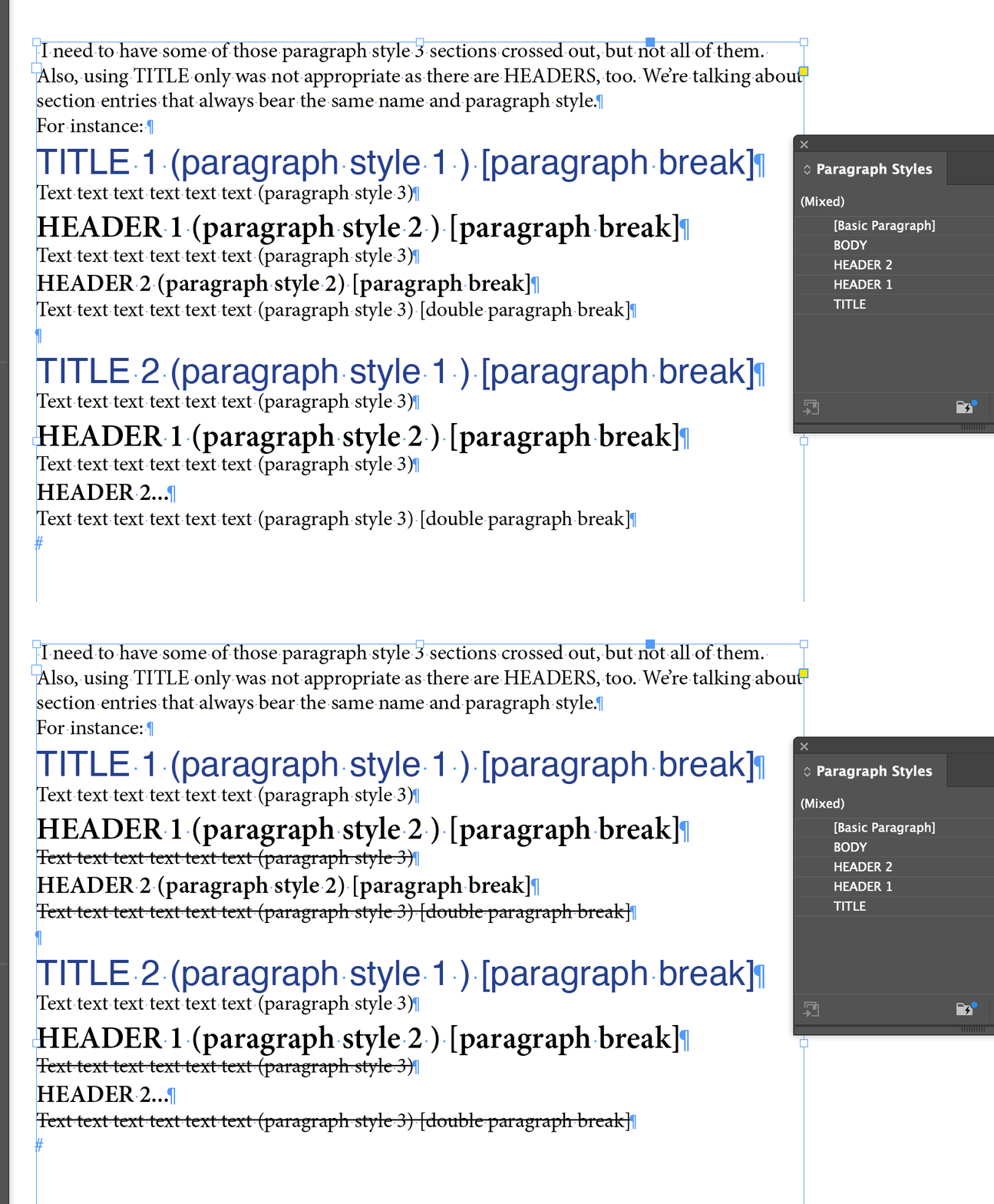
Sorry, you're right. I didn't say this is a very long document (1000 pages) with over 4000 entries. I need to have some of those paragraph style 3 sections crossed out, but not all of them. Also, using TITLE only was not appropriate as there are HEADERS, too. We're talking about section entries that always bear the same name and paragraph style.

For instance: 

TITLE 1 (paragraph style 1 ) [paragraph break]

Text text text text text text (paragraph style 3)

HEADER 1 (paragraph style 2 ) [paragraph break]

Text text text text text text (paragraph style 3)

HEADER 2 (paragraph style 2) [paragraph break]

Text text text text text text (paragraph style 3) [double paragraph break]


TITLE 2 (paragraph style 1 ) [paragraph break]

Text text text text text text (paragraph style 3)

HEADER 1 (paragraph style 2 ) [paragraph break]

Text text text text text text (paragraph style 3)

HEADER 2...


This should become:


TITLE 1 (paragraph style 1 ) [paragraph break]

Text text text text text text (paragraph style 3) -- needs indexing.

HEADER 1 (paragraph style 2 ) [paragraph break]

Text text text text text text (paragraph style 3) -- needs no indexing.

HEADER 2 (paragraph style 2) [paragraph break]

Text text text text text text (paragraph style 3)[double paragraph break] -- needs no indexing.


TITLE 2 (paragraph style 1 ) [paragraph break]

Text text text text text text (paragraph style 3) -- needs indexing.

HEADER 1 (paragraph style 2 ) [paragraph break]

Text text text text text text (paragraph style 3) -- needs no indexing.

HEADER 2...


So I'd need to be able to select the text (always PS3) bewteen headers (always PS2) or between headers and titles (always PS2 and PS1).