Participant
November 28, 2016
Question

Selecting numbers in palettes

  • November 28, 2016
  • 1 reply
  • 252 views

Hi there,

I'm having trouble selecting/altering nummers in my Indesign Palettes.

The position of the cursor doesn't correspond with the actual number.
In this example, the 3 is selected but doesn't appear to be so.

Not a mayor issue, however annoying 😞
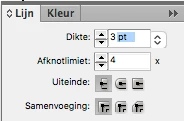
I tried to relaunche and remove prefences with (Alt-cmd-ctrl-shift).

Do you have a clue how solve this? Thanks in advance,

Kind regards, Bas

This topic has been closed for replies.

1 reply

vinny38
Legend
November 28, 2016

Hi

looks like the same bug as here :

selection issue bug on MacOS Sierra 10.12

try @Frans suggestion :

Deselect Show OpenType ornament on Text frame and Selected text in the Extra Text Preferences. It is a known bug.

Participant
November 28, 2016

Hi Vinny,

Thanks for answering.

Bas

Op 28 nov. 2016, om 16:11 heeft vinny38 <forums_noreply@adobe.com> het volgende geschreven:

Selecting numbers in palettes

created by vinny38 <https://forums.adobe.com/people/vinny38> in InDesign - View the full discussion <https://forums.adobe.com/message/9165366#9165366>

Hi

looks like the same bug as here :

selection issue bug on MacOS Sierra 10.12 <https://forums.adobe.com/thread/2231628>

try @Frans suggestion :

Deselect Show OpenType ornament on Text frame and Selected text in the Extra Text Preferences. It is a known bug.

If the reply above answers your question, please take a moment to mark this answer as correct by visiting: https://forums.adobe.com/message/9165366#9165366 and clicking ‘Correct’ below the answer

Replies to this message go to everyone subscribed to this thread, not directly to the person who posted the message. To post a reply, either reply to this email or visit the message page:

Please note that the Adobe Forums do not accept email attachments. If you want to embed an image in your message please visit the thread in the forum and click the camera icon: https://forums.adobe.com/message/9165366#9165366

To unsubscribe from this thread, please visit the message page at , click "Following" at the top right, & "Stop Following"

Start a new discussion in InDesign by email <mailto:discussions-community-indesign@adobe-v8.hosted.jivesoftware.com> or at Adobe Community <https://forums.adobe.com/choose-container.jspa?contentType=1&containerType=14&container=3359>

For more information about maintaining your forum email notifications please go to https://forums.adobe.com/thread/1516624 <https://forums.adobe.com/thread/1516624>.

This email was sent by Adobe Community because you are a registered user.

You may unsubscribe <https://forums.adobe.com/unsubscribe.jspa?email=b.hageman%40ziener.nl&token=3515308e0ab68f9c285b0c0aa3068f8b19c39a155f8ed0493b7d0ca80dbc1291> instantly from Adobe Community, or adjust email frequency in your email preferences <https://forums.adobe.com/user-preferences!input.jspa>

Ziener Innovatief Design 06-25022395