
Participant
January 2, 2019
Answered

Selecting only bold/ italics in the text - possible?

  • January 2, 2019
  • 2 replies
  • 5259 views

Hi fellows

I have a document finished and I need to change the font in it. However, only part of it has the paragraph styles attributed. There are portions of text edited manually - bolded/ italicized etc.

I wonder if there is any way in InDesign to select only bold/ italic text within the text box?

Or maybe it is possible to multiselect different words within the text box? So that I do not have to repeat the action mark>bold dozen times.

Thanks in advance!
This topic has been closed for replies.
Correct answer hammer0909

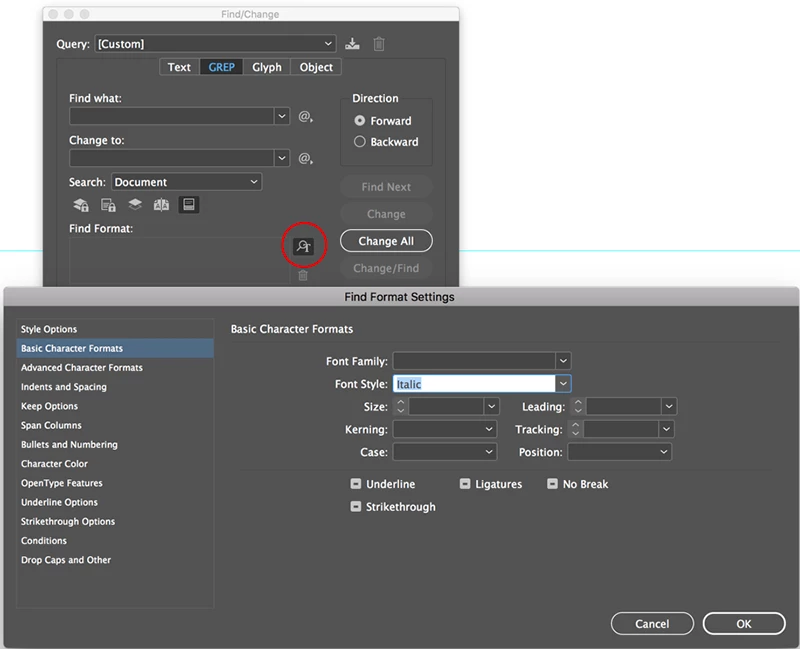
In the Find/Change dialog box, make sure that you have the "More Options" button enabled. In the "Specify Attributes to Find" section, click on the icon and define the style of bold or italic as the style you want to find. Click Find Next and it will show you each instance in your document. You can use the same option under the Change Format section to change the text to something else. I usually use this technique to apply an actual bold or italic character style to the text for efficient formatting.

2 replies

hammer0909
Community Expert
hammer0909Community ExpertCorrect answer
Community Expert
January 2, 2019

In the Find/Change dialog box, make sure that you have the "More Options" button enabled. In the "Specify Attributes to Find" section, click on the icon and define the style of bold or italic as the style you want to find. Click Find Next and it will show you each instance in your document. You can use the same option under the Change Format section to change the text to something else. I usually use this technique to apply an actual bold or italic character style to the text for efficient formatting.

Mike Witherell
Community Expert
Community Expert
January 2, 2019

Edit > Find/Change is the essential feature within InDesign that will allow you to search for this.

Mike Witherell