Inspiring
March 11, 2018
Question

"Send to back" working for text frame & photo but not photo & photo

  • March 11, 2018
  • 1 reply
  • 572 views

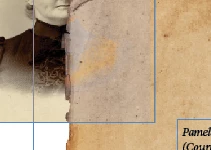
"Send to back" and "bring to front" is working with text frame and photo but not with photo and photo. I am trying to put the photo of the old paper behind the portrait. Indesign tells me that the paper is all the way back and that the portrait is in front but it is not working, see photo.(I have not been using layers, am trying to avoid them.)
This topic has been closed for replies.

1 reply

BobLevine
Community Expert
Community Expert
March 11, 2018

Sounds very much like you ARE using layers or the photo in question is on a master page.

sivey@pdxAuthor
Inspiring
March 11, 2018

I apply a Master page to each page in my document. Most are called "A-2-Col Master". To my surprise, I just clicked on layers and I see that the page in question DOES have two layers! The Blue Layer, Layer 1, had everything on it. The Red Layer, Layer 2, was blank.

So, I just put the portrait on the 'Red Layer and now I have two ways in which I cannot get her portrait on top of the old paper.

BobLevine
Community Expert
Community Expert
March 11, 2018

Seems like that Red layer is the bottom layer. Move it to the top and make sure nothing you want below that image is on the master on that layer.