Bart_Bossuyt_-_die_Keure
Known Participant
February 15, 2018
Answered

Seperate links folders after packaging.

  • February 15, 2018
  • 2 replies
  • 2031 views

Hi all,

I was wondering why i have seperate folders for my linked images after making a package.

FOR EXAMPLE:

Links>folderA...

Links>folderB...

Links>folderC...

I just have this for 1 file. All previous files i have made a package of put all the images in the "links" folder.

Not that much of a problem. But i was just wondering why it does it like this.

thanks
    This topic has been closed for replies.
    Correct answer SJRiegel

    https://forums.adobe.com/people/Bart+Bossuyt+-+die+Keure  wrote

    yes

    Come on, Bart :-)


    Please make up an example if you cannot share actual file and folder names.

    Additional question: What is the file type of the placed image or graphic?

    Regards,
    Uwe


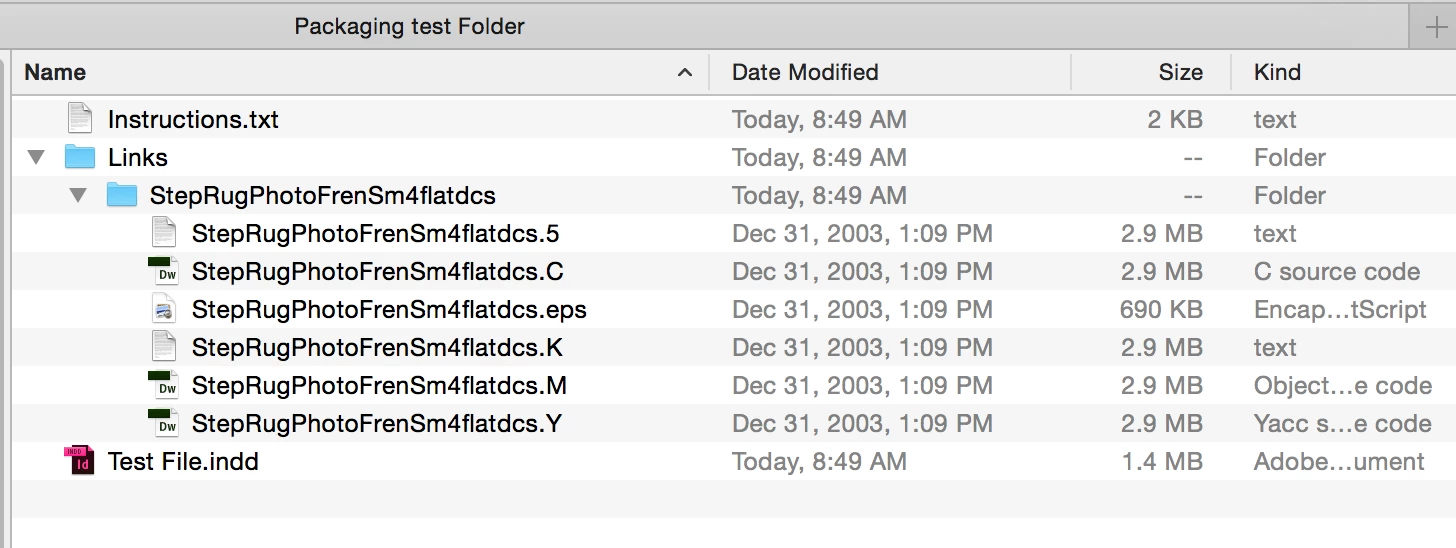
    I had a hunch and did a test on an old graphic from my archives. If the linked graphic is that old style dcs-eps, the the link file and all of its related channel files are collected into a folder when packaging. 

    2 replies

    BobLevine
    Community Expert
    Community Expert
    February 15, 2018

    I've never seen anything like that. Is it a book being packaged or a single document?

    Bart_Bossuyt_-_die_Keure
    Known Participant
    February 15, 2018

    Hi Bob,

    it's a single document.

    Bart_Bossuyt_-_die_Keure
    Known Participant
    February 15, 2018

    Hi All,

    screenshot included. Keep in mind that this screenshot has been taken AFTER making the package.

    The subfolders are made in the Packaging process. no idea why :s

    Also not all files come in the subfolders. Some of them are in the LINKS folder just as it should be.

    Screenshot is cut due to copyright reasons.

    John Mensinger
    Community Expert
    Community Expert
    February 15, 2018

    So the folders are named as you show, with the '>' character in them? Or, are you trying to demonstrate sub-folders there?

    A screenshot of the actual folders from Explorer or Finder might help.

    Bart_Bossuyt_-_die_Keure
    Known Participant
    February 15, 2018

    Hi John,

    the '>' is to demonstrate subfolders.

    Screenshot not possible at the moment.