
csm_phil
Legend
December 17, 2011
Question

Set Equal Spacing for selected frames Vertical & Horizontal

  • December 17, 2011
  • 3 replies
  • 1933 views

Hi Scripters All,

I have troubled in this part? How set the Vertical&Horizontal Space for the selected graphic frames. Any one share your valuable input.

I understand there is only one way calcuation methods. But i struggled that area Please help its very urgent.

This is my simple JS and output snapshot in the below.

app.activeDocument.distribute(app.selection, DistributeOptions.HORIZONTAL_SPACE, undefined, true, 12);

app.activeDocument.distribute(app.selection, DistributeOptions.VERTICAL_SPACE, undefined, true, 16);
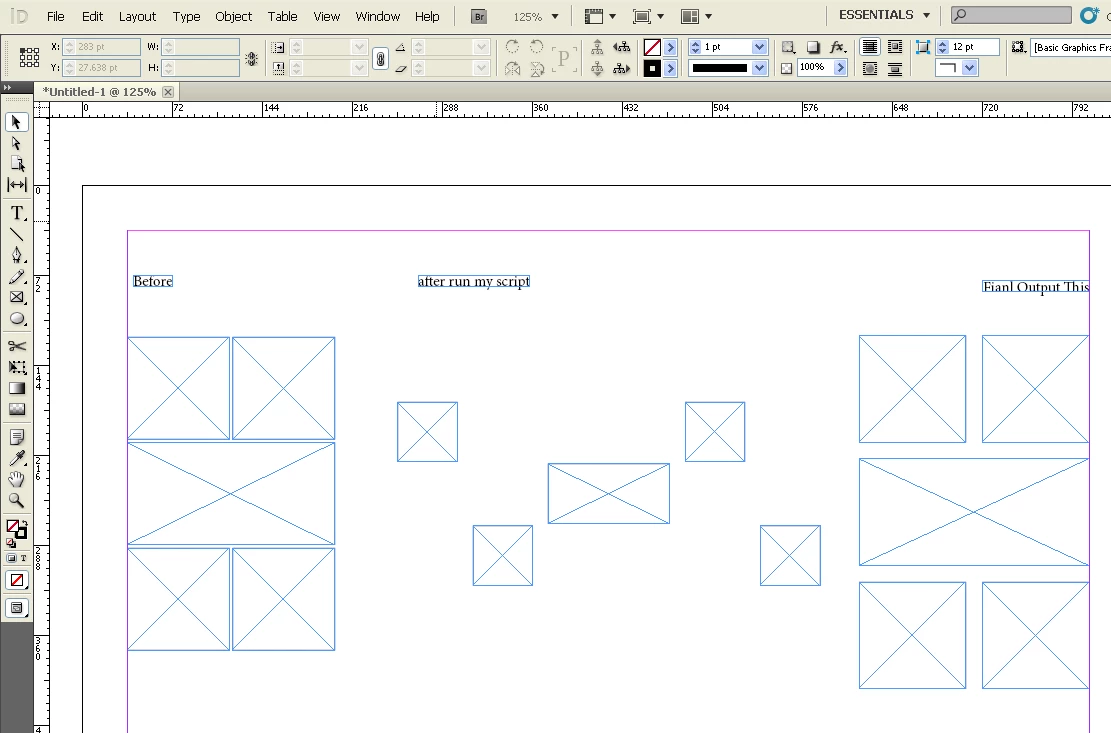
thx

csm_phil

This topic has been closed for replies.

3 replies

csm_phil
csm_philAuthor
Legend
December 19, 2011

Hi Scripters All,

I have tried this get the final output still i am struggled with getting the final out with resize or moving methods used the result is none.

Please help us any one look this and solve i am tried lot of possibilities, Can you any one check this issue and help me.

Harbs: I dont know the resize methods using the coordinates i m write the below js code, Please check and advice to me.

var myXVal = 5;
var myYVal = 5;
var win = new Window('dialog', 'TEST');
win.preferredSize = [200,150];
win.alignChildren = 'left';
win.margins = [18,18,18,18];
win.spacing = 18;
with(win){
     win.Grp = add('group');
     win.Grp.alignment = 'left';
     win.Grp.orientation = 'row';
     win.Grp.alignChildren = 'top';
     with(win.Grp){
          win.Grp.sText = add('statictext', undefined, 'H Space: ');
          win.Grp.eText = add('edittext', undefined, myXVal);
          win.Grp.eText.preferredSize = [145,20];
          }
     win.Grp1 = add('group');
     win.Grp1.alignment = 'left';
     win.Grp1.orientation = 'row';
     with(win.Grp1){
          win.Grp1.sText = add('statictext', undefined, 'V Space: ');
          win.Grp1.eText = add('edittext',undefined, myYVal);
          win.Grp1.eText.preferredSize = [145,20];
          }
     var myClickButton = win.add('group');
     myClickButton.alignment = 'left';
     myClickButton.orientation = 'row';
     with(myClickButton){
          var myCancel = myClickButton.add('button', undefined, 'Cancel');
          myCancel.preferredSize = [100,20];
          var myOkButton = myClickButton.add('button', undefined, 'OK', {name:'ok'});
          myOkButton.preferredSize = [100,20];
          }
     };

var myFlg = 1;
myCancel.onClick = function () {
     myFlg = 0;
     win.close();
     };

win.center();
win.show();

var myHSpaceValue = win.Grp.eText.text;
var myVSpaceValue = win.Grp1.eText.text;

var myDoc = app.activeDocument;
// GUI input value is 5 mm
myHSpaceValue = 5;
myVSpaceValue = 5;
var mySel = myDoc.selection;
if(mySel.length>1){
     if(myHSpaceValue!='' && myVSpaceValue!=''){
     for (a=0; a<app.selection.length; a++){
       oldbounds = app.selection.geometricBounds;
       newbounds = [oldbounds[0]+5, oldbounds[1], oldbounds[2], oldbounds[3]-5];
       app.selection
.geometricBounds = newbounds;
          }

              // the below line methods is also i tried but not working

          //myDoc.distribute(mySel, DistributeOptions.HORIZONTAL_SPACE, undefined, true, parseInt(myHSpaceValue));
          //myDoc.distribute(mySel, DistributeOptions.VERTICAL_SPACE, undefined, true, parseInt(myVSpaceValue));
          }
     }
else{
     exit(0);
     }

thx

csm_phil

csm_phil
csm_philAuthor
Legend
December 23, 2011

Hi All,

It is possible to reduce/increase the space within the inner coordinates spacing to the selected object. this is possible to get this requirement.

Please help and advice this requirement.

Liphou
Inspiring
February 5, 2012

newbounds = [oldbounds[0]+ myXVal, oldbounds[1], oldbounds[2], oldbounds[3]- myYVal];

csm_phil
csm_philAuthor
Legend
December 18, 2011

Hi Scripters,

Any one helps out my requirement its very urgent i very struggled with get the final out put.

thx

csm_phil

கற_பன___Imagine_
Inspiring
December 19, 2011

Hi csm,

to identifying the object position using the geometricBounds of x and y co-ordinates,  you've to do the calculation for getting the left, right, and middle objects separately.  May be its a complicated task too...

Harbs.
Legend
December 17, 2011

You have resizing going on besides distribution...

If you only need distribution and you want to use ID's built-in functionality, you'll need to do it the same way you would in the UI (i.e. group the different sections first)...

csm_phil
csm_philAuthor
Legend
December 18, 2011

Hi Harbs,

Thanks for you sharing Idea, Anyway can you please give the simple distribution and ID's Built-in function java script post i will understand.

And you said group the object after run the script its working fine. I already tried that methods. But the user select all the frames and run the script it will automatically resize this what i need. Can you please help us i am very much strugled in this case.

I am selecting the all frames how to i know the first two frames in the horizontal and next one is the above horizontal and third one is above middle frame.

Please help us give the simple code i will learn from you lot of things.

Harbs. wrote:

You have resizing going on besides distribution...

If you only need distribution and you want to use ID's built-in functionality, you'll need to do it the same way you would in the UI (i.e. group the different sections first)...

Harbs:  Any chance to apply the fix space horizontal/vertical using the resize() or reframe() or resolve(),  Can you please look into this problem and help me.

I am trying the another methods its also not working:

var myRectangle = app.activeDocument.pages.item(0).rectangles.everyItem();

var myTransformationMatrix =app.transformationMatrices.add({counterclockwiseRotationAngle:0, horizontalTranslation:12, verticalTranslation:12});

myRectangle.transform(CoordinateSpaces.INNER_COORDINATES, AnchorPoint.CENTER_ANCHOR, myTransformationMatrix);

myTransformationMatrix = myTransformationMatrix.translateMatrix();

myRectangle.transform(CoordinateSpaces.INNER_COORDINATES, AnchorPoint.CENTER_ANCHOR, myTransformationMatrix);

I am waiting for your support.

thx

csm_phil