
Set short date format to specific region
Hi,
I am exporting PDF from InDesign document with date. The pdf contains the 4 digits date format for United Kingdom. I need to change the year format from 4 digits to 2 digits format. I don't know how to change that year format. I have tried the below code. But its writing the static date as wrongly. I think that I have to click and change the year format as image shows.
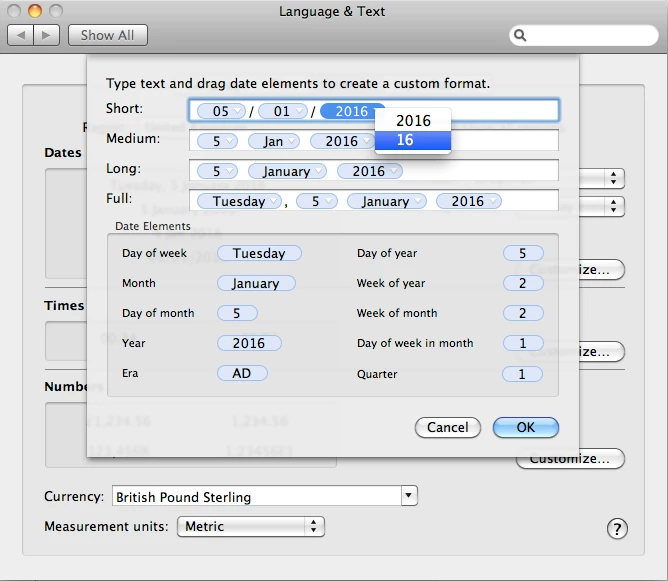
How to change the year format?? The text field control contains 3 drop down control. I could not know how to change that.
1. Click System Preferences -> Language & Text -> Formats
2. Set Region value to "United Kingdom"
3. Click Customize button (1st) and set the year 2016 to 16(2 digits) in short.
Code:
global theSettings
local versName
set osVersion to do shell script "sw_vers -productVersion"
set versList to my explode(".", osVersion)
if (count of versList) > 1 then
set versName to item 2 of versList as number
end if
setRegionValue(versName)
on setRegionValue(osVers)
tell application "System Preferences"
activate
get the name of every pane of application "System Preferences"
set the current pane to pane id "com.apple.Localization"
get the name of every anchor of pane id "com.apple.Localization"
if osVers ≥ 6 and osVers < 8 then
reveal anchor "Formats" of pane id "com.apple.Localization"
else if osVers ≥ 8 and osVers < 9 then
reveal anchor "Region" of pane id "com.apple.Localization"
else if osVers ≥ 9 then
else -- Other Versions
end if
end tell
tell application "System Events"
tell application process "System Preferences"
tell window 1
if osVers ≥ 6 and osVers < 9 then
set the theCountry to "United Kingdom"
tell pop up button 1 of tab group 1
set regionValue to value of item 1 as string
if (regionValue is not equal to theCountry) then
delay 0.25
try
click
click menu item theCountry of menu 1
end try
end if
end tell
else if osVers ≥ 9 then
set theSettings to {"Americas", "United Kingdom"}
tell pop up button 1 of group 1
set {theRegion, theCountry} to theSettings
set regionValue to value of item 1 as string
if (regionValue is not equal to theCountry) then
delay 0.25
try
click
click menu item theRegion of menu 1
click menu item theCountry of menu 1 of menu item theRegion of menu 1
end try
end if
end tell
else if osVers ≥ 9 then
else -- Other Versions
end if
end tell
end tell
tell application "System Events"
tell application process "System Preferences"
click button 4 of tab group 1 of window "Language & Text"
set dateValue to value of static text 4 of group 1 of tab group 1 of window "Language & Text"
set dateList to my explode("/", dateValue)
set yr to item 3 of dateList
if (count of yr) is equal to 4 then
set yr to characters 3 thru -1 of yr as string
set item 3 of dateList to yr
end if
set dateFrmt to my joinAList(dateList, "/")
tell static text 4 of group 1 of tab group 1 of window "Language & Text"
keystroke dateFrmt -- Here i need to change the year format by click
keystroke tab
keystroke tab
keystroke tab
keystroke tab
keystroke tab
keystroke return
end tell
end tell
end tell
keystroke "w" using {command down}
quit application "System Preferences"
end tell
end setRegionValue
on explode(delimiter, input)
local delimiter, input, ASTID
set ASTID to AppleScript's text item delimiters
try
set AppleScript's text item delimiters to delimiter
set input to text items of input
set AppleScript's text item delimiters to ASTID
return input
on error eMsg number eNum
set AppleScript's text item delimiters to ASTID
error "Can't explode: " & eMsg number eNum
end try
end explode
on joinAList(theList, delim)
set newString to ""
set oldDelims to AppleScript's text item delimiters
set AppleScript's text item delimiters to delim
set newString to theList as string
set AppleScript's text item delimiters to oldDelims
return newString
end joinAList
- Sudha K
 AdChoices