
Participant
June 5, 2020
Answered

Setting angle for text using Paragraph Styles

  • June 5, 2020
  • 1 reply
  • 1040 views

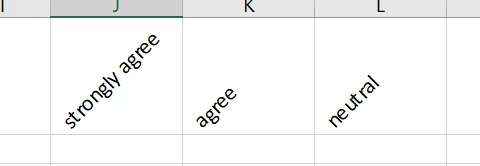
How do you apply an angle to text in Paragraph style? I have multiple sets of text that I would like to appear as a 45-degree angle, but I'm not seeing an option in Paragraph styles. 

For context, I have a table for a survey and the column headers are options "strongly agree, agree, etc." I would like those options to be at a 45-degree angle, as shown in the picture below.
This topic has been closed for replies.
Correct answer Barb Binder

It's a complex process in InDesign—it's not a feature that comes with the software. You will need to make a new table for the heading row in its own frame, skew the frame, add the text, and skew the text so that it is readable. This process is automated using the Create Angled Heads script from Keith Gilbert: https://www.gilbertconsulting.com/resources-scripts.html.


See https://www.youtube.com/watch?v=7UrBvl104pE on how to install a script.


You can download it for free, but if it does what you were hoping for, please consider a donation to help offset the costs of developing it. There is a donation link on the website, just above the download button.


~Barb


1 reply

Barb Binder
Community Expert
Barb BinderCommunity ExpertCorrect answer
Community Expert
June 5, 2020

It's a complex process in InDesign—it's not a feature that comes with the software. You will need to make a new table for the heading row in its own frame, skew the frame, add the text, and skew the text so that it is readable. This process is automated using the Create Angled Heads script from Keith Gilbert: https://www.gilbertconsulting.com/resources-scripts.html.


See https://www.youtube.com/watch?v=7UrBvl104pE on how to install a script.


You can download it for free, but if it does what you were hoping for, please consider a donation to help offset the costs of developing it. There is a donation link on the website, just above the download button.


~Barb


~Barb at Rocky Mountain Training