Participant
April 6, 2018
Answered

Setting InCopy as the default program to open InDesign files on PC

  • April 6, 2018
  • 1 reply
  • 898 views

Setting InCopy CC 2018 as default program to open InDesign CC 2018 files on PC

I am able to apply this setting easily on Mac but haven't been able to work out how to do it on PC?

InCopy isn't appearing in the list of applications when trying to apply this setting on PC.

Does anyone know how to do this on PC?

Many thanks in advance for your time/help.
This topic has been closed for replies.
Correct answer Srishti Bali

Hi gem,

InCopy is not the native application for INDD or IDML files, that is why you are not getting that option, however, if you want you can do that from windows settings menu.

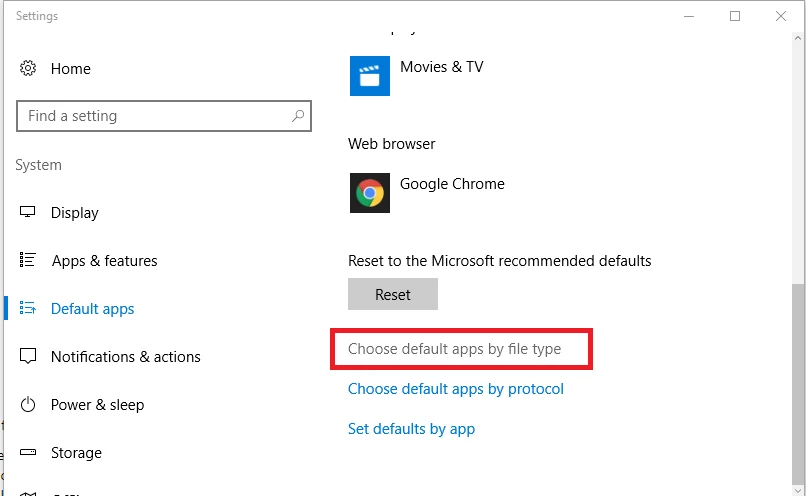
Settings > Default apps > Choose default apps by file type

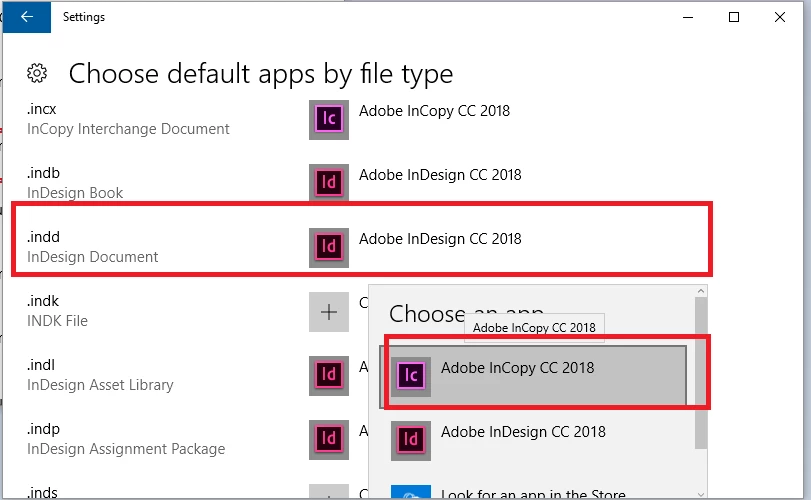
On Next page scroll down to INDD, click InDesign CC 2018 to choose other options and select Adobe InCopy.

Hope this helps!

Regards,

Srishti

1 reply

Srishti Bali
Community Manager
Srishti BaliCommunity ManagerCorrect answer
Community Manager
April 24, 2018

Hi gem,

InCopy is not the native application for INDD or IDML files, that is why you are not getting that option, however, if you want you can do that from windows settings menu.

Settings > Default apps > Choose default apps by file type

On Next page scroll down to INDD, click InDesign CC 2018 to choose other options and select Adobe InCopy.

Hope this helps!

Regards,

Srishti