


Inspiring
July 10, 2024
Answered

Setting tabs in para styles

  • July 10, 2024
  • 3 replies
  • 665 views

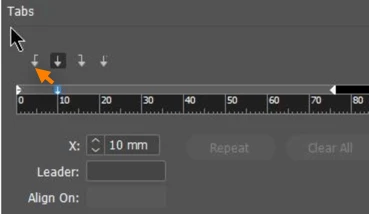
I have numbered section headings and I want to create a tab space between the number and the start of the text. So I have gone into the para style tab button and set a tab at 5mm. However, if I then go back to the text and enter a tab character, the distance is 25mm. Is there some minimum tab setting that I have to change or am I doing it all wrong?

This topic has been closed for replies.
Correct answer Barb Binder

You have a center tab at 10 mm. It should be a left tab.


~Barb

3 replies

Barb Binder
Community Expert
Community Expert
July 10, 2024

Haha. I love teaching tabs, but most of my students groan audibly when I bring them up in class... until I show them how they work and then they love them too. 😂


~Barb

~Barb at Rocky Mountain Training
Barb Binder
Community Expert
Barb BinderCommunity ExpertCorrect answer
Community Expert
July 10, 2024

You have a center tab at 10 mm. It should be a left tab.


~Barb

~Barb at Rocky Mountain Training
m5heathAuthor
Inspiring
July 10, 2024

I see I need a lesson on Tabs! Thank you very much for the good steer.

Barb Binder
Community Expert
Community Expert
July 10, 2024

It's possible that 5 mm isn't enough to clear the auto-numbers. Try 6 or 7 or 8 if you have large section headings. (In my video, the yellow frame is 5 mm wide.)


~Barb


~Barb at Rocky Mountain Training
m5heathAuthor
Inspiring
July 10, 2024

The page margin is 12.7mm, the (Roman) numeral is about 2mm wide. I have set the para style tab at 10mm (see first screenshot). When I press tab between the numeral and the text I first get a tab mark with no movement and when I press it a second time I get the result you can see in the second screenshot. It doesn't seem to make sense. Does the tab stop measure from the edge of the textbox or the edge of the page?