Jacob_Mintzer
Participant
June 16, 2016
Answered

Setting up environment in Visual Studio 2015 for building plugins for InDesign CS6

  • June 16, 2016
  • 2 replies
  • 1783 views

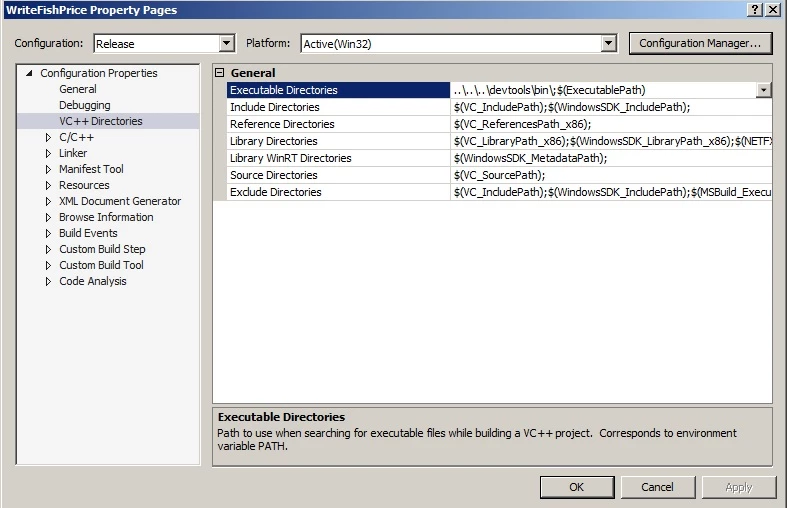
Hello, I am trying to develop plugins for Adobe InDesign CS6, and I am currently using Visual C++ in Visual Studio 2015 and I am having trouble importing Adobe's environment into visual studio, since the guide available is in reference to Visual Studio 2010.  Which directory should I set to go to which parts of the SDK?  Thank you very much.

This topic has been closed for replies.
Correct answer Manan Joshi

Hi Jacob,

Some pointers for you, VS 2015 is not the recommended environment for plugin dev. of InDesign CS6. You will run into all sorts of issues if you use 2015 for building CS6 plugins, some of the issues that you might face are

  1. Compilation or Linking errors
  2. Random Crashes while the plugin executes, if you manage to get this far.

The main reason for this is the different versions of CRT libraries used by different VS versions, which when used together causes all sorts of compatibility issues.

I would recommend that you stick to the VS version recommended by Adobe in the SDK.

Now with regards to setting up the project settings, you would need to setup mainly the following paths to point to different paths of the SDK

  1. Include paths for C++ compiler, these are directories that hold different header files. This will contain multiple paths, refer the SDK sample project for more details
  2. Path for the libraries that needs to be linked against your project, refer the Linker section of a SDK project.
  3. Include path for Resource compiler
  4. Apart from that you could also set the executable directories, as highlighted in the screenshot you attached. This is used to refer to some executables that are used during the post build phase of the project build.

You could refer the SDK sample project for more details, i would recommend that you base your new project on a SDK sample project for starters and once you are comfortable with the settings, you could go ahead and write your own project configuration files for the project based on how you like to setup your project. For more details on how to write configuration files for VS projects do a google search on it.

Hope this info gets you started.

-Manan

2 replies

Participant
December 12, 2016

I'm a bit off subject but this thread is the first returned when googling visual studio 2015 and CS6 (and i think it might help someone).

I found a possible workaround that allowed me to successfully compiled an InDesign CS6 sample plugin from the SDK while not having Visual studio 2010 installed.

I have visual studio 2015 community installed but I could not make it compiled a sample with any of the avaliable toolchain i have (v140, v100 and windows7.1SDK toolchains).

BUT, i managed to compiled the project (without modifying it) with the msbuild utility and the windows 7.1SDK.

So after installing Windows 7.1SDK, plus the KB2519277 patch for Visual c++ 10, you should find a Visual Studio 10.0 folder that contains the Visual C++ toolchain and some supplemental libs/dll specific to Visual Studio 2010 that are required to compile some projects.

You need to add the path to the new VS2010 IDE folder to your %PATH% env var to avoid a "missing mspdb100.dll" during compilation.

(typically : %programfiles(x86)%\Microsoft Visual Studio 10.0\Common7\IDE\ )

I then compiled the plugin project using the following command (in my case I tested BasicDialog) :

"C:\Windows\Microsoft.NET\Framework\v4.0.30319\MSBuild.exe" /p:PlatformToolset=Windows7.1SDK BasicDialog.sdk.vcxproj

Due to a misspackaged security update, you may find some missing headers like "ammintrin.h" (MS messed up the VC++ update and forgot some files). As an absolutely disgusting workaround, i just copied the missing header(s) from my %programfiles(x86)%\Microsoft Visual Studio 14.0\VC\include folder to the %programfiles(x86)%\Microsoft Visual Studio 10.0\VS\include folder (at your own risks).

Hope it wil help someone

Manan JoshiCommunity ExpertCorrect answer
Community Expert
June 17, 2016

Hi Jacob,

Some pointers for you, VS 2015 is not the recommended environment for plugin dev. of InDesign CS6. You will run into all sorts of issues if you use 2015 for building CS6 plugins, some of the issues that you might face are

  1. Compilation or Linking errors
  2. Random Crashes while the plugin executes, if you manage to get this far.

The main reason for this is the different versions of CRT libraries used by different VS versions, which when used together causes all sorts of compatibility issues.

I would recommend that you stick to the VS version recommended by Adobe in the SDK.

Now with regards to setting up the project settings, you would need to setup mainly the following paths to point to different paths of the SDK

  1. Include paths for C++ compiler, these are directories that hold different header files. This will contain multiple paths, refer the SDK sample project for more details
  2. Path for the libraries that needs to be linked against your project, refer the Linker section of a SDK project.
  3. Include path for Resource compiler
  4. Apart from that you could also set the executable directories, as highlighted in the screenshot you attached. This is used to refer to some executables that are used during the post build phase of the project build.

You could refer the SDK sample project for more details, i would recommend that you base your new project on a SDK sample project for starters and once you are comfortable with the settings, you could go ahead and write your own project configuration files for the project based on how you like to setup your project. For more details on how to write configuration files for VS projects do a google search on it.

Hope this info gets you started.

-Manan

-Manan
Jacob_Mintzer
Participant
June 17, 2016

Alright, looks like I should bite the bullet and go for visual studio 2010.  Thanks a lot for the advice!

--Jacob