
Eshu153
Inspiring
March 2, 2020
Answered

Shaded text frames shows low resolution as 150 DPI after export to pdf

  • March 2, 2020
  • 6 replies
  • 2218 views

Hi,


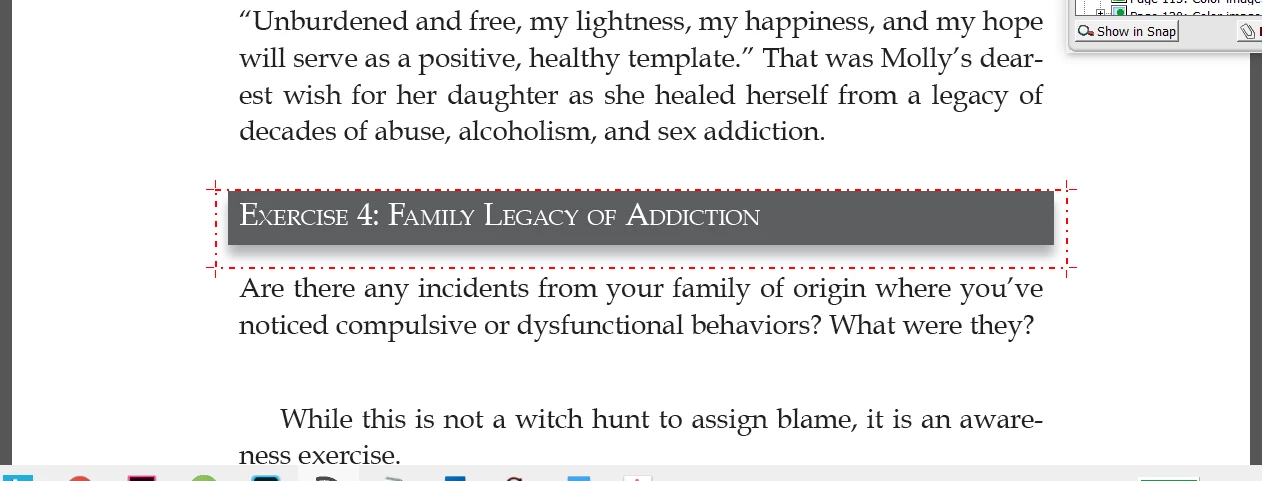
I have used paragraph shading to text headings and used drop shadow for text frames. When exported to pdf, it shows all the shaded boxes as low resolution (150 DPI). Due to which the pdf is failing resolution check. attached the screenshot.
This topic has been closed for replies.
Correct answer jmlevy

Change the Transparency Flattener preset to high resolution, not medium

6 replies

Community Expert
March 3, 2020

Eshu153 said:

Pdf x4 is not the desired option for me. I need pdf/x-1a for export to comply with Ingramspark guidelines. Does this work with pdf/x-1a too?


Just test it. Should work as well for an PDF/X-1a export situation. Do a custom transparency flattener preset, do a custom PDF/X-1a export preset with that custom flattener preset and check the result with Acrobat Pro's Preflight.


Regards,
Uwe Laubender

( ACP )

rob day
Community Expert
Community Expert
March 2, 2020

Also, if the shadow Size setting is high, and there isn’t much change in start and end values, the unnecessarily high resolution will be lowered. Here even using Uwe’s high res flattener preset the shadow res is 208ppi—this is a feature not a bug.


Community Expert
March 2, 2020

Hi Willi,

technically or visually there will be no issue with 150 ppi of this drop shadow.

But: A automatic preflight system will flag this.


One can resolve the issue with a custom transparency flattening preset.

Working with "High Resolution" will not help.


Something like the below flattener preset will do. From my German InDesign 2020:


Concentrate on the resolution for Gradient and Mesh. Try a value of 600 ppi or even more and check the results. This flattener preset can also be applied to an exported PDF/X-4 if you want that an auto preflight will not flag a drop shadow done in InDesign.


So I used my custom flattener preset from above for a custom PDF/X-4 export preset that exports a text frame with a drop shadow. As you can see in the screenshot below the option for transparency flattening is grayed out. But that does not mean the applied resolution is not applied!


One can build this custom PDF/X-4 export preset by starting with the deafult PDF/X-4 preset, change compatibility temporarily to Acrobat 4, apply the flattener preset, then switch back to Acrobat 7 and PDF/X-4. That's all.


The result is a drop shadow with 1200 ppi resolution.

From Acrobat's Preflight:


The preflight flags the resolution because its too high after running the single test:

List color and grayscale images not within 250 to 450 ppi


Regards,
Uwe Laubender

( ACP )

Eshu153
Eshu153Author
Inspiring
March 3, 2020

Pdf x4 is not the desired option for me. I need pdf/x-1a for export to comply with Ingramspark guidelines. Does this work with pdf/x-1a too?

Willi Adelberger
Community Expert
Community Expert
March 3, 2020

Oh no, you are completely wrong. You confuse IMPORT into InDesign and EXPORT for the printer.

Into InDesign, never, —NEVER —, NEVER!!!!!! place PDF/X-1a or X-3, regardless what the printer wants. 

Place RGB images and PDF/X-4.

If you place RGB images, Live Transparency and PDF/X-4  you can export PDF/X-1a, PDF/X-3 and PDF/X-4 with best quality.
If you place PDF/X-1a or X-3 you have preflattened files, it will not allow you to export correct shadows, it will not allow you to export any PDF in good quality.


Please learn: The standard for the import in InDesign has not to be the same as the output. Use PDF/X-4 in InDesign only.

Willi Adelberger
Community Expert
Community Expert
March 2, 2020

Drop shadow has always a lower resolution than the image export settings, as it does not cause a problem in printing. Don't forget to add noise to the drop shadow effect.

jmlevy
Community Expert
Community Expert
March 2, 2020

Hi,


What are your PDF export settings? Can you post screen captures of the general tab settings and the Advanced tab setttings?

Eshu153
Eshu153Author
Inspiring
March 2, 2020

jmlevy
Community Expert
jmlevyCommunity ExpertCorrect answer
Community Expert
March 2, 2020

Change the Transparency Flattener preset to high resolution, not medium

Document Geek
Community Expert
Community Expert
March 2, 2020

Export your PDF at a higher resolution.


but. Enter yet, please take a screen shot with frames edges turned on. What you explain doesn't make sense. If the graph boxes were made using paragraph shading, did you have the headline text in it's own text frame to accomplish the drop shadow? Because drop shadows can only be applied to objects, not to just text. 

Eshu153
Eshu153Author
Inspiring
March 2, 2020

Applied to a text frame object with text paragraph style has shading enabled.