

Shapes defaulting to gradient feather & won't appear solid over other objects.
I've had this problem several times. I always either find a workaround or restart everything and it fixes itself but I would really like to figure out the reason so I can fix it permanently. The first issue is that, often, when I create a new shape the shape will automatically have a gradient feather applied to it and I have to go in and change manually. This is not a huge deal but it is annoying and I would like to know how to make it stop.
The second issue I have seems to only happen after correcting the first issue, but I am not sure if the two are mutually exclusive. The shape (the same one that defaulted to gradient feather) will not appear as a solid color over-top of other objects. Here is a snip of the shape next to the rest of the content on the page:
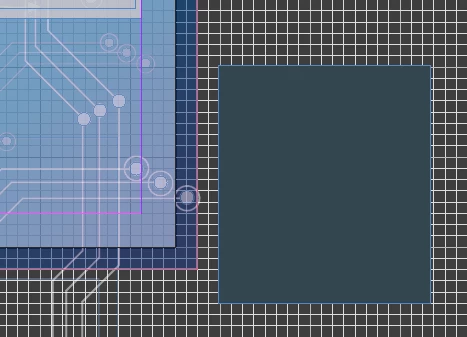
And here is the same shape on-top-of the rest of the content on the page:

I have triple checked, the shape is arranged to the front of the page. It does not even appear as a transparent version of itself, it becomes a completely different color altogether and covers the grid like a solid object but does not cover the objects behind it. Before you ask I do not assign/use layers, I am definitely an amateur user and do not know how to use them properly or what function they serve. That may be the reason I am experiencing this issue, but it seems unlikely since I only encounter this problem sometimes and the same document can be problem free one moment then display this issue the next. It does not seem to be specific to any set of criteria that is readily apparent. Can anyone tell me what in the hell is going on here?



 AdChoices