
Participant
December 11, 2024
Answered

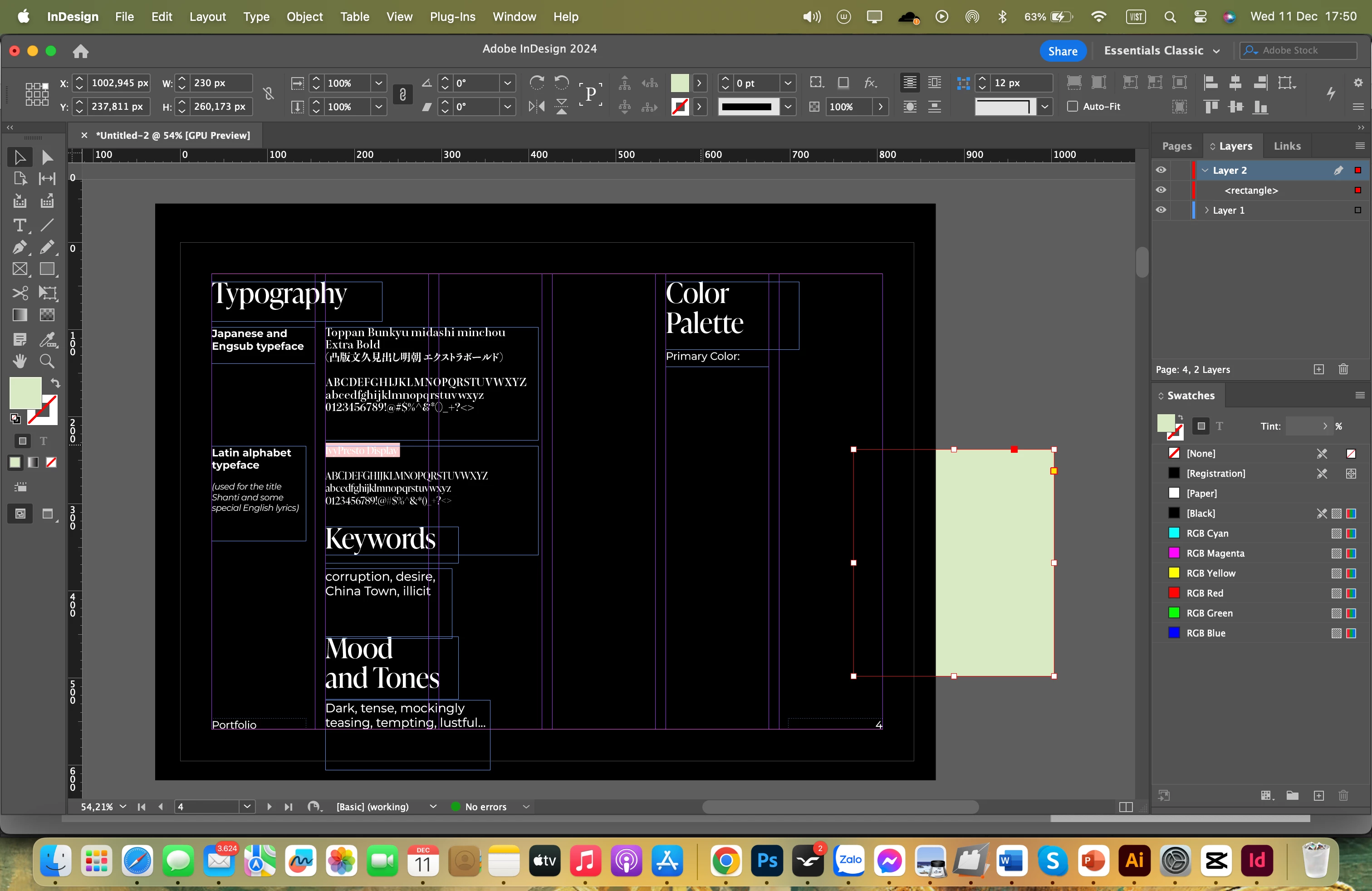
Shapes I create always being underneath even though I put it on the top layer

  • December 11, 2024
  • 3 replies
  • 633 views

This is the first time I've encountered this circumstance. You can look at the right of my screenshot, the rectangle I made was put in the front, however, it still appears underneath the black background of parent page. Does anybody know how to fix it? Please help!

This topic has been closed for replies.
Correct answer BobLevine

What layer is the black background on? Is the rectangle set to overprint or does it have a blend mode or transparency effect applied?

3 replies

Robert at ID-Tasker
Legend
December 12, 2024

@wynter_6656


Is rhe black rectangle on the Master / Parent page? On what layer?


Peter Spier
Community Expert
Community Expert
December 12, 2024

@Robert at ID-Tasker  problem can't be with a parent Page object -- those are always behind objects on the same layer on the document page and rectangle is clearly on top layer.

Robert at ID-Tasker
Legend
December 12, 2024

[...] rectangle is clearly on top layer.


Right, missed that. 


BobLevine
Community Expert
BobLevineCommunity ExpertCorrect answer
Community Expert
December 11, 2024

What layer is the black background on? Is the rectangle set to overprint or does it have a blend mode or transparency effect applied?

Participant
December 13, 2024

It is, the default effect of shapes that I created is always overlay, that's why it disappeared into the black background, thank you so much!

jmlevy
Community Expert
Community Expert
December 11, 2024

Open the effect panel and check the rectangle blending mode.

BobLevine
Community Expert
Community Expert
December 11, 2024

I guess I need to type faster. 🙂

jmlevy
Community Expert
Community Expert
December 11, 2024

😉