
rehana36276218
Known Participant
February 18, 2022
Question

shapes in Paragraph
  • February 18, 2022
  • 3 replies
  • 240 views

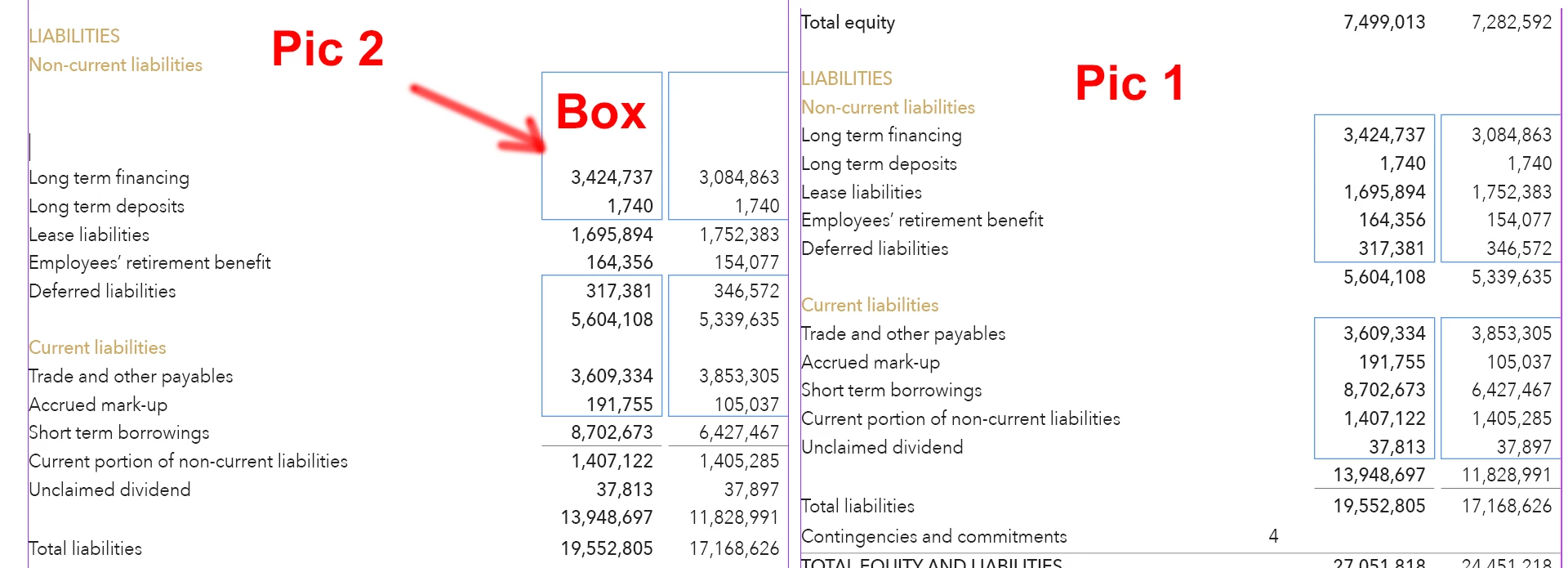
Hi all, i  make this in paragrah with the help of tabs setting in indesign , and for the values that is right side align i keep in the box , but the box i make with rectangle with 0.25 stroke and then put it on the top of text or below no matter , the issue is that when i add or delete some value , the box remain same position but text go down becuase of enter press , is there any way that when i hit enter box move with text......? is it possible 

Thanks in advance..

This topic has been closed for replies.

3 replies

Barb Binder
Community Expert
Community Expert
February 18, 2022

Hi @rehana36276218:


You can convert text with tabbed columns to a table (Table > Convert Text to Table). Once in a table, you simply add rules around the selected cells. 


~Barb


~Barb at Rocky Mountain Training
m1b
Community Expert
Community Expert
February 18, 2022

Hi @rehana36276218, I agree with Brian's answer. If you have laid out the text with tabs normally and want to add just the empty, stroked boxes over the top, then I would anchor them in the text. Here's my quick test:

1. draw two boxes the correct widths and distance apart and group them

2. copy or cut that group

3. put your insertion point after the top number in right column, eg. 3,084,863#here (see little red line in my screenshot)

4. paste (it will go in the wrong place for now)

5. select the blue boxes (the group, not just one box)

6. choose menu Object > Anchored Object > Options...

7. adjust this dialog to match my screenshot below

8. adjust the numbers +/- as needed in your case

9. press ok

10. you can manually adjust height of the group by moving the bottom center handle

- Mark


EDIT:

Important: if you do it this way, you *must* set up an object style for your boxes. The style can set all the anchored options I mentioned but also the stroke width and color etc. See second screen shot.


Also, I should have mentioned: don't do the boxes together as a group if you want to be able to alter the tab distance between columns. Paste them in as separate, single boxes, probably each with their own object style so you can adjust separately.


brian_p_dts
Community Expert
Community Expert
February 18, 2022

Anchor the text frame to your main text flow, or just use tables. 


https://helpx.adobe.com/indesign/using/anchored-objects.html