

Zebra Jamie
Known Participant
August 15, 2022
Answered

Share For Reivew - empty/ghost drop-down box?

  • August 15, 2022
  • 1 reply
  • 663 views

Every time I open a document, InDesign ghost-opens the "Share for Review" box, but it's litterally empty and it's under the workspacebutton instead of the share button.
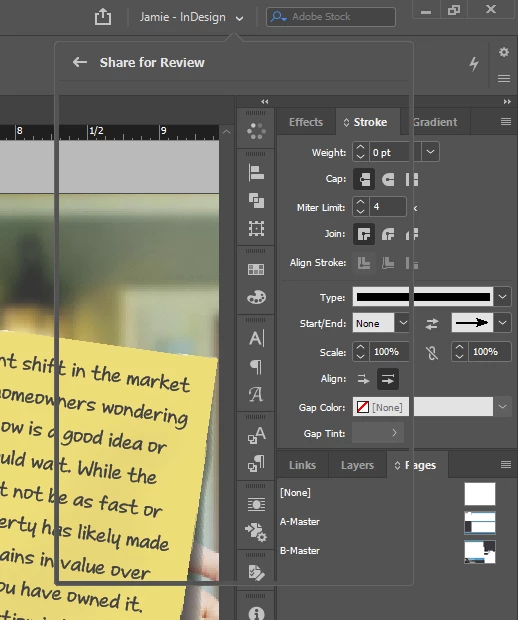


If I want to access anything under this ghost-menu, like my swatches or paths, I have to click in the scratch area to make the box dissapear. Not a huge problem, but it's really annoying, especially when deadline-stress piles up. Everything is updated (windows, InDesign, etc.).


Since I will never ever share anything from InDesign in this manner, is there a way to turn this sharing "feature" off?


This topic has been closed for replies.
Correct answer Rishabh_Tiwari

Hi @Zebra Jamie ,


We're so sorry to hear about the trouble. Please try the steps shared below:


  1. Sign-out of InDesign and Adobe Creative Cloud Desktop app.
  2. Close CoreSync and all Adobe-related processes from the Task Manager/Activity Monitor.
  3. Reboot the computer.
  4. Sign back in on the Adobe Creative Cloud Desktop app and launch InDesign from there and check if it still happens.


Let us know if this helps or if you need any further assistance.


Regards

Rishabh

1 reply

Community Expert
August 16, 2022

Hello


Try resetting your preferences:
The easiest way to reset everything is to delete the InDesign preferences: as soon as InDesign starts to boot hold down Shift, Alt, Ctrl (and Apple/Cmd if working on a Macintosh). A dialog will appear asking to delete the InDesign Preferences, select 'Yes' on this dialog.
Further info and instructions here if needed:
https://helpx.adobe.com/in/indesign/kb/indesign-preferences-support-file-locations.html


Zebra Jamie
Known Participant
August 16, 2022

Deleted all the preferances. It didn't work, but lost my workspace and custom shortcuts.

So if anyone else wants to try the magical "clear your preferances" to solve a problem, make sure you have a copy of the workspace and custom keyboard shortcuts saved elsewhere so you don't have to spend 30 minutes or more trying to remember how your usual workflow was put together. Or at least be warned that deleteing your preferances also deletes custom settings, and be ok with that.


Rishabh_Tiwari
Rishabh_TiwariCorrect answer
Legend
August 16, 2022

Hi @Zebra Jamie ,


We're so sorry to hear about the trouble. Please try the steps shared below:


  1. Sign-out of InDesign and Adobe Creative Cloud Desktop app.
  2. Close CoreSync and all Adobe-related processes from the Task Manager/Activity Monitor.
  3. Reboot the computer.
  4. Sign back in on the Adobe Creative Cloud Desktop app and launch InDesign from there and check if it still happens.


Let us know if this helps or if you need any further assistance.


Regards

Rishabh