
Participant
November 25, 2025
Question

Share for Review issue

  • November 25, 2025
  • 3 replies
  • 266 views

Hi there, another Share for review problem.
So, the issue im having is the link goes up all fine and is shared with the client ok. The problem occurs when I go to update the link all Im getting is a warning sign saying this...
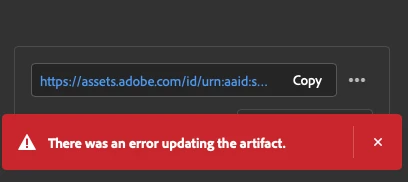


It doesn't matter which project it is im getting the same warning everytime when I go to update the link. The only thing atm that works is deleting the link and starting again. Which obviously makes the feature pointless. 

Using a MacBook Pro 2019, latest Indesign, Sonoma 14.7.4

Any help or acknowledgement appreciated! Getting really hard to rely on this feature now. Might have to axe it as Its making me look a bit stupid with clients. 


3 replies

Mike Witherell
Community Expert
Community Expert
December 16, 2025

Darren, 

Have you worked through these troubleshooting steps?

https://helpx.adobe.com/indesign/kb/resolve-share-for-review.html

Mike Witherell
Abhishek Rao
Community Manager
Community Manager
December 16, 2025

Hi @Darren281607778y40,


Thank you for the update, and I'm sorry this is still interrupting your workflow. To help us move this forward with the team, could you please confirm the exact version of InDesign you're currently using? It would also be helpful if you could sign out of the Creative Cloud desktop app and sign back in to see whether that changes the behavior.

Since network conditions can sometimes affect Share for Review, please let me know if this happens only on a specific connection, such as your work network, or if you see it at home as well. Try switching briefly to your phone’s hotspot and check if the link updates normally there.

You mentioned this affects all documents, so if possible, please share one sample file where the issue appears. If it's confidential, you can send it via DM using any cloud service like Google Drive or Dropbox.

One more thing to check is whether the error appears, but the document still updates correctly in the web view. If that happens, I want to let you know that we have already logged a bug for this behavior. You can also refer to this similar thread for context:
https://adobe.ly/455ReYD


We look forward to your update so we can continue investigating this matter for you.

Abhishek

Anubhav M
Community Manager
Community Manager
November 25, 2025

Hello @Darren281607778y40,

I'm sorry to hear about your experience. Could you check if you experience this behaviour in all documents or if it occurs after making a specific change to a document, so I can investigate with the team? 

Looking forward to hearing from you.

Anubhav

Participant
December 4, 2025

Its in every document I work in im afraid. Ive even set up new test Indesign documents and im having the same issue. 

Before the 'error updating the artifact' message I did have a brief period where the a message would flash up and say it couldn't update but the link had updated which was weird. However everything Ive been doing at the moment has just flagged up the red alert I sent above. 

Hoping this is a bug that is fixed soon, seems like there have been loads of problems with this and its becoming a bit unworkable which is a shame as its a great feature, when it works! 

Participant
December 5, 2025

Agree! Fix this already!!